Your Guide To YouTube Competitor Analysis

YouTube is one of the top platforms for creators, brands, and social media managers to get content seen. With billions of users, millions of hours watched daily, and roughly 114 million channels, the competition is fierce. YouTube’s huge user base and ability to create engaging content provide businesses with many ways to showcase their products or services. Finding your own voice and content style is important and essential for long-term growth on YouTube, and this can take some time and effort.
However, focusing only on your own content is usually often not enough to build an effective YouTube strategy. To stand out, you need to consider analyzing other competitor YouTube channels to gain valuable insights about what is working and what is not. The reality is that it is important to understand your competitors for a few reasons. First, you obviously want to know how your performance compares with other channels that are also speaking to your target audience. Second, you most likely want to learn from what they are doing right. This is especially true of the most successful ones.
But how can you actually conduct YouTube competitor analysis? To begin, you need to follow a process for putting together an analysis. Then you need to find the right YouTube competitor analysis tool to help you analyze the data. Studying the performance, content, and engagement tactics of other brands in your industry can provide valuable insights to drive your own growth. Leveraging data-based competitor analysis can help you set benchmarks, discover optimization opportunities, and refine your approach to content creation and community engagement, whether you’re just starting out or managing an established presence.
In this article, we will take you through the steps for how to analyze YouTube competitors effectively. This will be geared to giving you the know-how you need to set up your own YouTube competitor analysis study. After this, we will discuss what to look for in a YouTube competitor analysis tool and present our list of the top ones on the market.
The Steps to Conduct YouTube Competitor Analysis
Competitor analysis is more than simply comparing a few metrics to other channels. Rather, it is an involved process that is based on the analysis of data. There are actually a number of steps you need to follow to set up your data set, analyze your results, and implement your findings. That is why we are presenting tried and tested YouTube competitor analysis steps that will guide you through every stage of competitive research. The main building blocks of a YouTube competitor analysis are:
- Identifying relevant competitor channels
- Compiling your Data Set
- Building a benchmarking report
- Analyzing content to find improvement ideas
- Putting the insights into practice
Step 1: Identifying relevant competitor channels
Knowing exactly which channels are similar to yours or are competing against you for views is the foundation of any competitor YouTube analysis. So the first step is to clearly identify your relevant competitors. However, while this step may seem straightforward, there are some things to keep in mind. When we say “competitors,” that doesn’t just mean businesses offering similar products or services. It also includes any channels competing for the same audience you want to reach or talking about similar topics. This could be other brands in adjacent niches, influencers who cover similar topics, and content creators with a comparable focus and viewer intent.
A well-curated list of competitors will make your dataset far more useful, providing cleaner benchmarks and clearer insights. However, the more similar profiles you can add to the list, the more data points you have to analyze. That is why, even if you already have a competitor list, there is a good chance you’ve missed a few key channels.
Our tip is to take your time with this step, as it forms the basis for everything that follows. By mapping this broader competitive landscape up front, you ensure every benchmark, insight, and optimization that follows is grounded in reality. It also provides a better industry overview and deepens your understanding of your target market and audience, enabling you to make smarter, more effective decisions later on.
Identifying relevant competitors is much more efficient with a social media research tool. A specialized tool can help you more quickly find YouTube channels that you should analyze. This is through the use of various filters that let you specify what types of channels you are looking for. Doing this manually is time-consuming, and in broad markets you’ll almost certainly miss important accounts. Moreover, to maximize the value of your YouTube competitor analysis for crowded topic areas, you should consider using a tool that allows you to track an unlimited number of competitors. The larger the data set that you track, the richer your benchmarks and the clearer your picture of the market and audience.
Step 2: Compiling your Data Set
Once you have identified your relevant competitors and other similar channels, the next step is to compile a structured dataset. The more similar YouTube channels that are included in your data set, the better. However, this is not all you should take into account.
In this step it is essential to choose the right timeframe for your analysis. Timeframes such as the last 7, 28, 90, or 180 days can tell very different stories, so picking the wrong one can skew your benchmarks. Keep in mind that some YouTube competitor analysis tools provide access to historical data, strengthening your dataset and enabling you to identify long-term trends and seasonality. When conducting a YouTube competitor analysis, you should always keep your goal in mind and select periods that align with them.
To help give you a better idea of how important your data set is and the insights you can gain from analyzing it, we will use a real-world example in this article. In the following sections, we study well-known sportswear brands and their presence on YouTube. In many ways, the platform is the perfect arena for sportswear storytelling: product technology comes to life in motion, athletes lend instant credibility, and shorts increase reach by turning major moments into short, shareable content. We will analyze eight brands: Adidas, Asics, New Balance, Nike, On, Puma, Reebok, and Under Armour. For the following benchmarking and content optimization analyses, we will use the all-in-one social media tool Fanpage Karma to show you, step by step, how to analyze your YouTube competitors.
Step 3: Building a benchmarking overview
After selecting the sportswear brand channels that will make up our data set, the next step is to create a YouTube benchmarking overview showing how each brand performs on the platform. Understanding where your YouTube channel stands within your content niche and setting measurable targets for improvement is the goal of this benchmarking overview.
You should start by deciding which KPIs (key performance indicators) matter most for your channel’s goals. Keep in mind that there are many KPIs to choose from. The most common may be the overall number of subscribers, growth rate, number of posts, engagement rate, and post interaction rate. Choosing the right metrics is essential for analyzing the areas of your performance that are most important for you.
We should also mention that benchmarking is a key part of YouTube competitor analysis because it helps you set realistic, meaningful performance targets. Calculate category baselines for core KPIs to determine if your channel is above or below average. If growth is the priority, compare average subscriber growth rates across competitor channels. This will help you understand how quickly you should be expanding. With the right benchmarking tool, you can adjust these comparisons to specific time frames, such as seasonal peaks or campaign windows, so the goals you set are accurate, time-bound, and aligned with how your audience actually behaves.
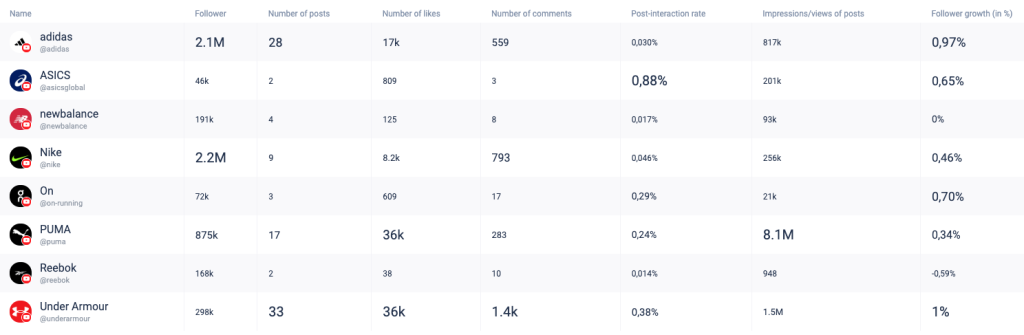
The table below compares these key metrics (number of posts, likes and comments, post interaction rate, impressions of posts, and follower growth) for the period August 13 to September 09, 2025. Through this visualization, the leading profiles in certain areas can be identified, and areas for improvement can be determined.
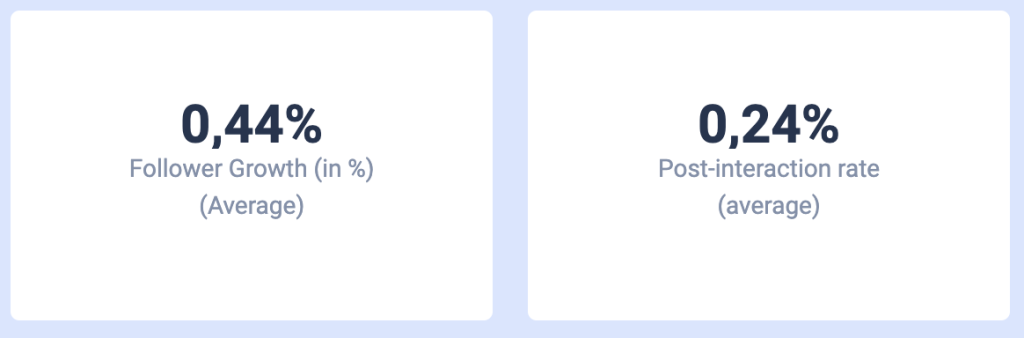
This following example illustrates the calculation of follower growth rate and post interaction rate. We generated the benchmarks for these metrics by calculating the average follower growth rate and post interaction rate for the profiles listed for the period August 13 to September 09, 2025. Then, you can use these to set your own goals and aim for numbers above average.
The analyses above are just a few examples of what might be included in a benchmarking report. Your benchmarking tool should give you the ability to explore correlations between metrics, the share of posts from all brands, post frequency, and much more. Most of all, make sure that your benchmarking tool allows you to analyze the metrics in the formats that you want them. You should also note the importance of continuous tracking. By analyzing your competitors’ YouTube channels over time, you’ll see who’s gaining momentum, who’s stalling, and which tactics are affecting performance. These trend lines show which channels deserve closer attention and which ideas are worth testing on your own.
Step 4: Analyzing content to find improvement ideas
After you have completed your YouTube competitor analysis and set up long-term tracking, you will know which channels lead your category, where you stand against them, and which specific, measurable goals make sense for your own YouTube channel. The next step is to go deeper into the channels’ insights and examine the content they’re actually posting. A content optimization analysis allows you to look beyond the topline numbers and study the patterns behind performance, such as what, when, and how they publish their content. Keep in mind that some social media analytics tools may provide quick tips, but a robust analytics tool allows you to thoroughly examine competitors’ strategies.
The analyses below are based on our analysis of the channels listed earlier and provide a few examples of content optimization insights you can get from competitor analysis. The first study you can conduct may relate to the optimal posting window for your audience on YouTube. If you are interested, read our article about how to set up an analysis of the best time to post on YouTube. The key point to emphasize here is that the profiles you include in your analysis should be focused on a similar industry or content niche and should post in relatively similar time zones.
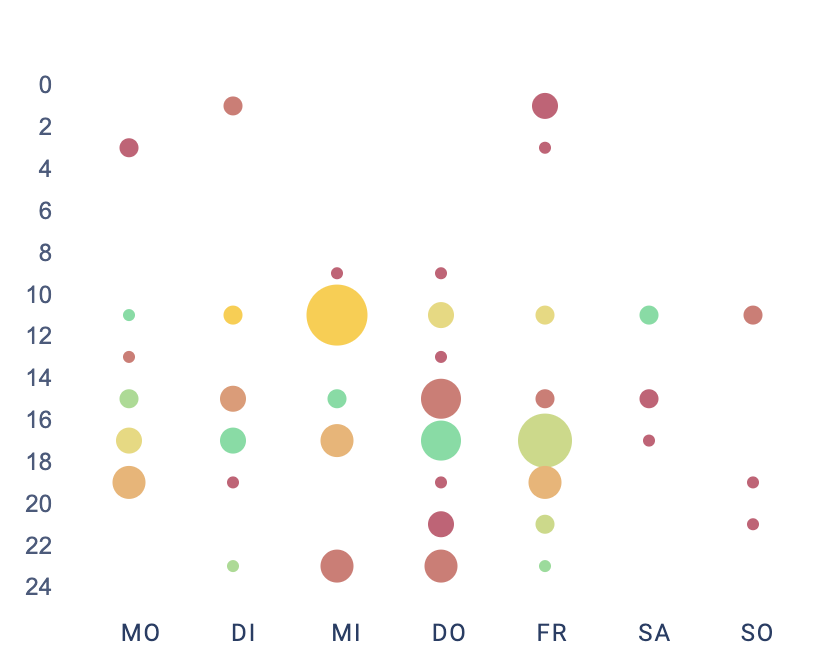
This analysis is particularly useful because it lets you examine both your competitors’ data and your own channel’s history, which gives you more data points to analyze. You can then better determine when you should be uploading your videos. The chart below shows how often people interacted with posts during a certain time (green circles show higher interaction rates, and bigger circles show more posts):
With the right YouTube competitor analysis tool, you can also research the best-performing keywords in terms of engagement. Similar to identifying the optimal publishing times, a YouTube hashtag analysis allows you to combine your data with that of similar channels to evaluate the impact of specific words in titles, thumbnails, and descriptions on results. The graphic below shows the top 50 hashtags, color-coded by engagement. Green indicates many reactions, while red signals few.
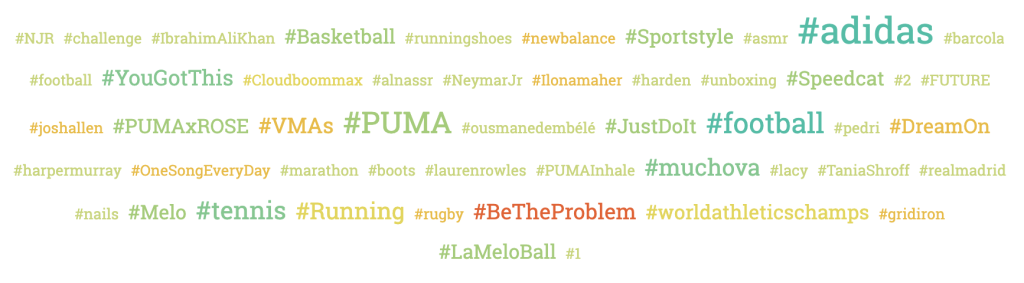
These are just two examples of content optimization insights you can get from competitor analysis. There are a number of insights you can gain, including finding the top-performing content formats, trending topics, or using a tagging analysis to find out what makes content engaging. The right YouTube analysis tool provides endless ways to explore correlations, trends, and best practices. Ultimately, you decide which analyses best serve your goals.
Step 5: Putting the insights into practice
After completing your benchmarking and content optimization analyses, the final step is to implement those insights. Analysis without execution won’t achieve anything, and adjusting your strategy from these data-based insights is key. If your data revealed optimal posting times, schedule your uploads during those time slots. If certain title or thumbnail patterns reliably increase click-through rate, adopt them and A/B test variations. Prioritize topics that deliver stronger views and retention, and deprioritize those that lag behind. Remember to set clear targets, implement the changes in your calendar, and review the results at regular intervals, doubling down on what works and eliminating what doesn’t.
You should always remember that posting is not the only important task you have. Active community management matters as well. Consistently reply to comments, answer questions, and join discussions to deepen relationships and build loyalty. A dedicated community management tool can centralize comments and messages and better organize them to make your community management easier and more efficient.
Finding the Best YouTube Competitor Analysis Tools
If you are new to analyzing competitors on YouTube, you may be wondering where to start looking for the right tool. There are countless tools on the internet, each with different strengths. They range from quick, lightweight checkers to full analytics suites. The right choice depends on whether you’re a business, an agency managing multiple brands, or an individual content creator with limited time and a single channel. There are plenty of options for conducting a YouTube competitor analysis.
Keep in mind that it is generally most helpful when your social media tool combines strong analytic capabilities with community management and publishing features. This eliminates the need to switch tools and keeps your team aligned. What you schedule and post is immediately tied to how you monitor, reply, and learn. This closed loop results in faster responses, clearer accountability, and a direct line from content planning to measurable engagement gains.
If you are starting out on your search, look through our list of the Top 10 YouTube Competitor Analysis Tools:
- Fanpage Karma
- Hootsuite
- Buffer
- Metricool
- Sprout Social
- Swat.io
- SocialPilot
- Brandwatch
- Hubspot
- Zoho Social
1. Fanpage Karma
To conduct a thorough and effective YouTube competitive analysis, you need a tool that can support you at every level. Fanpage Karma is a social media analytics and benchmarking platform designed for users who want to evaluate their performance in direct comparison to others in their industry. It enables users to track an unlimited number of competitor profiles and create powerful benchmarking data sets. Users can compare metrics such as follower growth, engagement rates, posting frequency, and top-performing content. This makes it easy to identify strengths, weaknesses, and trends over time.
Custom dashboards can also be created on the platform, and benchmarking data can be visualized in clear, actionable formats. Comparisons can be segmented by content type, platform, or time period to gain a detailed understanding of how your profiles perform in context. Fanpage Karma delivers strong analytical functions with unlimited profile analysis, automated reporting, and support for hundreds of metrics. If you want to see what this software can do, you can try it for free for 14 days. The platform’s features go beyond analytics and benchmarking. It includes robust tools for content scheduling, community management, and competitive research.

2. Hootsuite
Hootsuite is a long-standing, all-in-one platform for publishing, monitoring, and reporting. It makes it easy to manage multiple social networks and build benchmarking workflows alongside day-to-day scheduling. With Hootsuite, you can track KPIs across YouTube and various other social media platforms.
You can also create custom dashboards and exports for monthly reports, compare your performance against selected competitors or industry baselines, and coordinate teams with approvals, roles, and a shared content calendar.
3. Buffer
Buffer is a creator-friendly platform for planning, publishing, and basic analytics. It focuses on simplicity over bloat, making it ideal if you want to quickly schedule content, maintain an organized calendar, and easily analyze what’s working. It may not match the depth of enterprise suites, but for straightforward YouTube scheduling and performance tracking, Buffer is a budget-friendly and effective choice.
4. Metricool
Metricool offers a clean, user-friendly analytics dashboard with integrated benchmarking for competitor analysis. You can monitor public data from competing profiles, follower growth, engagement rates, publishing frequency, and best-performing posts and even layer in web analytics alongside social metrics for a complete view of content performance across channels. Metricool is a popular choice for freelancers, small businesses, and agencies that need the right balance between analytics and reporting.
5. Sprout Social
Sprout Social is a premium platform designed for businesses and agencies that require advanced analytics, collaboration tools, and competitor benchmarking on a large scale. It provides detailed engagement reports, audience insights, side-by-side competitor comparisons, and customizable, client-ready reports within a polished interface.
Historical dashboards and trend views demonstrate progress over time, and integrations with listening tools and CRMs connect social performance to broader marketing and sales outcomes. For larger teams requiring depth, scalability, and professional reporting, Sprout Social is a good choice.
6. Swat.io
Swat.io is a collaboration-first management tool for YouTube and other social media platforms. It offers clear analytics and team workflows. It provides a clean dashboard that tracks views, subscribers, comments, and publishing cadence, as well as roles/approvals, a unified calendar, and easy reporting. You can tag videos by campaign or theme for focused internal benchmarking. This feature is ideal for agencies and teams that prioritize coordination alongside performance insights.
7. SocialPilot
For agencies and small businesses running multiple channels, SocialPilot is an affordable choice for social media platforms. It covers daily essentials such as tracking views, comments, likes, subscriber growth, and performance trends for videos and shorts inside a clean, no-fuss dashboard that speeds up decision-making.
It’s designed to be user-friendly and includes features like client management, white-label reports, bulk scheduling, and a clear content calendar, making it easy to handle multiple channels. Although it’s lighter than enterprise suites, it delivers strong value and a practical toolkit for growing teams.
8. Brandwatch
Brandwatch is a data-rich social intelligence and competitive benchmarking platform. It combines channel metrics with listening signals to track sentiment, trends, and share of voice across brands. AI-driven categorization and custom dashboards enable deep audience segmentation, campaign analysis, and historical comparisons. Brandwatch is more complex than lightweight tools, but it delivers unmatched depth for enterprises and data-driven teams that need real-time and historical insight at scale.
9. Hubspot
HubSpot integrates social analytics into its marketing automation and CRM. It links social media performance to traffic, leads, deals, and revenue via built-in attribution. Since publishing, monitoring, and reporting are integrated with contacts and campaigns, marketing, sales, and service teams all have access to the same data for acquisition and retention. If you want ROI-oriented social analytics tied directly to your pipeline, HubSpot is a strong, integrated choice.
10. Zoho Social
Zoho Social for YouTube is an affordable option that covers the essentials: scheduling, analytics, and monitoring. Its clean, easy-to-learn interface provides clear visibility into views, engagement, reach, and audience trends, making it great for small businesses and startups.
It also includes useful extras like custom reports, multi-channel tracking, and team collaboration. If you need reliable YouTube publishing and analytics without an enterprise budget, Zoho Social is a smart, practical choice.