Social Media Management Tools for Agencies: Your Guide
Let’s start out this article with some good news for social media agencies: social media is still all the rage, and companies that want to promote their products and services are investing time and effort into growing on various networks. As a result, demand for specialized agencies that can manage content, build brand awareness, and handle social communities remains strong.
At the same time, social media management for agencies has become increasingly complex. Agencies must manage multiple clients, platforms, and expectations while providing clear processes, reliable reporting, and advanced insights. This goes far beyond publishing content and requires structured workflows, efficient collaboration, and strong organization, especially when working with larger clients or multiple stakeholders.
While having the right people is essential, choosing the right social media management tool is just as important. Agencies need tools that support their daily work and scale with their operations. With this in mind, this article focuses on two core areas. First, we´ll go over the key feature areas that a social media management tool for agencies must excel in. Second, we´ll provide an overview of the best social media management tool for agencies to help you compare options and find the right fit.
We are here to help you and will break this article down into three parts. The first part will give a brief introduction into exactly why finding the right so difficult and explain why making a selection simply on price can be problematic. We will then present our guide for finding the best social media management tool for agencies and what an ideal tool would have in terms of features. Finally, we will provide a list of the top social media management tools for agencies to get you started on your search:
- Fanpage Karma
- Social Pilot
- Hootsuite
- Sprinklr
- Zoho Social
- Buffer
- Agora Pulse
- Swat.io
- Sprout Social
- Metricool
The Challenges of Finding the Right Social Media Management Tool for your Agency
Several social media tools on the market advertise themselves as being a good fit for agencies, and it is clear why. Agencies will typically pay a premium for these tools, simply because they are so important for the success of their operations. However, even if you see a subscription option for agencies that a social media tool is advertising, it is wise to first understand what specific challenges you face and what technical solutions are available to help you.
The first and most important challenge is understanding your agency’s actual needs. Not all the agencies work in the same way and have the same needs. A content-focused agency that doesn’t need to focus on analytics and simply needs to manage a client’s social media content creation has rather narrow needs for a tool.
On the other hand, an agency that must manage all aspects of a client’s social media presence that ranges from analytics insights, community management, trend detection, monitoring, and content creation and planning has a much wider set of needs. For this reason, it is not always as simple as looking for some one-size-fits-all social media tool.
Another major challenge is that feature lists rarely reflect real-world usability. Most tools advertise the same core areas: publishing, analytics, research, reporting, community management, and monitoring. The problem is not whether these tools include these features, but how well they work at agency scale. Can the tool handle dozens or hundreds of client profiles? Can teams collaborate without friction? Can reports be customized, automated, and shared without adding extra users or costs? Many tools struggle once complexity increases, even if they appear powerful on paper.
Agencies also face the challenge of balancing flexibility with efficiency. Unlike single-brand teams, agencies must manage multiple workflows, approval processes, and client expectations at the same time. This requires a tool that is dynamic, customizable, and built for constant context switching. Tools designed primarily for businesses with only a few profiles often fall short when applied to agency workflows.
Finally, pricing itself is a challenge. Choosing an agency social media management tool based on price alone can be misleading, as costs often increase with additional profiles, users, reports, or features. What looks affordable at first can become expensive once you try to scale it across multiple clients.
For this reason, we wanted to provide a detailed guide that breaks down the various parts of social media management and talks about features that agencies need and should look for in a tool and why they matter.
What are the Features of Best Social Media Management Tools for Agencies
Nearly all social media management tools highlight a variety of functions that include analytics, publishing, community management, reporting, monitoring, and trend detection. However, when it comes to agencies, not all social media management tools are created equal. For example, some tools excel in areas such as analysis and benchmarking for dozens and perhaps hundreds of profiles, a task which is a must-have for agencies. While the sheer number of profiles may be daunting to some companies, this is business as usual for agencies.
It is important for social media agencies to go beyond just the naming of broad features provided by a social media tool and look closely at what is being offered. Our guide has been designed to help you do just that. We believe that the best social media management tools for agencies would most likely include:
- Unlimited Profile Analysis and Tracking
- Multiposting and Planning Capabilities
- Flexible and Automated Reporting
- Advanced Analytics
- Feedback and Approval Workflows
- Community Management Features
- Monitoring Options
1. Unlimited Profile Analysis and Tracking
Unlimited profile analysis is a core requirement for agencies, yet it is one of the most common limitations in social media tools. Agencies rarely manage only their clients’ profiles. They also need to track competitors, industry leaders, and benchmark accounts across multiple platforms. Many tools restrict the number of profiles you can track, even on higher-tier plans, which quickly becomes a problem at agency scale.
This is why the best social media management tools for agencies should allow them to track and analyze an unlimited number of profiles. This capability is important for several reasons:
- Stronger benchmarking and insights
Analyzing more profiles creates larger and more reliable data sets. This makes it easier to benchmark client performance, identify trends, and set realistic goals based on what is actually happening in the market. - Better content and performance optimization
Access to more data allows agencies to identify which content formats, topics, and posting strategies perform best across an entire niche, not just for a single client. - Centralized publishing and community management
Agencies need one place to manage outgoing posts and incoming comments or messages across all client profiles. When tools limit the number of profiles, teams are forced to split workflows across platforms, which slows execution and increases the risk of errors.
- Scalability without rising costs
Profile limits often lead to unexpected costs as agencies grow. Unlimited tracking ensures that adding new clients or benchmark profiles does not require upgrading plans or removing existing data.
2. Multiposting and Planning Capabilities
Multiposting and planning are essential for agencies managing dozens or hundreds of profiles at the same time. At this scale, manual posting or strict limits on scheduled posts quickly become a bottleneck. Your tool must support high-volume scheduling across multiple profiles without restrictions. This applies whether you rely on paid platforms or explore free social media scheduling tools before committing to more advanced solutions.
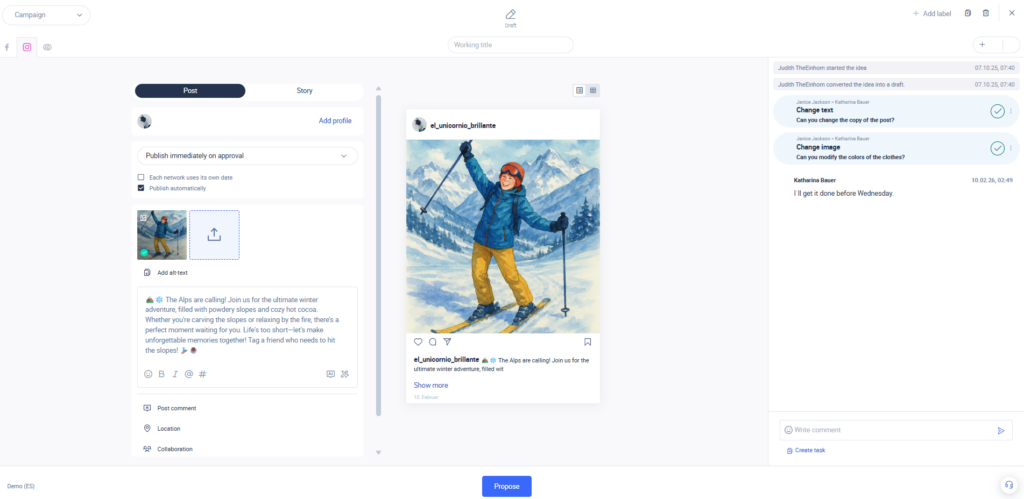
However, effective planning goes beyond a simple content calendar. Publishing only becomes truly effective when it supports real workflows, especially for agencies managing multiple clients. This includes scalable scheduling, collaboration, and structured approval processes.
- Scalable multiposting and scheduling
Agencies need to schedule large volumes of posts across many client accounts efficiently. This includes planning content weeks or months in advance and publishing consistently without hitting post or profile limits. Social media scheduling tools that limit the number of scheduled posts or profiles force teams into manual workarounds, which slows execution and increases the risk of errors. - Collaboration, feedback, and approvals
Content creation often involves showing progress, collecting feedback, and requesting approval before posts go live. The ability to add free guest users allows clients to review and comment directly in the tool. This improves communication and helps reduce costs by avoiding additional paid user accounts. - Project management for internal teams
Planning and publishing tools should allow agencies to assign tasks, track responsibilities, and clearly see who is working on what. This is especially important when large teams manage multiple client accounts. Clear task tracking helps keep everyone aligned and ensures nothing is overlooked.
Together, these features turn content planning into a repeatable and scalable workflow. Small efficiency improvements, such as faster approvals or clearer task ownership, quickly add up when applied across many accounts. This is why strong multiposting and planning capabilities are essential for agency-level social media work.
3. Flexible and Automated Reporting
Reporting is one of the most visible parts of an agency’s work. Clients expect clear proof of progress and results, which means reporting must be accurate, efficient, and easy to understand. For agencies, the challenge is not creating reports once, but doing it consistently and at scale across many clients.
When evaluating reporting capabilities in social media tools, agencies should focus on four core areas:
- Multiple report formats and customization
Agencies need full control over how results are presented. Reporting tools should allow you to build and adjust tables, charts, and graphs based on different goals and KPIs. This also includes flexible export options, such as CSV, Excel, PowerPoint, and PDF, so reports can be shared in the format each client prefers. Without this flexibility, teams often need to rebuild reports manually, which wastes time. - AI-supported explanations and insights
Agencies need full control over how results are presented. Reporting tools should allow you to build and adjust tables, charts, and graphs based on different goals and KPIs. This also includes flexible export options, such as CSV, Excel, PowerPoint, and PDF, so reports can be shared in the format each client prefers. Without this flexibility, teams often need to rebuild reports manually, which wastes time. - Easy sharing and client access
Sharing reports should not require adding every client as a paid user. Effective reporting tools offer shareable links, and public dashboards that clients can access to. This reduces back-and-forth communication, lowers tool costs, and increases transparency by giving clients ongoing access performance data. - Automated reporting and delivery
Automation is critical for scaling reporting. Agencies should be able to schedule reports to be generated and sent automatically to their emails on a weekly or monthly basis. Automated delivery ensures consistency, reduces manual effort, and frees up time for analysis and strategy instead of repetitive tasks.
Together, these features turn reporting into a repeatable and scalable process. Instead of spending hours preparing and sharing reports, agencies can focus on interpreting results and delivering insights that actually help clients grow.
4. Advanced Analytics
Advanced analytics help agencies improve performance by enabling them to move beyond mere tracking. Rather than relying on isolated metrics, analytics tools should make it easy to analyze patterns across content, timing, topics, and audience response. The following analyses demonstrate the capabilities of advanced analytics in managing multiple client accounts at scale.
Content format performance analysis
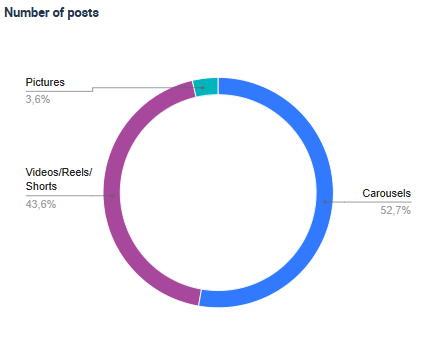
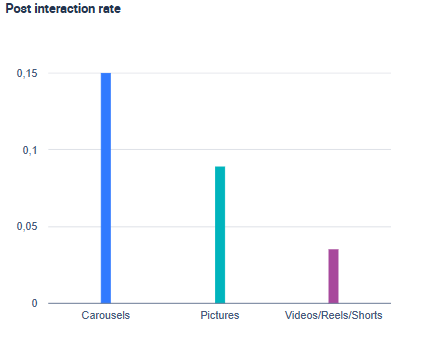
Agencies need to compare how different content formats perform across accounts, platforms, and time periods. This includes identifying which formats consistently generate higher engagement or interaction rates and which formats underperform.
The charts below illustrate how this analysis typically works in a social media management tool. The graph on the left shows how frequently each content format is used, while the second highlights the interaction rate each format generates. Looking at both together helps understand not only what they publish most often, but also whether those formats actually perform well.
Best posting times
Timing plays a major role in content visibility. Advanced analytics should make it possible to analyze historical posting data and identify time slots that correlate with stronger engagement. For agencies publishing large volumes of content, these insights help standardize posting schedules based on evidence rather than assumptions.
Hashtag performance analysis
Hashtag analysis helps understand which hashtags are most often associated with strong post performance. By reviewing historical data, you can see which hashtags appear on posts with higher interaction rates and which ones consistently underperform. As platforms increasingly limit hashtag usage, this analysis becomes essential for making more deliberate, data-driven hashtag choices instead of relying on long or generic hashtag lists.
Keyword and topic analysis
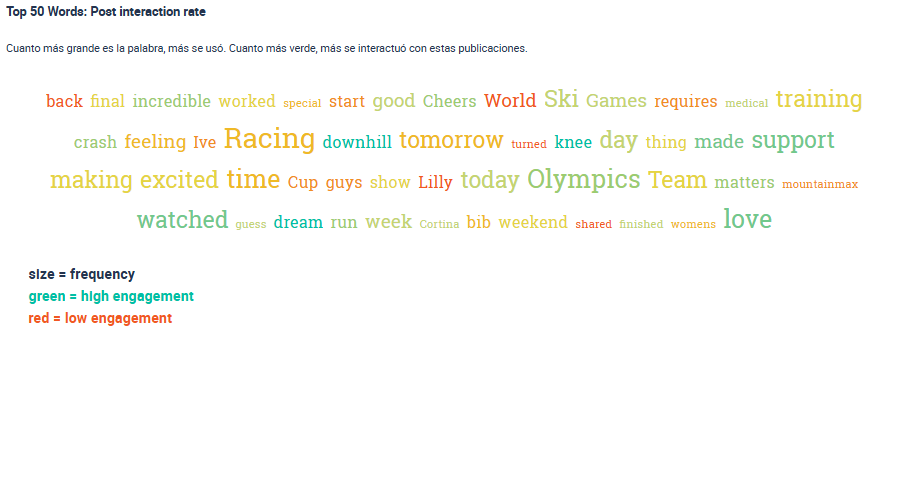
Similar to hashtag analysis, a keyword analysis shows which keywords and topics have brought engagement in an analyzed period of time. By analyzing which keywords correlate with a higher interaction rate, you can uncover what people are looking for and which topics they are interested in.
The chart below shows an example of how keyword analysis is visualized in a social media analytics tool. Larger keywords indicate more frequent usage, while darker green tones highlight stronger interaction rates.
Sentiment and audience response analysis
Understanding how audiences react to content goes beyond engagement numbers. Sentiment analysis helps assess whether those interactions are positive, neutral, or negative, supporting reputation monitoring and more informed community management decisions.
Tag-based performance analysis
Tagging analysis allows agencies to categorize posts by custom criteria, such as content themes, formats, or strategic intent, and analyze how those tags relate to specific performance metrics. This makes it easier to identify which content elements consistently drive engagement and which ones have little impact. The value of a tagging analysis also lies in its flexibility. Agencies can analyze individual tags or combinations of tags to uncover patterns tied to the KPIs that matter most.
5. Feedback and Approval Workflows
Free guest access is important for agencies primarily because it enables structured feedback and approvals, not just account access. Many social media management tools for agencies charge per user, which can quickly increase costs when clients need to review content or track progress. Guest access helps agencies involve clients without adding paid seats.
One of the areas that most depends on strong feedback and approval workflows is content planning and publishing. Clients often want to review drafts, leave comments, and approve posts before they go live. A tool that allows clients to provide feedback directly on post drafts makes this process faster and more transparent. Instead of managing approvals through emails or shared documents, centralized feedback and approvals can reduce delays and miscommunication.
Beyond publishing, structured workflows should also support transparent performance sharing. Clients frequently ask for updates on campaign results or growth metrics. While they do not always need direct access to analytics, agencies benefit from social media analysis tools that make sharing results simple and repeatable. Features such as public dashboards, automated email reports, or easily shareable visual exports allow agencies to keep clients informed without adding user accounts or manually rebuilding reports.
6. Project and Community Management Features
Strong project management is essential for agencies, especially when it comes to organizing community management and coordinating work across multiple client accounts. While there are many standalone project management tools on the market, agencies benefit most when these features are integrated directly into their social media management tool. This reduces constant tool switching and keeps all social media related tasks in one place.
A key requirement for agencies should be structured community management. If responding to comments, messages, or mentions is part of your service offering, your tool should allow you to organize and delegate these tasks efficiently. This means working from a centralized inbox connected to all client profiles, where team members can clearly see which conversations they are responsible for. Clear task assignment helps prevent missed messages, duplicated responses, and unresolved conversations.
What matters most is not just that project management features exist, but that they are designed for agency-scale work. Social media agencies must manage tasks across many clients, platforms, and team members at the same time. Tools that centralize community management, content workflows, and task ownership help agencies stay organized, work faster, and maintain consistent quality across all client accounts.
7. Monitoring Options
Brand and reputation management are important for clients who want to stay proactive in public conversations about their brand. For agencies, social media monitoring is often a case-by-case service, depending on industry, risk level, and client expectations. This makes it essential to understand whether a social media tool supports monitoring and how far those capabilities go.
Social media monitoring focuses on detecting brand mentions outside a client’s own profiles. These mentions can appear in comments, social media groups, forums, or on external websites. For agencies offering monitoring as part of their services, this capability is valuable for several reasons:
- Early detection of brand issues
Monitoring helps agencies spot negative sentiment, complaints, or emerging issues before they escalate. This allows teams to respond quickly and protect the client’s reputation. - Understanding public perception and sentiment
By analyzing how people talk about a brand or product, agencies gain insight into audience sentiment, recurring themes, and perception gaps that are not visible through owned channels alone. - Identifying engagement and response opportunities
Monitoring uncovers conversations where brands are mentioned but not tagged directly. These moments create opportunities for engagement, support, or clarification that would otherwise be missed. - Supporting crisis and reputation management
For clients in regulated or high-risk industries, continuous monitoring is essential for tracking sensitive discussions and responding in a controlled, timely way.
Bonus Point: Watch Out for Hidden Costs and Fees!
Choosing a social media tool based on price alone can be risky. While keeping costs under control is important, functionality and scalability matter more than the lowest starting price. Many tools advertise affordable entry plans, but the real costs often appear as your agency grows and your needs increase.
To avoid surprises, you should review pricing plans in detail and understand which features are included only in higher-tier subscriptions. The most common hidden cost areas include:
- Additional profiles and accounts: many tools charge extra as soon as you exceed a set number of tracked or managed profiles. This can become expensive for agencies that need to monitor multiple clients, competitors, or regions.
- Advanced analytics and benchmarking features: some platforms limit access to deeper analytics, historical data, or competitor benchmarking unless you upgrade to premium plans.
- AI-powered features: AI-based insights, automated explanations, tagging analyses, or content suggestions are often sold as add-ons or included only in enterprise tiers.
- Reporting and automation options: automated reports, custom dashboards, or advanced export options are frequently restricted to higher-priced plans.
- Additional users or collaborators: costs can rise quickly when tools charge per user, especially if clients or external stakeholders need access.
The best way to avoid unexpected fees is to define your agency’s needs first, including the number of profiles, users, and features required. From there, compare tools based on total cost at scale, not just entry-level pricing. This approach helps ensure you choose a tool that supports growth without eroding margins over time.
What are the Best Social Media Management Tools for Agencies
Social media agency tools need to do a lot of things well for them to truly be effective. Agency life is complicated both by the sheer number of client profiles you need to manage in terms of creating content, tracking performance, and providing reporting. Our guide hopefully will help you to identify exactly what is essential to have, and what features you need to take a close look at.
Now that you have read our guide, the next step is to start looking at all the tools available. There are a lot of tools that claim to be perfect for agencies, and you may be wondering how to start your search. Therefore, to help you in your search, we have compiled our list of the best social media management tools for agencies:
- Fanpage Karma
- Social Pilot
- Hootsuite
- Sprinklr
- Zoho Social
- Buffer
- Agora Pulse
- Swat.io
- Sprout Social
- Metricool
Fanpage Karma
If you are looking for a tool that not only offers all the features in our guide, but goes beyond even that, then look no further! The tool combines advanced features for publishing, analytics, monitoring, research, and community management, all accessible through a single intuitive platform. Fanpage Karma is a leading social media management tool for agencies, created with their needs in mind, and provides the features and capabilities that agencies require for managing their client’s account.
- Unlimited profile tracking and benchmarking
Fanpage Karma allows agencies to track and analyze an unlimited number of profiles. This includes client accounts, competitors, and industry benchmarks across multiple platforms. This is especially important for agencies that manage many clients or run in-depth benchmarking and competitor analyses without worrying about profile limits or rising costs. - Publishing, planning, and free collaboration
Agencies can plan and publish content across multiple profiles from a single calendar. Fanpage Karma supports high-volume scheduling and multiposting, making it suitable for agencies managing dozens or hundreds of accounts. Free external feedback options allow clients or stakeholders to review post drafts and leave comments without needing a paid user account, supporting clear approval workflows. - Community management at scale
The platform includes centralized community management features that help agencies monitor and respond to comments and messages across multiple profiles. Tasks can be organized and assigned within the tool, giving teams a clear overview of who is handling which conversations and ensuring no interactions are missed. - Advanced analytics and performance optimization
Fanpage Karma offers flexible analytics for content performance, benchmarking, and historical analysis. Agencies can analyze content formats, posting times, hashtags, keywords, and tagged content across large data sets. These insights support data-driven content optimization and long-term performance tracking across clients. - Flexible and automated reporting
Agencies can create fully customizable reports using adjustable templates and share them in multiple formats. Automated reporting and public dashboards make it easier to keep clients informed without manual effort, while visual reports help clearly communicate results and progress. - AI-supported workflows
AI features support analytics, reporting, content analysis, and community management by helping identify patterns, summarize insights, and speed up repetitive tasks. This allows agency teams to focus more on strategy and less on manual analysis.
If you want to see for yourself why Fanpage Karma is the most effective social media management tool for agencies, try it out with a free 14-day trial. You can also join one Fanpage Karma’s free weekly webinar to see how this tool can help you manage multiple client profiles in an efficient way.

Social Pilot
Social Pilot is a scalable social media management solution designed to support agencies managing multiple client accounts. It offers a cost-effective platform with features that include bulk scheduling, detailed analytics, and collaborative tools. The tool’s multi-client support allows agencies to switch between accounts easily while maintaining full control over content strategy and performance tracking.
One of Social Pilot’s standout features is its ability to schedule posts in bulk, saving time for agencies that handle large content volumes. The tool also integrates with major platforms like Facebook, Twitter/X, LinkedIn, and Instagram, enabling seamless cross-platform management. Additionally, Social Pilot’s advanced analytics provide insights into engagement, audience growth, and top-performing content.
Collaboration features in Social Pilot allow team members and clients to collaborate efficiently on content planning. Agencies can assign roles, approve posts, and track project progress within the platform. This streamlined workflow helps agencies maintain transparency and efficiency when working with clients and internal teams.
Hootsuite
Hootsuite is a widely recognized social media management software that caters to agencies by offering extensive functionality and scalability. It allows users to manage multiple social profiles across platforms like Facebook, Instagram, Twitter/X, and LinkedIn through a centralized dashboard. The tool supports scheduling, publishing, and real-time monitoring, making it ideal for agencies juggling complex client needs.
However, while Hootsuite offers comprehensive features, agencies should be aware of potential downsides. The platform can become costly when multiple users and profiles are involved, which may be a limiting factor for smaller agencies. Despite these considerations, Hootsuite excels in social listening, enabling agencies to monitor brand mentions, competitor activity, and industry trends. This feature, combined with robust integration capabilities, allows agencies to customize workflows and automate tasks, ultimately improving productivity.
Sprinklr
For many agencies, you may be looking for a social media management software solution with advanced social listening capabilities, and Sprinklr is a good tool to look at in this case. The platform’s social listening capabilities enable agencies to monitor conversations around brands, competitors, and industry trends, providing real-time insights that drive informed decision-making. Sprinklr may be relatively less-known than some of the other players in the market, but nonetheless offers a strong product for agencies that want helpful analytical insights.
Additionally, Sprinklr’s integrated analytics offer detailed performance reports, helping agencies track engagement, sentiment, and conversion metrics. However, agencies should be mindful that Sprinklr can be expensive and may limit the number of profiles available for analysis. Despite this, its integration with CRM systems makes it a strong contender for agencies aiming to provide personalized, cross-channel experiences to their clients, ultimately strengthening customer loyalty and engagement. tailored to agencies handling extensive client portfolios.
Zoho Social
Zoho Social is an accessible and budget-friendly tool for agencies seeking efficient social media management. It supports essential features such as post scheduling, content performance monitoring, and social listening. Agencies benefit from Zoho’s integration with other Zoho business applications, enabling a broader range of functionality within one ecosystem.
The social listening capabilities allow agencies to track brand mentions and industry discussions, enabling timely engagement with relevant conversations. Zoho Social’s analytics provide actionable data on post performance, helping agencies refine strategies based on measurable outcomes.
Collaboration tools are another key highlight. Agencies can streamline teamwork by assigning tasks, reviewing drafts, and approving content within the platform. Customizable reports help agencies provide detailed performance insights to clients, reinforcing transparency and trust.
Buffer
Another social media management platform for agencies is Buffer, which may serve as a good option if your requirements for analytics are low and you simply want to manage your client’s publishing. In some cases, this can be cheaper than other options available, but may also come with limitations. However, Buffer remains popular due to its ease of use and straightforward approach to scheduling content.
Buffer’s content calendar offers a clear view of upcoming posts, allowing agencies to coordinate campaigns and adjust schedules with ease. The platform supports publishing across Instagram, Facebook, Twitter/X, and LinkedIn, making it convenient for agencies focused on maintaining a consistent posting strategy. Agencies can quickly edit or reschedule content, which helps keep workflows flexible.
While Buffer’s analytics may not be as comprehensive as some competitors, it provides essential insights such as engagement metrics and audience growth. This data is sufficient for agencies with simpler reporting needs. For those prioritizing ease and cost-efficiency, Buffer can serve as a reliable solution for managing content distribution without overwhelming complexity.
Agora Pulse
Agorapulse is a comprehensive tool designed for agencies to manage client communications and engagement. Its unified inbox consolidates messages, comments, and mentions from various social networks, enabling quick responses and streamlined interaction management. The platform also provides in-depth analytics, offering insights into engagement, audience behavior, and campaign performance. Agencies can generate custom reports that showcase key results, demonstrating the value of social media strategies to their clients.
Agorapulse also excels in collaboration, providing tools for content approval and task delegation. Automation features help reduce repetitive tasks, allowing teams to focus on strategic initiatives. The platform’s user-friendly interface and extensive feature set make it a preferred choice for many agencies.
Swat.io
Swat.io specializes in content planning, social listening, and team collaboration. Its centralized content calendar simplifies the scheduling process for agencies handling multiple client accounts. Approval workflows ensure that all content adheres to brand guidelines and compliance standards, which is especially valuable for industries with strict regulations. The platform’s analytics offer detailed insights into engagement and audience trends, allowing agencies to continuously optimize their strategies.
Social listening tools help agencies stay informed about relevant conversations and emerging trends. By leveraging these insights, agencies can develop timely and impactful content that resonates with their clients’ target audiences.
Sprout Social
Sprout Social is a robust platform combining content management, analytics, and social listening features. It supports agencies in enhancing client engagement through data-driven strategies and collaborative workflows. The platform’s audience insights provide a deeper understanding of followers’ preferences, helping agencies craft targeted content. Customizable reports allow agencies to present performance metrics in a clear, impactful manner.
Sprout Social’s integration with CRM systems facilitates personalized engagement, building stronger relationships with audiences. Its balance of advanced features and usability makes it a valuable resource for agencies seeking to improve social media operations.
Metricool
Metricool is a dynamic social media management and analytics platform designed for agencies that need a comprehensive tool to track both organic and paid campaigns. The platform provides seamless integration with platforms like Instagram, Facebook, Twitter/X, LinkedIn, Google Ads, and TikTok, allowing agencies to oversee all aspects of their digital strategies in one place.
One of Metricool’s key strengths is its performance analytics dashboard, which consolidates data from various channels. Agencies can track KPIs such as reach, engagement, follower growth, and ad performance, giving them a holistic view of client success. The tool also includes heatmaps to identify optimal posting times, ensuring that content reaches audiences when they are most active.
Metricool supports content planning and cross-platform scheduling, making campaign management efficient. Agencies can also leverage its competitor analysis tools to benchmark their clients’ performance against industry standards. With built-in ad tracking and real-time reporting, Metricool empowers agencies to optimize both their paid and organic strategies, delivering measurable results to clients.