Find the Best YouTube Analytics Tools for Smarter Growth
YouTube is more than a video platform. It is also a powerful search engine where users actively look for information, entertainment, and solutions. This is why so many businesses invest significant time and money to grow their channels. However, to grow successfully, you need to understand how your content performs and how to optimize it for visibility, engagement, and watch time.
For many, specialized YouTube analytics tools are the key to making informed decisions to better grow your channel. Specific keyword research tools help with titles and tags, but these are only giving you a partial picture of the analytics that go into making informed decisions. That’s why serious YouTubers should consider specialized YouTube analytics tools that go beyond keyword research, offering more in-depth insights into audience behavior, content performance, and growth opportunities.
In this article, we’ll explain why tools for YouTube analytics are essential for smarter growth, which features matter most, and include our list of the Top 10 YouTube Analytics Tools in 2026 to help you succeed.
Why YouTube Analytical Insights Can Make a Real Difference
Keywords play an important role in YouTube optimization, but they’re only one piece of the puzzle. Real growth depends on many additional factors, such as audience retention, watch time, engagement, click-through rates, and how viewers interact with your content over time. Without understanding these signals, it’s difficult to know why a video performs well or how to replicate that success consistently.
YouTube Studio provides a solid foundation by offering insights into your own channel performance. It shows key metrics like views, watch time, audience retention, traffic sources, and subscriber growth, helping you understand how your videos perform individually and over time. These insights are valuable for tracking your own progress and identifying basic trends within your content.
However, YouTube Studio is limited when it comes to deeper, strategic analysis, especially beyond your own channel. It does not allow you to:
- analyze competitor performance in a meaningful way
- compare benchmarks across multiple channels
- identify industry-wide trends
This makes it difficult to understand why competitors succeed, which content formats perform best in your niche, or how your performance compares in a broader context.
Advanced YouTube analytics tools fill these gaps by enabling you to analyze other profiles alongside your own, track competitor metrics, and benchmark performance across your industry. By combining your data with external insights, these tools give you a much clearer picture of what drives success, allowing you to refine your strategy, spot opportunities earlier, and make smarter, growth-focused decisions.
8 Key Features of YouTube Analytics Tools
In order to better analyze your YouTube performance and make data-driven decisions, you need analytics tools that go beyond basic metrics. The right technological solution should give you a complete view of your content, audience, and competitive landscape, while remaining flexible enough to match your specific goals.
Below are the 8 key features to look for when choosing a YouTube analytics tool built for smarter, sustainable growth:
- Analyze All Your Profiles Without Limits
- Benchmark Your Performance Against Competitors
- Have Access to Historical Data
- Identify the Best Times to Post
- Discover the Best Hashtags for Your Content
- Use AI-Driven Analytics to Understand Your Audience
- Understand Audience Sentiment
- Turn Insights Into Clear Reports
1. Analyze All Your Profiles Without Limits
Managing multiple YouTube channels or brand profiles shouldn’t mean juggling separate tools or dashboards. YouTube channel analytics tools allow you to analyze all your profiles in one place, without artificial limits or restrictions. This is especially important for three key reasons:
- Broader Competitive Perspective
In most industries there are many relevant competitors, creators, and benchmark channels you want to learn from. Limiting your analysis to just a few profiles means missing valuable insights. Being able to analyze a wide range of channels gives you a much more complete picture of your niche. - More Reliable Data Sets
Analyzing more profiles means working with larger and more reliable datasets. Instead of drawing conclusions from a handful of examples, you can base your strategy on broader patterns and more robust data, which leads to more accurate and actionable insights. - Better Trend Identification
An expanded dataset allows you to better identify industry trends, compare performance across different channels, and understand which strategies consistently drive success. You can spot emerging formats, posting behaviors, or engagement patterns much earlier and adapt your strategy accordingly.
Ultimately, having access to unlimited profile analysis significantly increases the value of all other analytics features, from benchmarking and reporting to audience insights, because every insight is backed by stronger, more comprehensive data.
2. Benchmark Your Performance Against Competitors
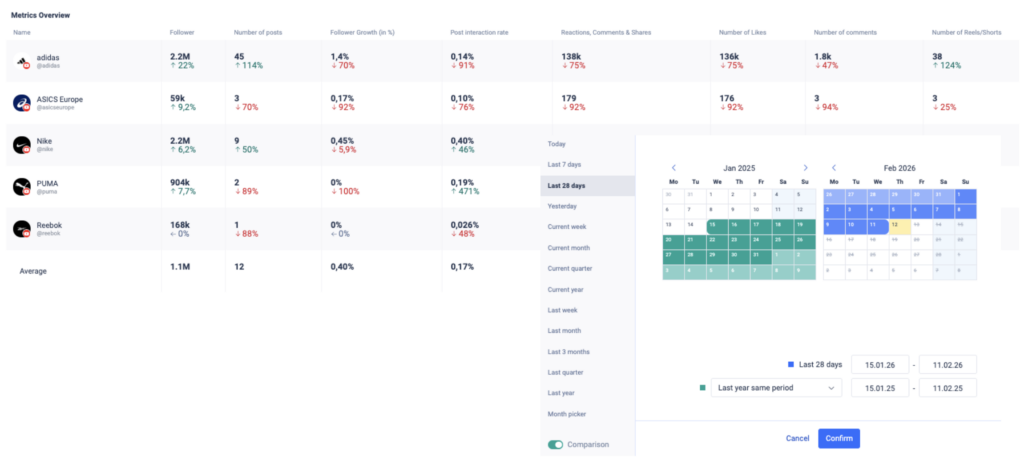
Understanding your own performance is essential, but it’s not enough to grow successfully on YouTube. To make informed, strategic decisions, you need context and that comes from benchmarking. Benchmarking means comparing your performance against other channels in your niche across multiple metrics to understand what “good” actually looks like.
With the right YouTube analytics tools, benchmarking allows you to:
- Define realistic averages and goals by seeing typical performance levels for views, engagement, or growth within your industry
- Evaluate performance across multiple metrics, not just one, because a single metric never tells the full story (e.g., high views don’t always mean high engagement)
- Identify top-performing competitors for specific metrics, such as channels with exceptional engagement rates or strong subscriber growth
- Learn from focused examples by analyzing what these competitors do differently in terms of content, format, or posting strategy
- Compare your performance more accurately by placing your results within a broader, data-driven context rather than evaluating them in isolation
By benchmarking against a wide range of competitors, you move from guessing what success looks like to clearly understanding it, and can then adapt your strategy based on proven performance patterns in your niche.
3. Have Access to Historical Data
Access to historical data is essential for understanding long-term YouTube performance. Short time frames only provide snapshots, while real insights come from analyzing how your content evolves over weeks, months, and years.
Because datasets can vary significantly depending on the timeframe, short-term performance doesn’t always reflect long-term success. That’s why it’s important to use tools that provide flexible access to historical data. Advanced YouTube channel analytics tools allow you to track trends, measure the impact of past optimizations, and identify seasonal patterns.
This flexibility is especially valuable for recurring campaigns or seasonal content. By comparing similar time periods and analyzing data from different perspectives, you can identify consistent patterns, refine your strategy, and make more reliable, data-driven decisions.
4. Identify the Best Times to Post
Posting great content is most effective if it reaches your audience at the right moment. That means that identifying the best times to post ensures your videos go live when the users are most active and most likely to engage.
This is because early engagement plays a crucial role in signaling to the YouTube algorithm that your content is relevant and valuable. Strong initial interactions, such as views, likes, comments, and watch time, increase the chances of your video being promoted in search results and recommendations.
Advanced tools for YouTube engagement analytics reports help you analyze interaction data and historical performance to determine when the users are most likely to engage. Instead of focusing only on your own channel, these tools incorporate data from multiple profiles, including competitors, to build larger, more reliable datasets.
This broader data foundation allows you to identify more accurate interaction patterns and optimal posting times based on real engagement behavior across your niche. As a result, you can schedule your content when interaction rates are highest and give your videos the best possible start.
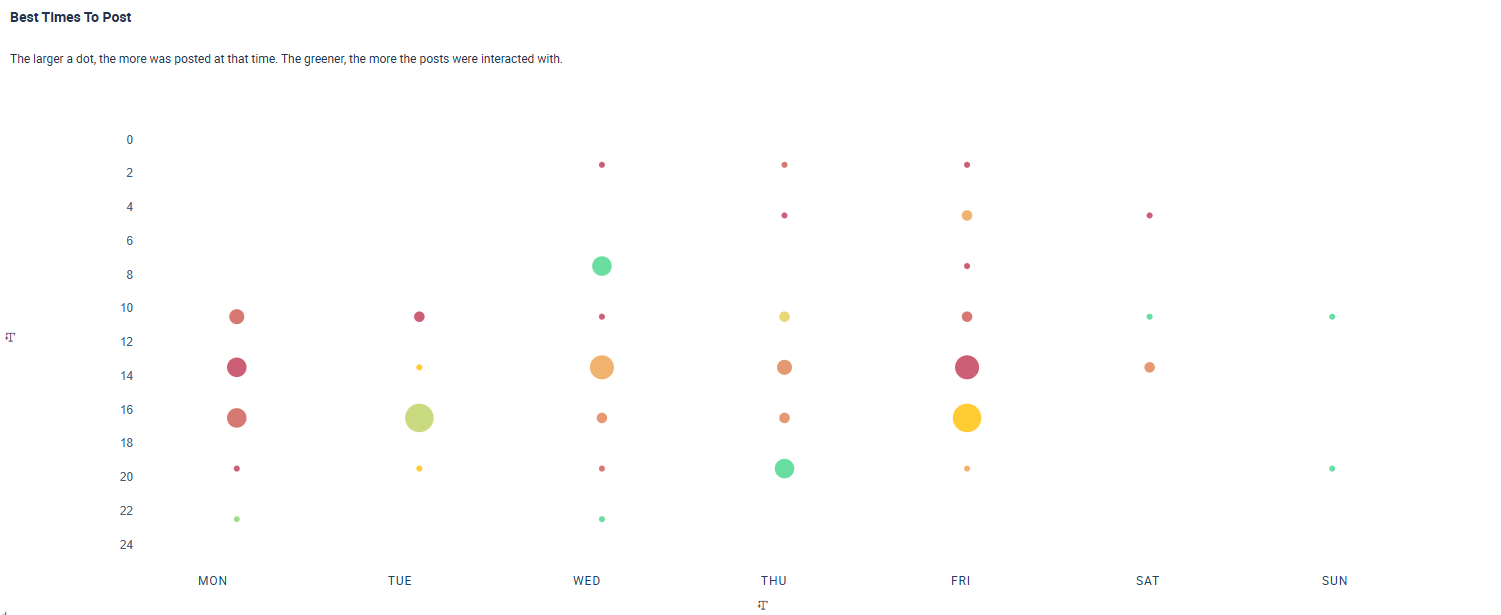
Below, you can see a chart illustrating the best times to post:
- The larger a circle, the more content was published at that time.
- The greener a circle, the higher the user’s engagement.
To stand out from competitors, it’s strategic to find time slots where engagement is high (greener circles) but competition is lower (smaller circles). For example, while Wednesday midday shows high engagement, it’s also very competitive. A smaller but green circle on Thursday evening may offer a better opportunity since there are usually fewer posts during this time. However, this time still shows strong interaction rates.
5. Discover the Best Hashtags for Your Content
Choosing the right hashtags can significantly impact how your content is discovered on YouTube. A strong hashtag strategy not only improves visibility in search results but also helps you reach viewers who are actively interested in your topic. That’s why top YouTube analytics tools should include two essential components: in-depth hashtag research and clear visual hashtag analysis.
Hashtag Research
A powerful YouTube analytics tool should provide comprehensive hashtag research capabilities. By analyzing performance data, trending topics, competitor usage, and audience behavior, it helps identify which hashtags truly drive visibility and engagement. Instead of simply choosing the most popular tags, you can evaluate search volume, competition levels, engagement rates, and trend development to make strategic, data-driven decisions.
Hashtag Graphics
In addition to raw data, visual hashtag analysis is equally important. Clear hashtag graphics allow you to quickly identify valuable opportunities, such as hashtags that generate strong engagement while facing relatively low competition.
In the graph below, you can see the 50 top trending hashtags. The larger a hashtag appears, the more frequently it has been used, while the greener it is, the higher the engagement it generates.
The key is not just to pick the biggest hashtags, but to find the right balance between usage and engagement. For example, a hashtag like #adidas may be very large but also highly competitive, meaning your content can easily get lost. On the other hand, hashtags like #footballboots or #winter, show strong engagement with relatively lower competition, making them more strategic choices.
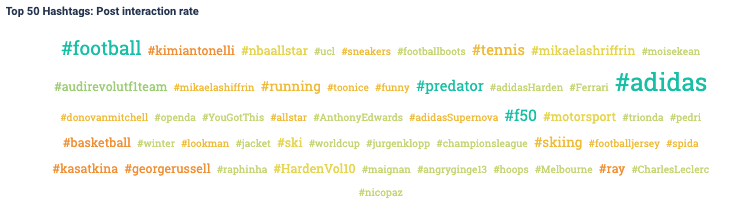
By selecting hashtags that are green but not overly large, you can increase your chances of visibility and interaction. This data-driven approach helps you move from simply following trends to actively choosing hashtags that maximize performance.
- Comprehensive Collaboration Functionality for Teams
- Dynamic Publishing Capabilities
- Unlimited Profiles that can be Analyzed
- Shareable Feedback and Approval Processes (even for those without a subscription)
6. Use AI-Driven Analytics to Understand Your Audience
Understanding your audience goes far beyond basic demographics like age, gender, or location. AI-driven tagging analysis helps uncover deeper insights into viewer behavior, preferences, and content affinities by analyzing large volumes of data in real time.
With intelligent tagging features integrated into YouTube Shorts analytics tools and YouTube video analytics tools, you can categorize your content and that of your competitors based on specific characteristics. This allows you to go beyond standard performance metrics (such as interaction rates) and analyze what type of content truly resonates with your audience.
For example, you can tag your videos and Shorts based on:
- Topic (product-focused, educational, promotional)
- Tone (emotional, humorous, neutral)
- Call to Action (shop now, learn more, join us, get inspired, stay tuned)
- Visual Style (high-contrast, vibrant colors, minimalist design, retro aesthetic, action shots)
A YouTube analytics tool can then analyze how these tags correlate with key performance metrics such as watch time, engagement rate, click-through rate, or conversions. This makes it possible to identify patterns.
In the example below, we tagged posts from some of the most popular sports brands according to specific content characteristics. By applying structured tags, we were able to analyze not only how frequently certain themes appear, but also how they influence engagement and overall performance.
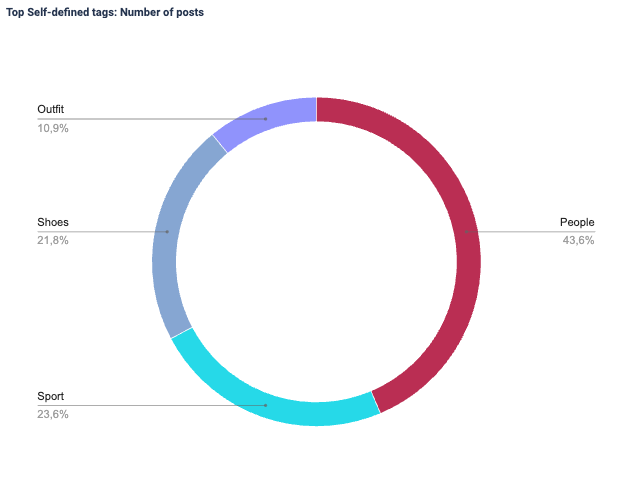
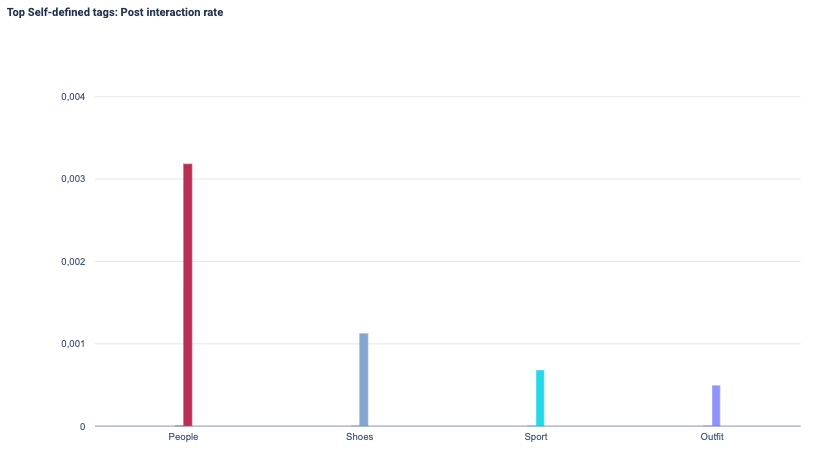
The first chart shows that most posts are tagged with People (43.6%), followed by Sport (23.6%), Shoes (21.8%), and Outfit (10.9%). This indicates a strong focus on people-centered content in the overall posting strategy.
The second chart reveals that People also generates the highest interaction rate, clearly outperforming the other categories. Shoes ranks second in engagement, while Sport and Outfit show comparatively lower interaction rates.
Overall, content featuring people not only dominates in volume but also performs best in terms of engagement, making it the most impactful content category.
This example shows how advanced YouTube analytics tools use tagging analysis to uncover deeper insights into what truly resonates with an audience. In particular, modern YouTube Shorts analytics tools 2026 go beyond basic metrics by analyzing content characteristics alongside performance data.
Instead of relying solely on surface-level metrics like views or likes, advanced analytics solutions connect content characteristics with performance data to reveal clear patterns and strategic opportunities. By going beyond basic reporting, they help you understand why certain content performs better and how to replicate that success consistently.
7. Understand Audience Sentiment
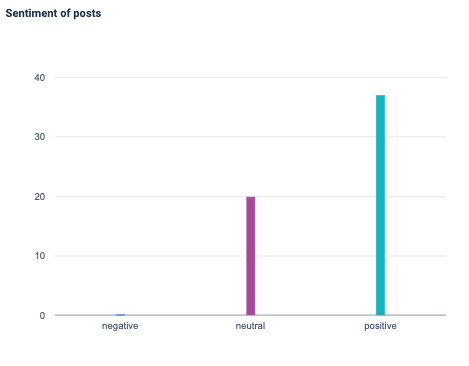
Understanding how your audience feels about your content is just as important as knowing how it performs. Audience sentiment analysis helps you identify whether reactions are positive, negative, or neutral, giving you deeper context behind likes, comments, and engagement metrics. It works by analyzing large volumes of data, such as comments or interactions, and categorizing them into these three sentiment groups.
By analyzing sentiment across videos and comments, YouTube analytics tools allow you to understand audience perception, spot potential issues early, and recognize content that resonates emotionally. These insights help you adjust your messaging, improve audience relationships, and create content that connects more effectively with viewers.
8. Turn Insights Into Clear Reports
Collecting data is only valuable if you can communicate it effectively. The best YouTube analytics reporting tools help you transform complex metrics into structured, easy-to-understand reports that highlight what truly matters.
Modern YouTube analytics tools for creators go beyond raw numbers by offering:
- Customizable dashboards to focus on the metrics that matter most
- Visual performance summaries for quick and intuitive insights
- Automated reporting features to save time and ensure consistency
- AI-powered analysis to interpret data, generate insights, and assist in writing report summaries
- Export and sharing options such as downloadable reports, shareable links, or presentation-ready formats
These features allow you to track trends over time, compare results across videos or campaigns, and communicate findings clearly across your team.
Whether you’re sharing updates with colleagues, presenting results to clients, or evaluating your own strategy, well-structured reports turn analytics into actionable insights and measurable progress, helping you make smarter, data-driven decisions for long-term growth.
The Best YouTube Analytics Tools in 2026
Choosing the right analytics solution can make a significant difference in how efficiently you grow your channel. With YouTube becoming increasingly competitive, creators and brands need advanced insights that go beyond basic metrics. That’s why finding the right YouTube analytics tools 2026 has to offer is more important than ever.
The best tools for YouTube analytics combine performance tracking, competitor benchmarking, audience insights, reporting features, and AI-driven analysis in one platform. Whether you’re a creator looking to optimize individual videos or a brand managing multiple channels, the best YouTube channel analytics tools help you turn data into clear, strategic decisions.
Below, you’ll find our curated list of the top YouTube analytics tools in 2026, including solutions designed for creators, agencies, and enterprise teams alike:
- FanpageKarma
- Buffer
- Metricool
- SproutSocial
- UnboxSocial
- Brand24
- HootSuite
- VidIQ
- TubeBuddy
- ViralState
1. Fanpage Karma
Fanpage Karma is one of the best YouTube channel analytics tools in 2026 for creators, brands, and agencies that want more in-depth insights beyond basic YouTube Studio data. The platform combines advanced performance tracking, benchmarking and competitor analysis, and customizable reporting in one powerful solution.
With Fanpage Karma, you can analyze unlimited YouTube channels and access historical data to identify long-term trends and seasonal patterns. The best thing about FanpageKarma is not only its strong analytic capabilities but also that it offers community management, publishing, research, and monitoring features for every social media platform. You can try Fanpage Karma with a free 14-day trial or join our free weekly webinar where you can get an overview of the main functions aiding your social media activities.

2. Buffer
Buffer is a simple and intuitive social media analytics tool that also supports basic YouTube analytics. It allows creators and brands to schedule videos, track engagement, and monitor performance in one streamlined dashboard. While it focuses more on publishing and planning than deep analytics, it’s a practical solution for teams looking to combine scheduling with clear performance insights.
3. Metricool
Metricool is a comprehensive social media analytics and scheduling tool that includes strong YouTube performance tracking features. It allows creators and brands to analyze views, engagement, subscriber growth, and posting performance in a clear, visual dashboard. With competitor tracking and cross-platform reporting, Metricool is a solid option for those who want both analytics and content planning in one platform.
4. SproutSocial
SproutSocial is a solid YouTube analytics tool that offers detailed performance reporting, audience insights, and competitor benchmarking to help brands optimize their content strategy. With customizable reports and enterprise-level features, Sprout Social is particularly well-suited for larger teams and businesses managing multiple social channels.
5. UnboxSocial
Unbox Social is a data-driven social media analytics platform designed to provide in-depth performance insights across channels, including YouTube. It offers detailed audience analytics, engagement tracking, and competitor benchmarking to help brands understand what content resonates most. With its reporting and influencer analysis features, Unbox Social is particularly useful for marketing teams looking to refine strategy through actionable insights.
6. Brand24
Brand24 is a social listening and analytics tool that helps brands monitor online conversations, including mentions on YouTube. It provides real-time insights into brand visibility, audience sentiment, and engagement trends. While its strength lies in monitoring and reputation management rather than deep channel analytics, Brand24 is a valuable tool for understanding how your brand is perceived across platforms.
7. HootSuite
Hootsuite is a widely used social media analytics tool that includes YouTube analytics and scheduling features. It allows teams to monitor performance, track engagement, and manage multiple social channels from one centralized dashboard. With customizable reporting and collaboration tools, Hootsuite is a practical solution for businesses looking to combine content publishing with structured performance analysis.
8. VidIQ
VidIQ is a specialized YouTube optimization and analytics tool designed to help creators grow their channels faster. It provides keyword research, SEO insights, competitor tracking, and performance analytics directly within YouTube. With real-time data and optimization suggestions, VidIQ is especially useful for creators who want to improve discoverability and increase views through smarter video strategy.
9. TubeBuddy
TubeBuddy is a browser-based YouTube optimization and analytics tool built to help creators improve video performance and channel growth. It offers keyword research, SEO recommendations, A/B testing, and performance tracking directly within YouTube. With its practical optimization features and productivity tools, TubeBuddy is a popular choice for creators looking to streamline workflows and boost discoverability.
10. ViralState
ViralStat is a video analytics and competitor tracking tool focused on identifying trending content and performance patterns on YouTube. It helps users monitor viral videos, analyze engagement metrics, and track competitor channel growth. With its emphasis on trend discovery and benchmarking, ViralStat is particularly useful for brands and creators looking to spot opportunities early and adapt their content strategy accordingly.