How to Get More Likes on Instagram

Likes remain an important Instagram KPI since they show how well your content resonates with your audience. While this is not the only metric that shows this, understanding how to get more Likes on Instagram posts is essential for anyone looking to expand their reach and strengthen their presence on the platform.
This guide will walk you through 11 proven techniques to increase Likes on Instagram. From optimizing content formats to leveraging analytics and collaboration, we will explain how our diverse list of techniques can play a role in strengthening performance on the platform. We will go beyond just mentioning what some techniques are and highlight how data-based insights can take your Instagram performance to the next level.
Do Likes Still Matter on Instagram?
Likes show how your audience responds to your content and help the algorithm determine whether it should reach more people. They are one of the simplest and strongest signals of a post’s success. In terms of measuring performance, Likes are an especially important KPI because they:
- Signal quality to the algorithm
- Indicate audience interest
- Support both organic reach and paid performance
There is also a practical matter relating to Likes as a sign of engagement. For the most part, Likes can be easier to get than some other reactions, such as comments, since a single, quick click is all that is needed. This means that understanding strategies to attract more Likes can be a relatively efficient way to build engagement on Instagram.
11 Techniques to Get More Likes on Instagram
Increasing the number of Likes you receive on Instagram isn’t about luck. Rather, it is about finding out what techniques and strategies are best suited for your content and then implementing what works best.
The key is to focus on content that resonates with your audience while optimizing every element of your posts. In the sections below, we will walk you through 11 actionable techniques that can help you to improve your overall engagement and get more Likes on Instagram:
- Look for (and Learn from) Successful Content
- Study Different Content Formats
- Use Instagram Collab Posts
- Share your Posts in your Stories
- Use the Right Hashtags
- Share your Posts in your Stories
- Find your Best Times to Post
- Tag your Post´s Location
- Optimize your Captions for Likes
- Create Interactive Stories
- Run a Poll with Likes and Comments
1. Look for (and Learn from) Successful Content
It sounds simple, but getting Likes is all about producing content that people want to see. A relatively straightforward way to get you started is to simply view content in your niche that has generated a lot of Likes.
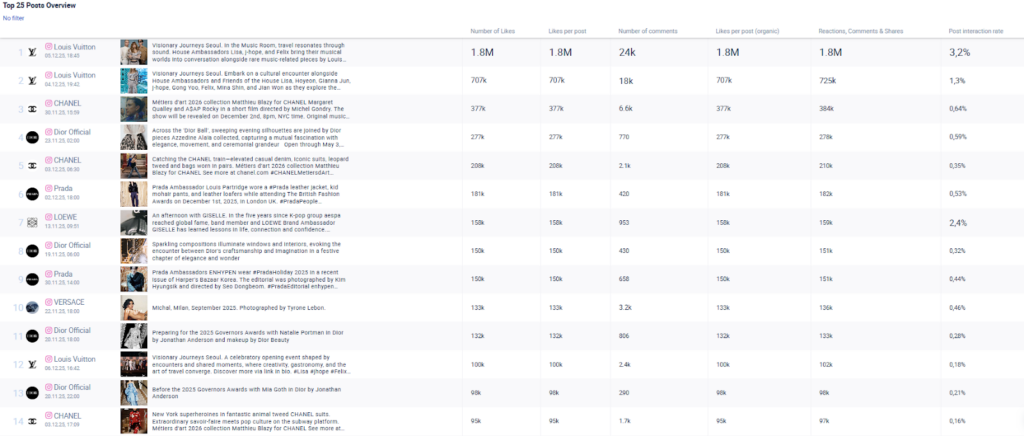
For this, we recommend using a social media analytics tool to uncover the trends, emerging topics, and content formats that are currently resonating in your niche and correlate with a higher number of Likes. On the most basic level, you can produce a metric table as shown below by filtering for Likes to see what posts received the most ones. Additionally, filtering by keywords alongside Likes allows you to focus on specific topics or themes that drive engagement. For example, we could filter the table by the word “purse” to see the trendiest posts on that topic for the analyzed profiles, making it easier to understand what type of content drives the highest number of Likes.
Once you have applied your filters you can look at:
- Which posts received the highest number of Likes– these show clear interest and should guide what you create more of.
- Which topics consistently drive Likes– look for patterns in themes such as tutorials, inspiration, behind-the-scenes, tips, or entertainment.
- Which creative styles work well – compare thumbnails, hooks, visual styles, and tones that led to higher engagement.
- Which posts perform well for competitors – competitor data expands your sample size and shows what your audience responds to across your niche, not only on your own profile.
2. Study Different Content Formats
Instagram allows you to use various content formats, including Stories, Reels, Carousels, or simply posting photos. Understanding how to get more likes on Instagram Reels is particularly important because there may be some specific content formats that your audience prefers and that perform better for your profile.
With a social media analytics tool, you can analyze correlations between content formats and the number of Likes that each format receives for a specific time period. This analysis may involve looking not only at data from your own profile but also other profiles that have a similar target audience, provided that your social media analytics tool allows for this. Creating large data sets with many data points helps you more accurately determine what content formats may be correlated with more Likes.
The charts below visualizes what the output of this analysis may provide:
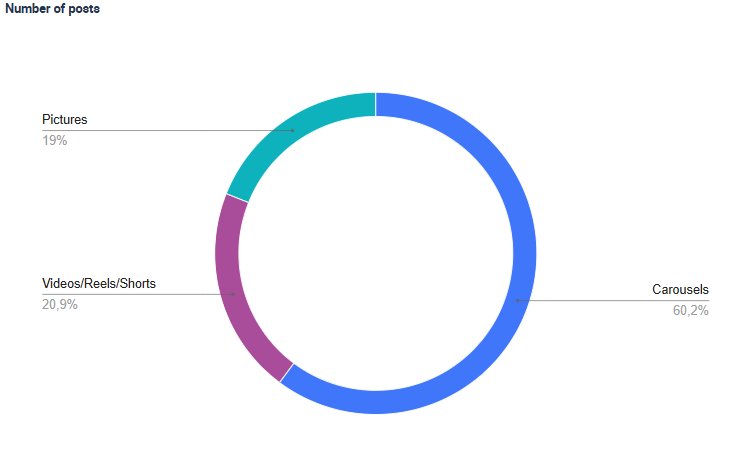
- Format distribution: The tool categorizes every post from the analyzed profiles (e.g., Reels, Carousels, Pictures) and shows how often each format is used. This is reflected in the “Number of posts per format” chart.
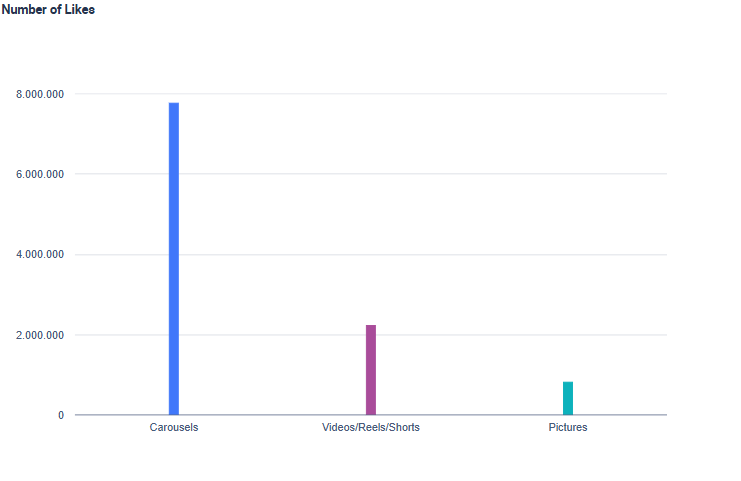
- Number of Likes: It then calculates the average like associated with each format, which you can see in the “Number of Likes” chart. This helps reveal which formats actually drive a higher number of Likes.
In the example below, Carousels account for 54.1% of all posts, while Videos/Reels/Shorts (23.7%) and Pictures (22.2%) are used less often. However, when we look at the number of Likes, Videos/Reels/Shorts and Carousels clearly outperform Pictures.
The real advantage of this type of analysis is that you can directly see which formats typically generate the most Likes by bringing together historical data. Remember, this isn’t just based on the past performance of your Instagram content, but also that of other creators who focus on a similar target audience.
Pro-Tip: Remember that each content format serves a different purpose. Reels are typically best for short, viral-friendly content, while carousels work well for deeper storytelling. Stories can help support daily interaction, and photos are effective for strong visual posts.
3. Use Instagram Collab Posts
Instagram Collab posts allow two accounts to publish the same post together so it appears on both profiles and shares a single set of engagement metrics. This means all Likes and other engagement metrics are combined into one post instead of split between two versions.
Why Collab posts help you get more Likes on Instagram:
- Instant audience expansion: your content is shown to your followers as well as the collaborator’s content.
- Combined interactions: Likes stacks on one post instead of being split across two versions.
- Higher engagement potential: two communities interacting multiplies Likes.
- Audience crossover: you get exposure to a relevant audience that already trusts your collaborator. There is also a chance that they will start following you, see your posts and interact with them by Liking them.
To set it up, create a post that works for both audiences. When publishing, select ‘Tag People‘ and choose the ‘Invite Collaborator‘ option. Once the invited account accepts, the post will appear on both profiles, sharing the same Likes.
To really make this work, you need to align on the basics so the post performs for both audiences. Start by agreeing on a single CTA that encourages users to Like the post, such as “Like this to see part two”. Also, make sure you are creating content that resonates for both audiences so followers from both accounts feel motivated to engage. This means that the hook and messaging must be aligned and relevant to both communities, as mixed messaging could reduce Likes.
4. Share your Posts in your Stories
Not every follower will see your post in their feed, but Stories provide a second chance to grab their attention. Stories can increase the visibility of your posts, making it more likely that users engage with your content. Also remember that adding interactive elements such as polls, stickers, and call-to-actions enhances audience participation.
After posting, share your post to your Story with a compelling call-to-actions such as “Tap to Like.” You should use Instagram’s engagement features, for instance questions and emoji sliders, to make your Stories more interactive and increase the likelihood of earning Likes on the original post and at the same time in your Stories.
Here´s how to set this up effectively:
- Share your post immediately after publishing to maximize early engagement.
- Add a clear call-to-action in your Story, such as “Tap to Like” or “Check out this post!” rather than general questions.
- Use interactive stickers strategically (polls, quizzes, emoji sliders) to keep viewers engaged and prompt them to visit the original post.
- Highlight key content visually by adding text or arrows pointing to the post preview, making it clear why users should interact.
- Track performance by monitoring which story shares lead to the most Likes on your post and refine your approach over time.
5. Use the Right Hashtags
Hashtags can help you get more Likes on Instagram because they increase the chances that the right people actually see your post. In order to build a strong hashtag strategy, you should use two things:
1. Hashtag Research
A data-based hashtag research shows you which tags are actually linked to a higher number of Likes in your niche. Instead of relying on generic or trending hashtags, you analyze real data from your posts and from similar or competing profiles.
When you look at a hashtag map or bubble chart such as the one above, here’s what it shows:
- Bigger hashtags = used more frequently
- Greener hashtags = higher number of Likes
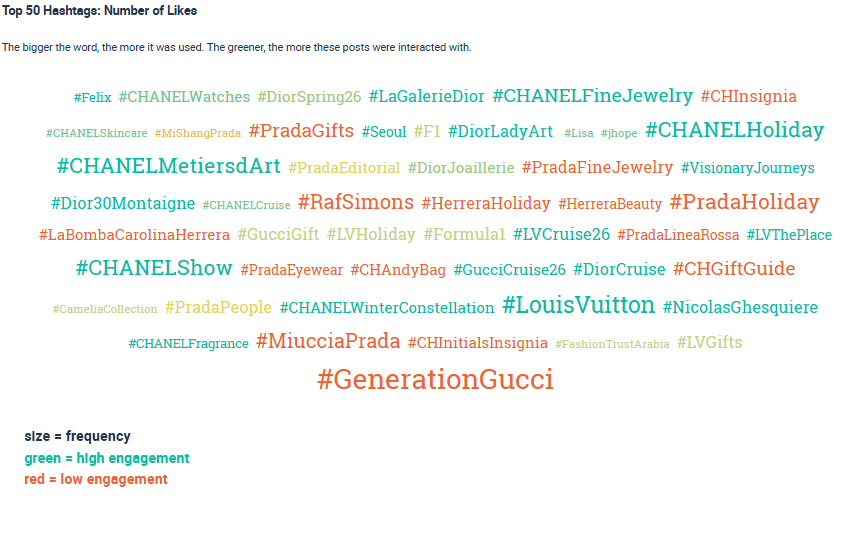
This type of chart is created by comparing hashtags across selected profiles, calculating the number of Likes of the posts that used them, and mapping those results. It helps you see which hashtags generate Likes and which ones are overused but ineffective. By focusing on high-performing hashtags that have already generated Likes on other posts inside your niche, you can increase the chances that your content is discovered by the right audience and be Liked by them.
2. Instagram Hashtag Generator
Using a hashtag generator helps you instantly discover additional related hashtags that fit your topic, your niche, and your audience. A hashtag generator is valuable because it can help you find suitable hashtags quicker than just with manual research. Instagram hashtag generators automatically analyze both the popularity and reach of related hashtags, giving you a broader list of relevant hashtags without manual research. By using a generator, you expand your reach to additional hashtags that have the potential to attract users who are may be more likely to Like your content.
6. Ask your Audience to Like your Content
Sometimes increasing engagement is as simple as asking for it. Encouraging your audience to Like your post can be the push that your audience needs to act, especially if they like your content. Many users may enjoy your content, but may forget to Like with it. A simple CTA can remind them to Like your post. By telling users to Like your post, you not only get Likes from your followers, but you also amplify your reach, which can attract Likes from non-followers.
To get you started, here are some CTAs you can try out:
- “Double-tap if this is true for you.”: this works well for relatable or funny content because users react instantly without needing to think.
- “Like this if you agree.”: Ideal for opinion-based statements, quotes, or bold claims where users naturally want to signal agreement.
- “Tap the heart if you want more posts like this.”: Good for content series, educational posts, or Reels where you want to test audience demand.
- “Drop a Like if you’ve experienced this.”: Perfect for relatable frustrations, industry insights, or shared experiences.
- “Like for part two.”: use this when you want to test interest in a follow-up post and encourage early engagement.
7. Find your Best Times to Post
Another strategy you can implement if you’re looking for ways related to how to get more likes on an Instagram post is posting at the right times. Remember, early engagement signals Instagram’s algorithm that your content is interesting, which increases its visibility to a wider audience.
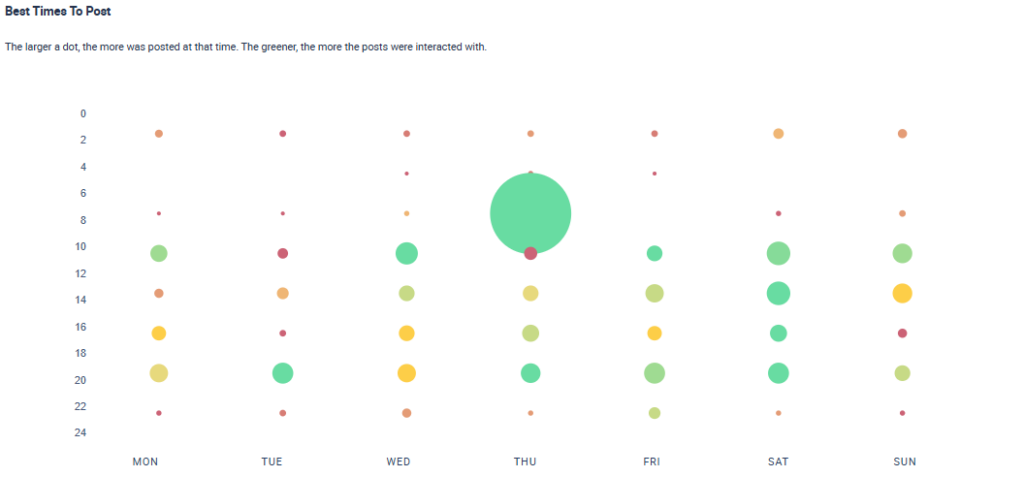
The best posting times to get Likes vary based on industry, audience location, and user habits. Since there’s no universal best time to post, professionals in the social media world must rely on their own data-based research that relies on analyzing your one historical data as well as those of other similar profiles. The goal is to understand when your audience and similar ones are most likely to Like content in your niche.
A social media analytics tool can help identify days and times when the most number of Likes occur. The chart below shows what an analysis such as this can look like as an end result. The larger dots show time frames with more posts, and the greener the dot, themore Likes that a posts during that time received.
Pro tip: A scheduling tool can support this process by allowing you to schedule your posts at the optimal times in advance to be published automatically. This means your content goes live at the right times, even if those are on the weekends or outside of normal working hours.
8. Tag your Post’s Location
Location tags are labels you can add to your Instagram posts to indicate a specific place, such as a business, museum, café, restaurant, park, or even a city. When you tag a location, your content can appear on location pages and in place-based searches, which are seen by users who don’t follow you but are interested in specific areas, events, or businesses.
You first need to tag a relevant location in your post so that Instagram shows your post on the location page and in the search results for that specific place. This means that users exploring that specific location can discover your post, even if they are not following you.
These new users are likely to interact with your post by liking it since they’re interested in the topic. Instagram interprets these interactions as signals of interest, which helps the algorithm to prioritize your post in feeds. As a result, your post is shown to more users (followers and non-followers), increasing views and the likelihood of getting more Likes.
To use location tags effectively, keep these best practices in mind:
- Choose a location that accurately represents your content. Only use locations that truly match your post. Misleading tags may frustrate users and reduce engagement, lowering the chance of Likes.
- Tag specific locations when possible. Tagging a restaurant or a café in a review video or carousel attracts users actively searching for that place. These new users who find your post through these searches are more likely to Like it because it’s relevant to their interests.
- Use locations your audience actually searches for. Highly searched spots get more impressions, giving your post more chances to be Liked.
- Match the location to the content type. Posts about lifestyle, food, or travel perform better when they include highly searched, specific locations. Tutorials and general tips can use broader tags, but ensure they are relevant.
- Stay consistent across your posts. Repeated location tags help Instagram understand your niche and audience, increasing the likelihood your posts are shown to users who are more likely to Like them.
9. Optimize your Captions for Likes
Captions can play a crucial role in encouraging engagement and helping posts gain more Likes on Instagram. A well-crafted caption can make users stop scrolling while adding context, spark curiosity, and guide users to Like your post.
If you want to create captions that help you bring more Likes to your account, you should follow these tips:
- Focus on Crafting a Strong Opening Line
Your opening line should grab attention right away because it’s the part people see before tapping “more.” Use a question, a bold statement or a simple hook that makes users stop scrolling. - Add Helpful or interesting Context
Explain what the post is about in a clear and concise way. This can be a quick tip, a story, a takeaway or a reason the content matters. Keep it simple so users can understand it fast. - Keep the Caption easy to read
Use short sentences, line breaks and simple language. People tend to engage more when they can read your caption quickly. - Include Relevant Keywords
Captions also improve discoverability when they include relevant keywords that match what your audience is searching for on the platform. Just like hashtags, keywords in captions can help surface your posts in Instagram search results. Conducting keyword research allows you to understand the terms and phrases your target audience uses most often, increasing the chances of your content being found. - Guide the user with a Call-to-Action that Focuses on Likes
Tell people exactly what to do next. For example: “Like for more related videos” or even “Click the Like button” provides clear and simple instructions that can increase engagement.
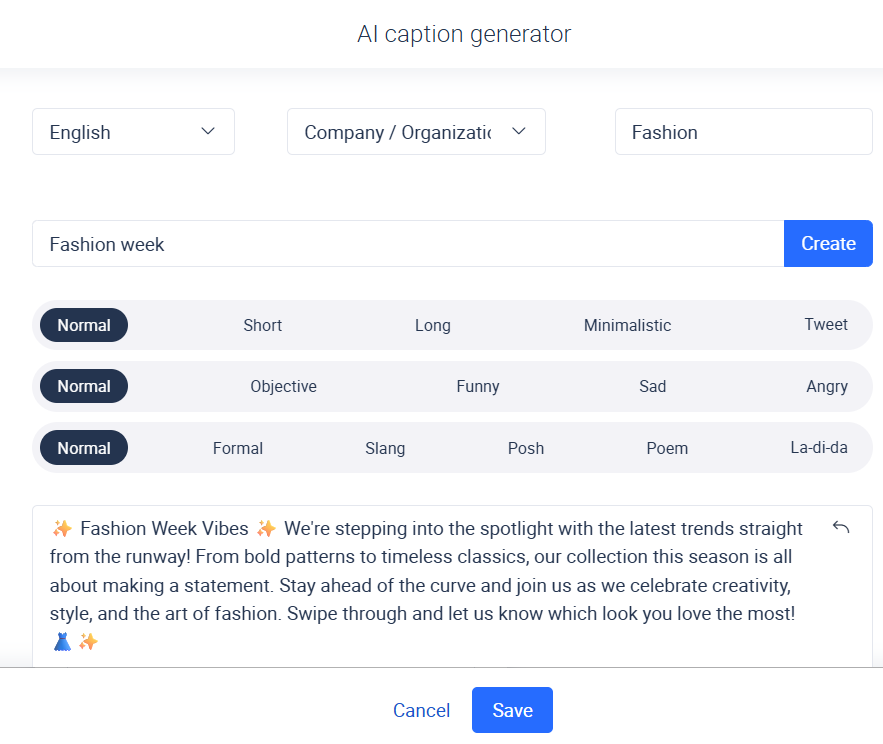
ProTip: Use a publishing tool that includes an AI caption generator to help you craft clearer, more engaging captions faster, especially when you need variations for Reels, Carousels, or posts with different messaging. If you want to learn more about the process of creating social media captions, then read our article.
10. Create Interactive Stories
Instagram Stories provide an engaging, real-time way to connect with your audience. Not only do interactive Stories strengthen overall engagement signals, but they can also increase the number of Likes your Stories receive. Here’s how: when a user taps on a poll, replies to a quiz, or votes on a slider, Instagram counts these actions as strong indicators of interest. This tells the algorithm that the user wants to see more from you, so Instagram prioritizes your content in that user’s feed.
As a result, your posts and stories appear earlier and more frequently for those users, increasing the chances they will see your content right away. And, because your posts get viewed sooner, they also tend to receive Likes earlier, a signal that can push your content even further across Instagram and bring you more Likes.
Here are some of the interactive features to drive quick, meaningful actions that you should consider using:
- Polls: simple choices such as “A or B” drive fast taps, which help increase visibility for your next posts.
- Quizzes: keeps your users engaged longer and strengthen the engagement signals Instagram uses to rank your content.
- Emoji sliders: low-effort interactions that almost everyone completes, helping keep your profile active.
- Question boxes: encourages users to type a response, creating high-quality interactions that improve future reach.
- Emoji stickers: even a simple click counts as engagement and supports visibility for upcoming posts.
- “Add Yours” stickers: invites users to participate in trends, increasing reach and helping your account stay top of mind.
5. Use the Right Hashtags
Polls can be a fun and effective way to increase Likes while encouraging your audience to interact. Running a poll with likes and comments allows followers to express their preferences in a quick and easy way. Using this strategy regularly also helps keep your audience involved, making them feel part of the conversation.
To set this up, you can simply create a poll that uses Likes as a means for voting. Another benefit is that you can also use this for generating other types of interactions, such as comments as well. Below are some examples you can use:
- Like for Option A, Comment for Option B
- Like if you agree, Comment if you disagree
- Like for this trend, Comment if it’s overrated
- Like for Product A, Comment for Product B
- Like if you want part two, Comment if you want a different topic
- Like for Team Morning, Comment for Team Night
Last Thoughts on How to Get More Likes on Instagram Posts
So now that you know the techniques you can use for how to get more Likes on an Instagram post, it’s time to take action. For social media professionals, social media tools can help with everything from research, competitor analysis, tracking performance, detecting trends, and planning your content. That is why finding the right social media tool can be yet another important step in getting more Likes on Instagram.
If you’re searching for a tool that provides advanced insights that will help you implement some of the techniques above, we encourage you to try Fanpage Karma’s free 14-day trial. Fanpage Karma is an “all-in-one” social media tool can help you gain content optimization insights, learn from your competitors, and help you research social media trends. In this way, Fanpage Karma can help you make data-driven decisions to maximize your engagement and get more likes on Instagram. It also comes with monitoring, publishing, and community management features.
Additionally, you can participate in the free weekly webinar that explains how you use the tool for all aspects of social media management.