The Complete Facebook Analytics Guide: Best Tools and Strategies
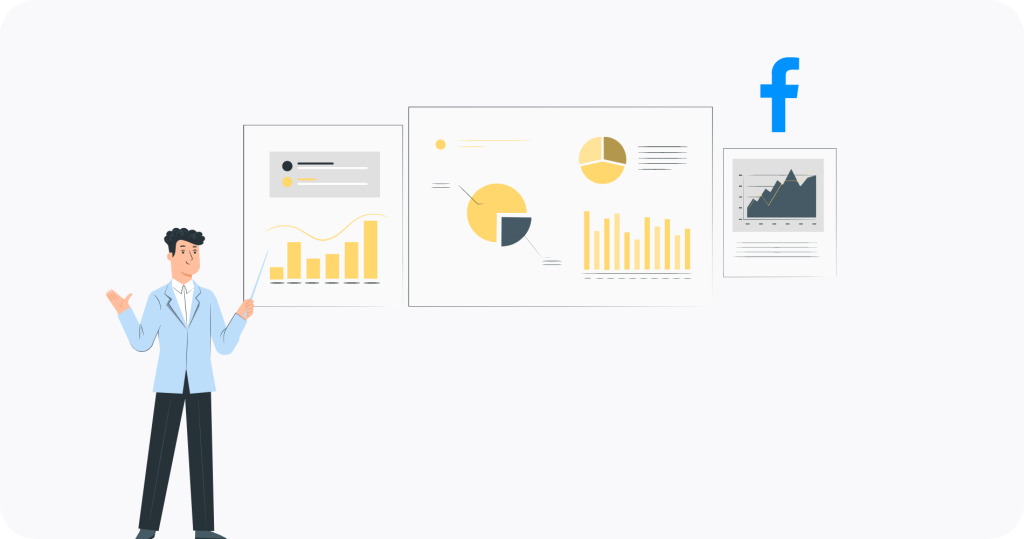
Success on Facebook no longer comes from counting likes or just tracking Facebook followers. The real challenge is understanding what drives engagement and growth. That´s why many social media managers look for a reliable Facebook page analytics tool to go beyond those surface-level metrics. This is because the real value of any Facebook strategy comes from uncovering deeper insights that help you see what is working, how you compare to competitors, and where you can optimize content for better results.
With the right Facebook data analyses, you can see which content resonates, how you compare to your competitors, and where to focus your resources for better results. This can mean the difference between guessing what works and making confident, data-driven decisions that shape your strategy.
In this guide, we will highlight 9 main areas in which your Facebook analytics tool should excel at while explaining what to look for when making your choice among the different options on the market. Once we have given you an in-depth insight about what to look for, we will present our list of the 10 best Facebook analytics tools available on the market that will help you turn your data into actionable strategies.
How Facebook Analytics Translate into Strategy
Facebook analytics refers to the practice of collecting, interpreting, and acting on the performance data that the platform generates. This includes a range of metrics such as reach, engagement, follower growth, audience demographics, and post impressions. While these figures may seem overwhelming at first, they provide a solid foundation for a stronger, data-driven strategy when analyzed correctly.
One of the most valuable aspects of analytics is benchmarking, which provides context by comparing your performance to competitors and industry standards. Without these comparisons, a metric like a 5% engagement rate lacks significance. Benchmarking provides insights into your organization’s position relative to competitors, enabling the establishment of realistic goals and the identification of growth opportunities.
Another key aspect is content optimization. By studying which formats, topics, and posting times perform best, analytics allow you to fine-tune your strategy. Instead of relying on guesswork, you can gain clear insights into whether videos outperform images or whether your audience engages more during the day than at night.
Together, benchmarking and content optimization transform raw numbers into actionable improvements. This process transforms Facebook analysis into a fundamental element of a solid strategy, providing insights into one’s position, identifying optimal strategies, and directing subsequent efforts.
Key Features of Facebook Analytics Tools
Not all Facebook analytics tools are the same. Many platforms offer basic metrics, such as likes and reach, which are already included in the Facebook page analytics. Professional teams need more advanced features to understand performance and transform data into strategy. The right tool should help you track the profiles that matter, uncover long-term trends, and analyze your content in a way that shows clear opportunities for growth.
Modern analytics platforms do more than just report information. They go deeper by offering customizable dashboards, AI-driven recommendations, and insights that show what works and what doesn’t. They also provide context through benchmarking, help deeper analyze posts with tagging, and measure audience sentiment to give you a fuller picture of your brand’s impact.
In this section, we’ll highlight the essential capabilities that every social media manager should look for when choosing a Facebook analytics tool:
- Analyze Enough Profiles to Benchmark and Grow
- Track Everything in a Centralized Dashboard
- Access to Extensive Historical Data
- Track Key Metrics that are Relevant to Your Goals
- Gain Actionable Content Optimization Insights
- Build Strong, Customizable Reporting
- Use AI-Driven Features to Save Time
- Tag Content to Analyze What Really Works
- Understand your Audience with Sentiment Analysis
1. Analyze Enough Profiles to Benchmark and Grow
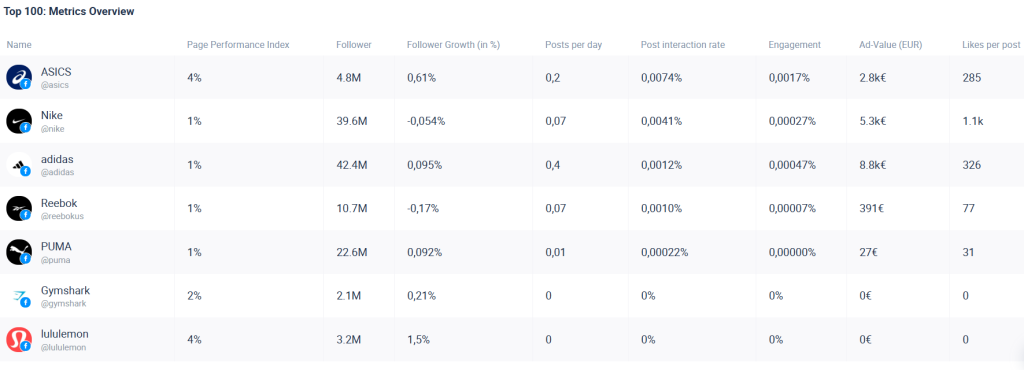
Effective Facebook analysis requires more than just looking at your own pages. Tracking and comparing a wide range of profiles, which range from competitors to other similar content creators, provides the context necessary for realistic evaluation of your performance. The more profiles you include, the richer and more meaningful your comparisons will be. As we explain in our article about the importance of large data sets, unlimited profile tracking is a game-changer giving you access to a larger data set makes every benchmark more accurate.
Also keep in mind that social media performance is always context-dependent. For example, a high engagement rate is only meaningful when compared to the performance of others in your field. By analyzing a large number of profiles, agencies and brands can access more reliable and actionable benchmarks. This bigger picture enables you to identify trends, spot opportunities, and develop strategies that promote real growth a core part of what makes Analytics for Facebook so powerful.
2. Track Everything in a Centralized Dashboard
A centralized Facebook analytics dashboard is your personal control center for social media analytics. It puts all the Facebook pages you are tracking and analyzing, including key metrics, into one interface, so you don’t have to jump between accounts or platforms. You can make a custom “folder” to collect profiles and reports from different social media networks.
This matters because time and focus are often lost when teams juggle multiple logins and scattered Facebook analytics reports. With everything in a single dashboard, you get a clear, comprehensive view of performance across pages, campaigns, and clients. The result is greater efficiency, consistency, and collaboration, which makes it far easier for teams to manage multiple accounts and align strategy.
3. Access to Extensive Historical Data
One of the most important aspects of Facebook analysis is the ability to look back, not just a few weeks but months or even years. Historical data storage makes it possible to review performance over the long term, so you can go beyond short-term fluctuations and focus on real trends.
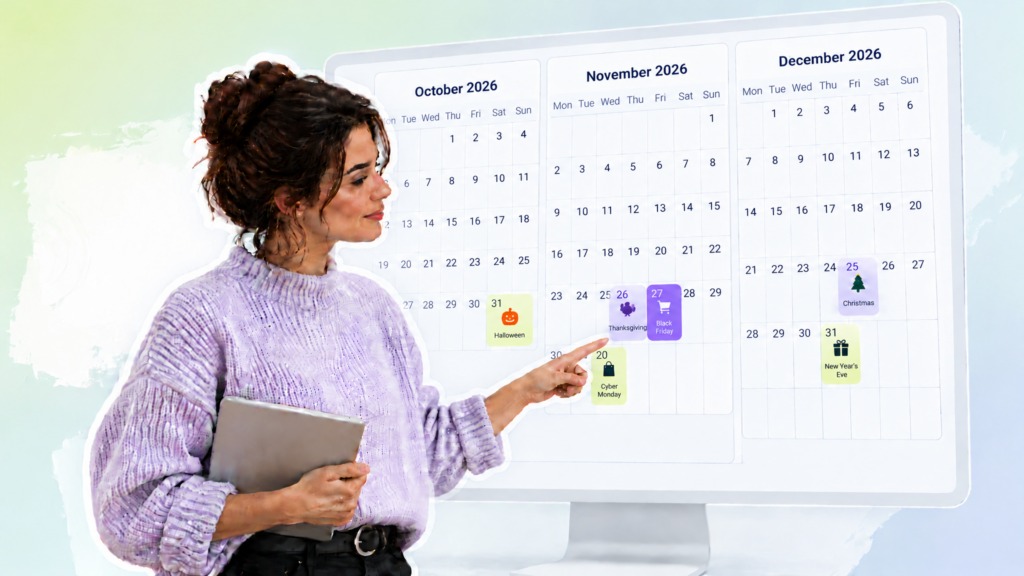
This broader perspective allows you to identify growth patterns, spot seasonal behaviors, and accurately measure campaign effectiveness. You can even compare different time periods to see if this year’s Black Friday campaign outperformed last year’s or if a seasonal promotion is gaining or losing traction. Rather than relying on limited snapshots, teams get the full story that results in a clearer view of what drives consistent results and where long-term improvements can be made. As an aside, this is one of the most essential features when it comes to shopping for the best Facebook analytics tools since access to historical data really can change the effectiveness of your analyses.
4. Track Key Metrics that are Relevant to Your Goals
A powerful Facebook analytics tool should allow you to do much more than just look at basic numbers. With access to hundreds of metrics, including engagement, reach, impressions, clicks, sentiment, and more, you can measure what matters most to your business.
Every brand has its own goals, so one-size-fits-all metrics won’t suffice. The ability to select your own Facebook KPIs that align with your strategy allows you to focus on indicators that accurately reflect success. This makes your reporting more relevant, your benchmarks more precise, and your decision-making more data-driven. If you want to dive deeper, we’ve put together a guide on the most important Facebook KPIs to help you understand which metrics matter most for your goals.
5. Gain Actionable Content Optimization Insights
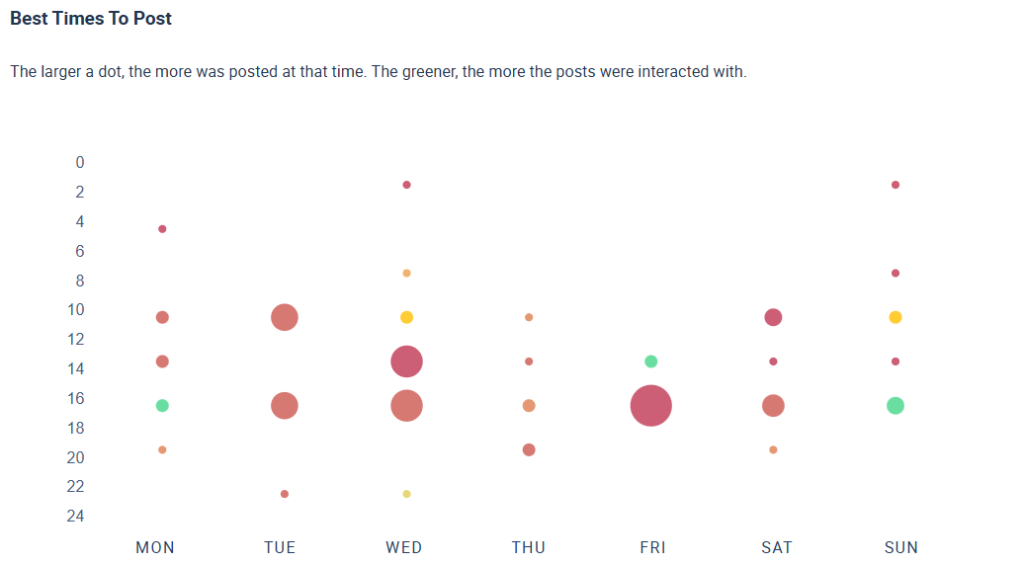
Content optimization research aims at turning raw performance data into concrete improvements. For instance, Facebook post analytics make it possible to see which posts resonate most, which formats drive interaction, and which topics your audience engages with. Instead of relying on trial and error, you gain a clear understanding of what works and where to focus your creative energy. But that is not all. One of the other things you can look at is timing. There is no universal best time to post on Facebook since it varies depending on your audience, region, and industry. However, by reviewing your historical data, comparing it with competitor activity, and analyzing engagement peaks through Facebook advanced analytics, you can identify the times when your followers are most likely to engage with your post. This ensures your content gets maximum visibility and impact. For this reason, doing your own research on when to post on Facebook is important.
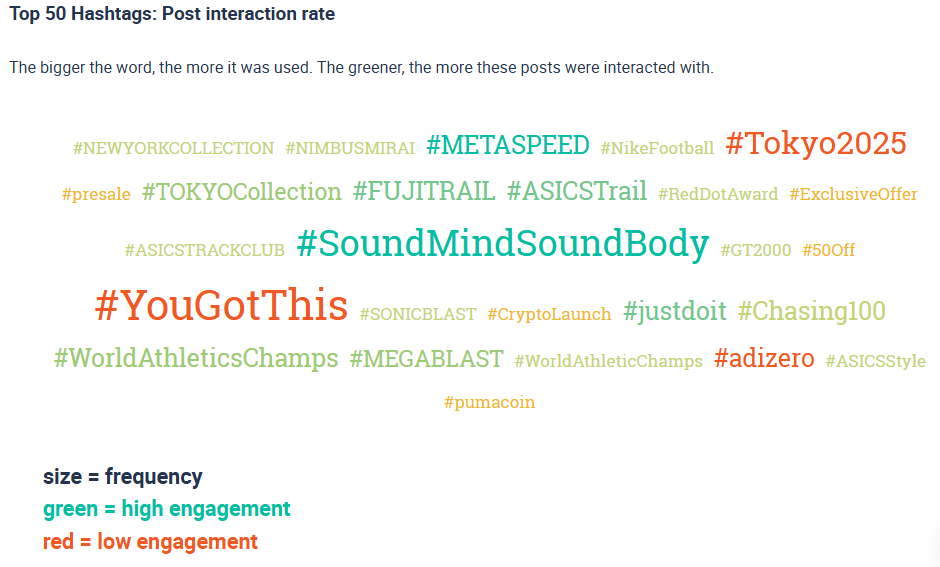
Hashtags are another important area for optimization. Researching optimal hashtags to use on Facebook and those tied to higher engagement rates, helps you select tags that extend reach and spark conversation. Some hashtags may not be used often but still generate high interaction, making them hidden opportunities. Dashboards that track competitors’ hashtag performance over time provide the insights you need to refine your own strategy.
By combining insights into formats, timing, and hashtags, you create a continuous feedback loop that improves content performance over time. Each post becomes an experiment guided by data, helping you build a more consistent, engaging, and effective Facebook strategy.
6. Build Strong, Customizable Reporting
Reporting is one of the most important functions of any Facebook analytics tool. The ability to build, export, and even schedule the creation of Facebook analytics reports in multiple formats (Excel, PDF, PowerPoint, CSV) ensures that you always have the right data ready when you need it. Instead of manually compiling numbers, automated reports save time and reduce errors.
But not every audience wants to see the same type of report. Management often needs polished, presentation-ready summaries, while managers might prefer concise dashboards, and internal teams may require detailed breakdowns. Customizable reporting makes it easy to adapt the same data into the right format for each stakeholder, allowing you to share insights clearly, professionally, and in a way that supports better decision-making.
7. Use AI-Driven Features to Save Time
Almost every social media tool today claims to have AI integrations, but not all AI features are created equal. In Facebook analytics, the real value of AI lies in how it enhances your workflow and reduces repetitive tasks. Instead of manually interpreting charts or pulling together explanations for managers and clients, the right tool can use AI to generate clear summaries in seconds which can save you hours of reporting time.
AI can also accelerate more complex types of analysis. For example, tagging posts by theme or campaign is often a manual process, but with AI, content can be automatically categorized and compared. This speeds up benchmarking, content optimization, and reporting, while still leaving the strategic decisions in your hands. The key is to look closely at what AI features a tool is offering and evaluate whether they provide genuine benefits that helps you focus more on creativity and strategy while AI handles the heavy lifting.
8. Tag Content to Analyze What Really Works
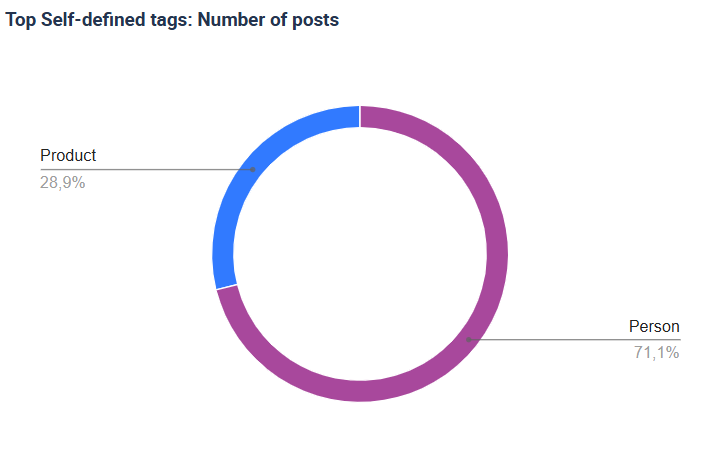
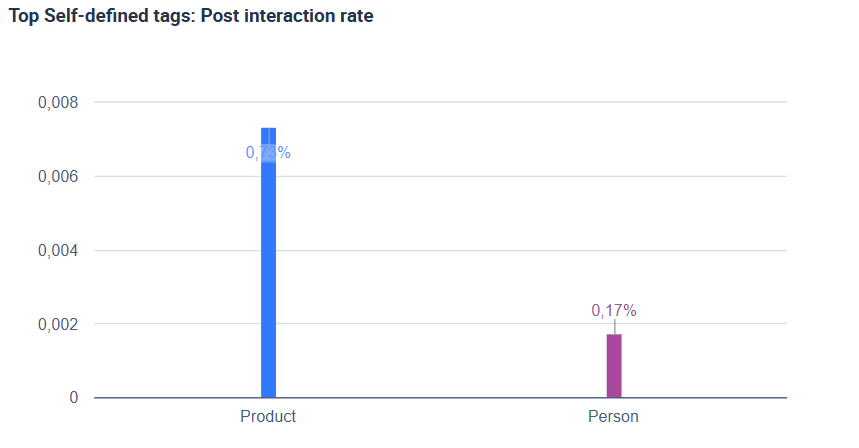
Performing a tagging analysis allows you to break down posts into their individual elements and analyze them in a structured way. Rather than looking at overall performance, you can assign tags such as “by product,” “people,” “tone,” etc. to each post. This makes it possible to see which elements consistently correlate with higher engagement rates.
For instance, you might find that posts featuring a particular product or spokesperson generate significantly more interaction. You might also find that videos tagged with a “tutorial” label perform better than those tagged as “promo.” By systematically tagging posts, you can identify hidden drivers of engagement and build a content strategy that focuses on what actually works.
9. Understand your Audience with Sentiment Analysis
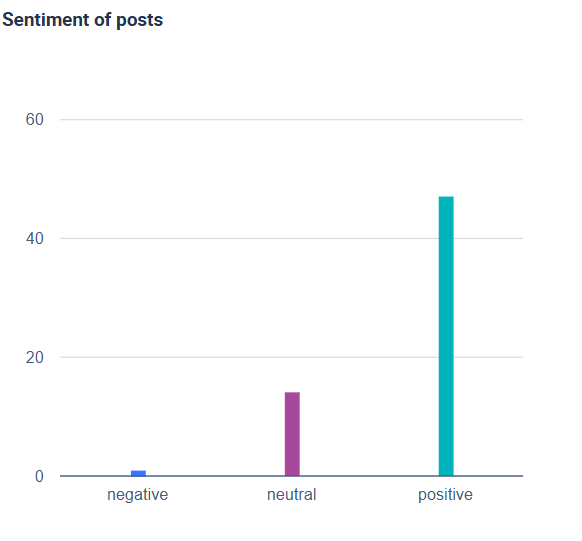
Sentiment analysis allows you to do more than just count likes, comments, and engagement; it helps you understand how people feel about your content. By examining the tone of reactions, comments, and feedback, you can determine if your posts are being received positively, negatively, or ambivalently. This is a useful strategy to understand the overall feelings or opinion to a certain profile and its content.
Pairing sentiment data with audience-insight tools lets you detect opinion shifts early. With these insights, you can quickly adjust your messaging, protect your brand reputation, and create content that reaches and meaningfully connects with people.
Best Facebook Analysis Tools
Choosing the right Facebook analysis tool can feel overwhelming. With so many platforms on the market, it can be difficult to know which ones offer the level of insight and range of features that you actually need. The best Facebook analytics tool should offer more than just surface-level metrics, providing a clear picture of performance, audience behavior, and growth opportunities. Moreover, you may be tempted to look for a Facebook analytics tool that offers a free version, which can be fine in some cases. However, make sure you are just not looking for the cheapest option, but for the one that helps give you the insights you need.
In the following section, we’ll look at our list of Facebook analytics tools. Each has its own strengths, ranging from competitor benchmarking to AI-powered recommendations. The right choice depends on your needs, but all of them can help you transform Facebook data into an actionable strategy. Here is our list of the 10 best Facebook analytics tools on the market:
- Fanpage Karma
- Hootsuite
- Buffer
- Metricool
- Sprout Social
- Swat.io
- SocialPilot
- Brandwatch
- Hubspot
- Zoho Social
1. Fanpage Karma
Fanpage Karma is an all-in-one social media tool designed for professional social media management. One of its core strengths is its analytics features, since the tool enables you to track an unlimited number of profiles, which includes your own pages as well as your competitors and industry leaders. This provides the context you need to understand your position and areas for improvement. Its centralized dashboard makes it easy to monitor key metrics at a glance, while extensive historical data enables you to analyze long-term trends rather than being limited to short-term insights.
What sets Fanpage Karma apart is its depth and flexibility. You can track hundreds of metrics, perform tagging analysis, and gain actionable insights for optimizing your content. Furthermore, customizable reporting enables agencies and teams to share clear, branded results with clients or stakeholders, while AI-driven. Fanpage Karma is one of the most comprehensive solutions on the market for businesses, agencies, and influencers who want to turn Facebook analysis into a strategic advantage.
In addition to analytics, Fanpage Karma also offers publishing, community management, and monitoring features, helping you manage your entire Facebook workflow in one place. If you want to see by yourself how Fanpage Karma can help with your Facebook analytics, you can try it now with a free 14-day trial. You can also join one of Fanpage Karma’s free weekly webinars to discover more about how the tool can help you with your Facebook strategy.

2. Hootsuite
Hootsuite is one of the most widely recognized social media management platforms, and its Facebook analytics capabilities are robust enough for most businesses. The tool provides a clean dashboard where you can monitor performance, schedule posts, and track engagement metrics side by side. It integrates seamlessly with multiple platforms, making it easy to see how Facebook fits into your overall social strategy.
For teams, Hootsuite is particularly useful thanks to its collaboration and approval workflows. Reporting is straightforward and customizable, helping managers share results with stakeholders in a clear, professional way. While it is best known for scheduling, Hootsuite’s analytics features are a strong choice for brands that want a balance of publishing, monitoring, and performance insights in one place.
3. Buffer
Buffer is a lightweight yet powerful tool known for its simplicity and ease of use. Its analytics features focus on giving clear insights into post performance, audience engagement, and reach. The interface is intuitive, making it ideal for small businesses or creators who want reliable data without unnecessary complexity.
Where Buffer shines is in accessibility. Reports are straightforward, visually clean, and easy to export, making them practical for freelancers or teams with limited resources. It may not have the analytic depth of some of the enterprise tools, but for straightforward Facebook performance tracking and scheduling, Buffer is a budget-friendly and effective choice.
4. Metricool
Metricool is a popular option for both small businesses and agencies that need a balance between analytics and reporting. Its strength lies in combining organic and paid performance data, so you can see how ads and regular posts contribute to overall growth. Historical data access makes it easy to identify long-term patterns and measure campaign effectiveness.
The tool also offers strong reporting features, allowing you to create polished exports in just a few clicks. For agencies, this is a major advantage when sharing results with clients. Metricool is user-friendly, affordable, and provides enough depth for businesses that want reliable Facebook insights without investing in heavy enterprise software.
5. Sprout Social
Sprout Social is a premium platform built for businesses and agencies that need advanced analytics and collaboration tools. Its Facebook analytics include detailed engagement reports, audience insights, and competitive benchmarking. The interface is polished and professional, designed for teams that manage multiple accounts at scale.
What sets Sprout Social apart is its emphasis on reporting and integrations. It connects with CRMs and other business tools, making it easier to link social performance with broader marketing and sales efforts. For larger organizations that need depth, scalability, and professional client reporting, Sprout Social is one of the strongest solutions available.
6. Swat.io
Swat.io is a collaboration-focused social media management tool with strong analytics and community management features. For Facebook, it provides detailed performance insights and engagement tracking, all organized in a clear dashboard. Its focus on workflow makes it well suited for teams that handle multiple accounts and need to stay coordinated.
The tool also offers solid reporting and visualization options, helping teams present results internally or to clients. Swat.io may not be as widely known as some competitors, but it delivers reliable analytics combined with excellent collaboration features. Agencies and organizations that prioritize teamwork alongside insights will find it a valuable choice.
7. SocialPilot
SocialPilot is designed as a cost-effective solution for agencies and small businesses managing multiple social media accounts. Its Facebook analytics include engagement tracking, audience insights, and performance comparisons over time. The platform is straightforward and efficient, with enough metrics to support day-to-day decision-making.
For teams, SocialPilot is especially appealing because of its scalability. It offers features like client management, white-label reporting, and bulk scheduling, making it easy to manage several accounts at once. While simpler than enterprise platforms, SocialPilot delivers strong value for money and is a practical choice for growing teams.
8. Brandwatch
Brandwatch is best known for its advanced social listening and sentiment analysis features, making it an excellent tool for Facebook analysis beyond basic metrics. It provides deep insights into audience conversations, brand perception, and campaign impact. For brands concerned with reputation and customer sentiment, this is a standout advantage.
The platform also offers customizable dashboards and powerful data visualization options, enabling teams to dig into insights at both a strategic and granular level. It’s more complex than lightweight tools, but for enterprises and data-driven marketers, Brandwatch offers a level of depth few competitors can match.
9. Hubspot
HubSpot integrates Facebook analytics into its broader marketing and CRM ecosystem, allowing businesses to directly connect social performance with leads and revenue. Its analytics show how Facebook content drives website visits, conversions, and customer journeys, making it a strong choice for companies that value ROI tracking.
Because it’s part of an all-in-one platform, HubSpot also enables seamless collaboration between marketing, sales, and customer service. This holistic view is especially powerful for businesses that want to tie social media insights directly to customer acquisition and retention strategies.
10. Zoho Social
Zoho Social is a budget-friendly platform with solid Facebook analytics, publishing, and monitoring features. It gives clear visibility into engagement, reach, and audience trends, making it a good entry-level tool for small businesses or startups. Its interface is simple and easy to learn, which makes adoption fast.
One of Zoho Social’s strengths is affordability without sacrificing functionality. It offers custom reporting, multi-channel tracking, and team collaboration features at a lower price point than many competitors. For businesses that need reliable analytics without a large budget, Zoho Social is a smart choice.