
Pinterest Analytics Tools
Pinterest is not like any other social media platform, and its content structure is unique. This is because Pinterest is, above all, a visual search engine where people come to explore ideas, find inspiration, and plan future actions. Mostly, this means that aesthetics, relevance, and timing matter far more than direct user engagement.
For many businesses, Pinterest’s real goal is to attract users with visually appealing content and guide them to your website. Therefore, every Pin should be designed not just to look good, but to lead users to take action, whether that’s visiting your site, exploring your product, or saving your idea for later. Clearly, every business or influencer wants their content on Pinterest to shine. For this reason, to truly understand how your content performs, it’s important to know how to check Pinterest analytics.
However, simply looking at the basic analytics around your performance is not necessarily enough for professionals on the platform. When it comes to competitor analysis, advanced benchmarking, and finding content optimization insights, you need to have access to more than just your own data. Luckily, there are Pinterest analytics tools available to help you with all of this. A great Pinterest analytics tool doesn’t just track numbers but also helps you understand what’s working, what’s not, and where new opportunities may be.
In this article, we’ll talk about what to look for in a Pinterest analytics tool and why choosing the right one can make all the difference for your Pinterest marketing strategy. From advanced performance tracking to competitor benchmarking and content optimization insights, we’ll explore the essential features that can help you gain actionable insights aimed at growing on Pinterest. At the end of this article, we will also present our list of the best tools for Pinterest analytics so that you can choose the one that fits your goals.
Pinterest Analytics Explained
Pinterest offers its own built-in analytics tool that gives creators and businesses a complete Pinterest analytics overview, helping them understand how their content performs across the platform. If you’re wondering how to see Pinterest analytics, you should know that you first need to set up a Pinterest Business account. Once activated, you can explore insights about your overall Pinterest presence and how users engage with your content.
After accessing your native analytics dashboard, you’ll notice that it presents your data in an easy-to-navigate dashboard that highlights your most important performance insights. By regularly reviewing these metrics, you can make data-driven decisions, refining your visuals, messaging, and posting strategy to achieve consistent growth on Pinterest.
However, while Pinterest’s native analytics tool is an excellent starting point, it has its limitations. It only includes your own account data, meaning there’s no benchmarking, no competitor comparison. So, if you’re serious about growing and succeeding on Pinterest, you’ll need to complement it with advanced Pinterest analytics tools that offer deeper insights and broader context. These solutions offer benchmarking and content optimization for Pinterest that the native tool alone cannot provide.
Benchmarking is one of the most powerful features of advanced Pinterest analytics tools since it allows you to compare your account’s performance with competitors, industry averages, or even leading brands within your niche. By benchmarking key Pinterest metrics such as impressions, engagement rate, saves, and click-through rate, you can clearly see where you stand in your industry.
Another essential capability of advanced Pinterest analytics tools is detailed content optimization for Pinterest. These insights help you understand not only which pins perform best, but why they perform well. You can identify trends in image style, color palette, text overlay, or keywords that consistently drive engagement. Since Pinterest is a highly visual social media platform, the way your content looks plays a major role in capturing users’ attention. Eye-catching imagery, strong aesthetics, and consistent branding are what make people stop scrolling and interact with your Pins. That’s why combining benchmarking and content optimization for Pinterest is so powerful. It turns raw data into a clear creative direction, helping you understand where you stand, what works, and how to improve.
Obviously, Pinterest analytics is important for improving your performance monitoring and having the right tool can be helpful. That is why we will walk you through the essential features to look for when choosing a powerful and reliable Pinterest analytics tool and then explain why these features are so important for taking your Pinterest content to the next level.

What to Look for in a Pinterest Analytics Tool
There are many Pinterest analytics tools available on the market today, each offering unique ways to help you understand your performance on the platform. Whether you’re a creator, brand, or social media marketer, analytics for Pinterest provides the insights you need to optimize your content strategy, grow your audience, and drive meaningful engagement.
With the right analytics tool for Pinterest, you can move beyond surface-level metrics and gain a deeper understanding of what truly works. For instance, these tools help you track your Pin performance, discover what visuals resonate most, and identify which boards or campaigns generate the highest engagement. When choosing a Pinterest analytics solution, it’s important to focus on the features that truly matter for your goals. Whether you’re a brand looking to grow traffic, an agency managing multiple client accounts, or a creator optimizing your content for better visibility, your analytics tool should give you more than just numbers but also should provide actionable insights. Here are the 7 essential features you should look for in a Pinterest analytics tool:
- Unlimited profile analysis and tracking
- Extensive access to historical data to better research specific timeframes
- KPI tracking to measure and benchmark your performance
- Optimize Pinterest content through data and actionable insights
- Sentiment analysis to gain deeper audience insights
- Content Tagging Analyses that supercharge your Pinterest Analytics
- Building unified dashboards and reports to simplify Pinterest analytics
1. Unlimited profile analysis and tracking
One of the most valuable features of advanced social media tools that focus on Pinterest analytics is unlimited profile tracking. This capability allows you to monitor and compare multiple profiles at once, including your own accounts and those of your competitors. With unlimited tracking, your data set becomes far more comprehensive, giving you a complete picture of how your performance stacks up across your niche or industry.
By comparing your Pinterest activity and results with others, you can easily identify best practices and uncover what strategies drive engagement, growth, and conversions. This feature not only highlights what’s working for top-performing competitors, but also helps you learn from smaller, niche businesses that often experiment with creative ideas and unique approaches.
2. Extensive access to historical data to better research specific timeframes
Time is a critical factor when going for Pinterest analytics. The most effective Pinterest analytics tools provide extensive access to historical data, allowing you to go far beyond short-term metrics and uncover long-term trends that shape your strategy. When research and discovery features are combined with historical data, you can identify patterns and insights that might otherwise remain hidden. This helps you uncover what has consistently worked for your brand and find relevant opportunities for your future content.
With access to deeper data, you can gain a clearer understanding of your competitors’ strategies and performance over time, learning how they adapt to trends, seasons, or platform updates. Historical data also enables you to analyze long-term performance trends or review how specific campaigns performed during certain time periods. For example, you can evaluate how a product launch or seasonal campaign performed last year, compare it to this year’s results, and fine-tune your future approach based on proven insights.
Lastly, your tool should allow you to select specific timeframes to study. For instance, you may want to take a closer look at a particular month or even week in some cases. In other cases, you may want to analyze an entire year. For these reasons, having the ability to adjust the timeframes for your data analysis is an important feature to keep an eye on.
3. KPI tracking to measure and benchmark your performance
When we talk about what “resonates” on Pinterest, we’re referring to content that captures attention and inspires action. In this context, resonance means creating Pins that users save, share, and engage with because they find them inspiring, useful, or aligned with their personal interests.
This is where Pinterest analytics tools become even more valuable. They help you identify which Pins are performing best and uncover why they stand out. By tracking specific metrics, you can gain a deeper understanding of what your audience finds engaging and how your content drives results.
Key performance metrics to monitor include:
- Impressions – how often your Pins are seen across Pinterest
- Saves – which Pins users find valuable enough to keep for later
- Outbound Clicks – which Pins successfully drive traffic to your website
- Engagement Rate – how actively users interact with your content overall
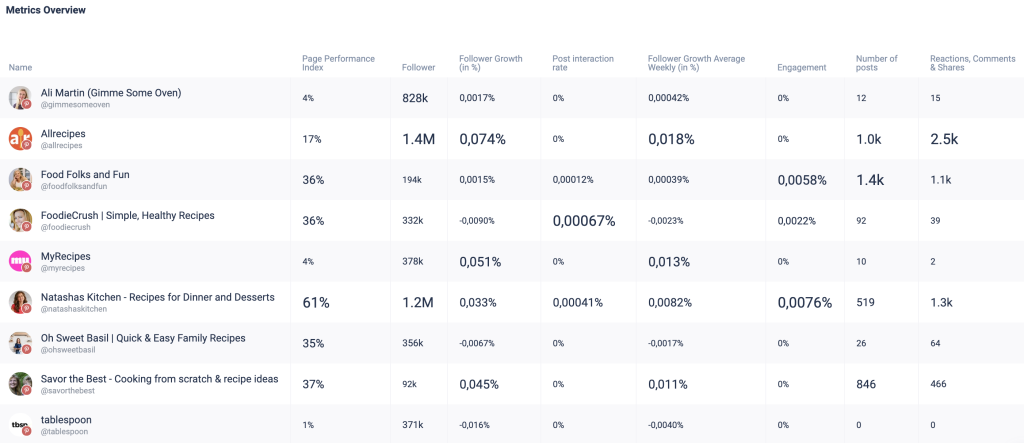
However, tracking your metrics and analyzing your own performance is only half the battle. Determining if you are growing fast enough or if your content is generating enough interactions relies on comparison. That is why it is so important to have a Pinterest analytics tool that allows you to conduct benchmarking analyses across different metrics so you can effectively set goals and find out how you compare to your competitors.
4. Optimize Pinterest content through data and actionable insights
Analyzing Pinterest metrics are not just useful for benchmarking, it’s also key to understanding what types of content perform best. By looking closely at your data, you can identify recurring themes, formats, and designs that consistently drive engagement. Over time, these insights help you refine your creative strategy so that every new pin has a stronger chance of resonating with your audience and boosting your overall Pinterest performance.
These types of content optimization insights go beyond key performance indicators and give you tangible ways to improve your conduct. For instance, you can research the best posting times or ideal hashtags for your Pins. What’s best of all is that, with the right competitor analysis tool, you can utilize not only the data of your past performance but also that of other similar profiles, which gives you more data to analyze in your data set.
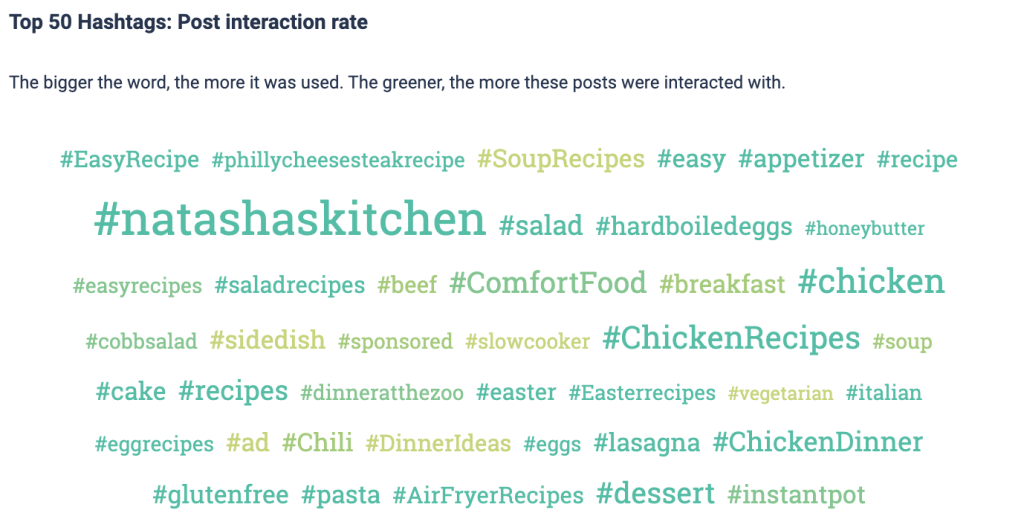
Let’s look at an example. As you may already know, hashtags play an important role in optimizing Pinterest content. Hashtags help organize content on the platform and make it easier for users to discover posts related to their interests. Using the right hashtags connects your Pins to trending topics, niche communities, and active searches, increasing your visibility. However, simply adding random or overly popular hashtags won’t deliver the desired results, since you want to find ones that are correlated with higher post interaction rates. So, as part of a hashtag research study, you can look for trends in your content niche and look at what hashtags are driving the most engagement. Below is an example from the cooking field.
5. Sentiment analysis to gain deeper audience insights
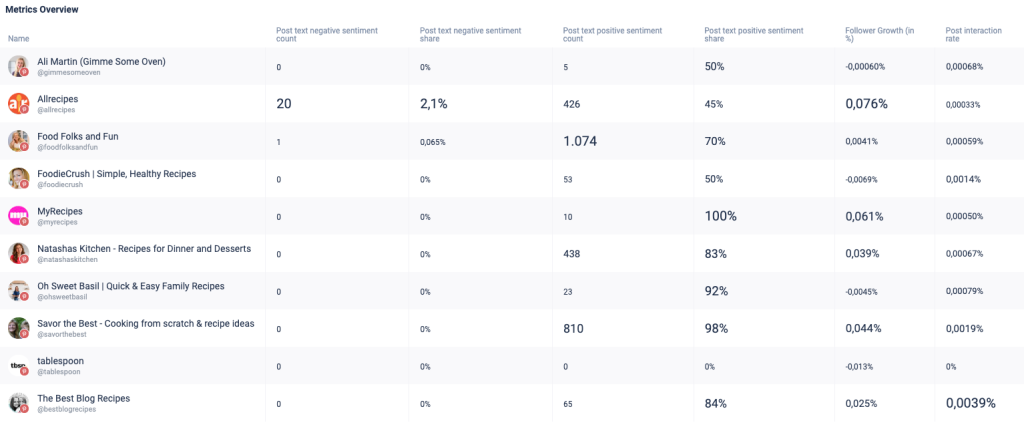
Understanding numbers alone isn’t enough to create content that truly connects, you also need to understand how people feel about what they see. That’s where sentiment analysis comes in. Sentiment analysis examines the emotional tone behind audience reactions and categorizes them into three main types: positive, neutral, and negative. By identifying these sentiments, you can uncover how people emotionally respond to your brand, products, or content. By tracking the sentiment of your Pins alongside engagement metrics, you gain deeper audience insights that help refine your creative strategy, strengthen brand perception, and guide the tone of future Pinterest content.
On Pinterest, sentiment analysis works a bit differently than on platforms with direct comments or replies. Advanced analytics for Pinterest can visualize this data in a sentiment metric table, comparing how Pins with different emotional tones, whether they are positive, neutral, or negative, relate to key performance indicators such as post interaction rate and follower growth. You can also analyze sentiment across your competitors’ or similar profiles’ Pins to understand what kind of emotions their content evokes and how that correlates with growth and engagement. Over time, this approach helps you identify which visuals, colors, or themes generate the most positive reactions and drive meaningful interactions.
6. Content Tagging Analyses that supercharge your Pinterest Analytics
Content tagging is a simple yet powerful way to enhance your Pinterest analytics since it can help you determine what topics or themes you should be posting about. By tagging your Pins according to topic, campaign, product type, or visual style, you can group similar content and make performance tracking far more specific and accurate. This is because a tagging analysis helps you quickly identify which categories or themes are delivering the strongest results.
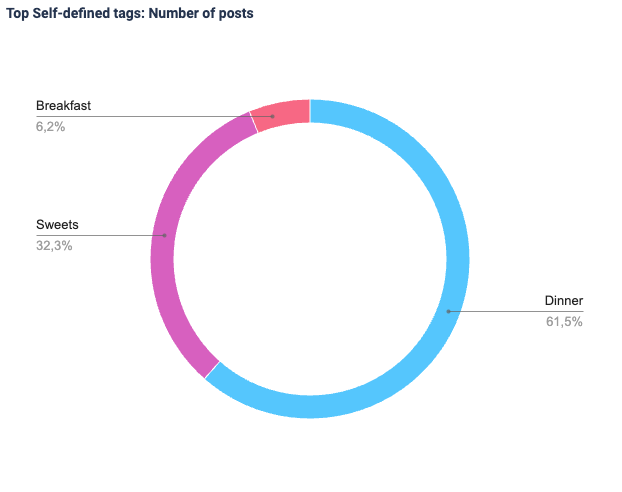
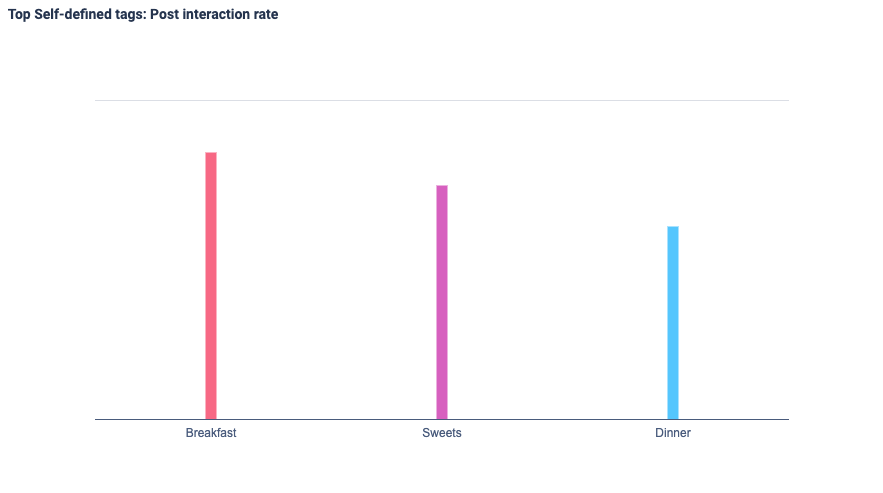
Let’s look at an example below generated by Fanpage Karma’s content tagging feature. In this case, we analyzed cooking Pinterest accounts to see how different content types perform. The data shows that dinner posts make up 61.5% of all content, followed by sweets (32.3%), and breakfast (6.2%). However, the engagement chart reveals that breakfast and sweets receive higher interaction rates than dinner on average. This shows that it may make sense to post more often about breakfast or sweets going forward in your content planning. By using content tagging in your Pinterest analytics, you can discover which topics truly engage your audience and adjust your posting strategy.
7. Building unified dashboards and reports
One of the best ways to simplify your Pinterest analytics overview and make sense of your data is to build unified dashboards and custom reports to help show your progress and areas to strengthen. Centralizing all your performance metrics, including impressions, saves, clicks, and engagement rates, into a single Pinterest analytics dashboard gives you a complete, at-a-glance understanding of how your content performs. Automated dashboards save valuable time by eliminating the need for manual data collection, allowing you to focus on creative strategy instead of spreadsheets. Combining historical and real-time data enhances your long-term strategy, enabling you to plan future campaigns more effectively and optimize for continuous growth.
Make sure that your tool allows you to tailor custom reports to your specific goals, highlighting the KPIs and metrics that matter most to your brand, campaign, or clients. This is because these dashboards help you identify trends faster by visualizing performance over time and revealing seasonal patterns and shifts in audience engagement. Consolidated reporting enables smarter benchmarking, allowing you to compare your performance against competitors or industry averages. They also improve collaboration by giving your marketing team or clients transparent, real-time access to a unified Pinterest analytics overview.
Ultimately, a well-structured Pinterest analytics dashboard transforms complex data into clear, actionable insights. It empowers you to make faster, data-driven decisions that elevate your Pinterest performance and long-term success by simplifying reporting and visualization.
The Best Pinterest Analytics Reporting Tools
The native Pinterest analytics overview provides a basic understanding of how your content performs, but it doesn’t always deliver truly meaningful insights. While it can show you numbers like impressions, saves, or clicks, it doesn’t go deep enough to help you build an effective long-term strategy. That’s where a dedicated Pinterest analytics tool becomes essential. These tools go far beyond the native dashboard, offering advanced features like unlimited profile tracking, competitor benchmarking, in-depth content analysis, and customizable reporting. With these capabilities, you can uncover valuable patterns, track progress over time, and create data-driven strategies that actually move the needle.
To help you find the solution that best fits your needs, we’ve compiled a list of the best Pinterest analytics tools currently on the market. Ready to find the right tool for your brand? Here’s our roundup of the 8 best Pinterest analytics tools:
- Fanpage Karma
- Tailwind
- Sprout Social
- Hootsuite
- Later
- SocialPilot
- Buffer
- Metricool
1. Fanpage Karma
Fanpage Karma is an all-in-one social media tool that was created for brands, agencies, and content producers. It allows you to track an unlimited number of profiles in order to help you identify patterns and better optimize your content. Furthermore, you can look at as many Pinterest accounts as you want, see how you stack up against competitors, and see how your results compare to others in the same field.
In addition to analytics, Fanpage Karma provides publishing, community management, and research capabilities. If you want to see what Fanpage Karma has to offer, you can start with a 14-day free trial. You can also use Fanpage Karma for free, which includes access to basic analytics features for your own profiles and the powerful publishing tool. There are also free weekly webinars where you can learn the best ways to use social media analytics and get the most out of your social media tool.

2. Tailwind
Tailwind is a dedicated Pinterest analytics and scheduling tool designed specifically for creators, brands, and marketers who focus on Pinterest. It provides everything you need to plan, post, and analyze your Pins in one place. With features like Smart Schedule, Tailwind makes it easy to grow and manage your Pinterest strategy. It also offers AI-powered recommendations for hashtags, visuals, and captions, helping you create content that performs.
However, since Tailwind is limited to Pinterest, it lacks cross-platform analytics that could provide a broader view of your social media performance. Including additional platforms would make it a more comprehensive analytics solution. But if you want to focus on Pinterest, this tool is made for you.
3. Sprout Social
Sprout Social is a powerful social media management tool that includes advanced Pinterest analytics alongside insights for other major platforms. It allows you to track key Pinterest metrics like impressions, clicks, and engagement while comparing performance across all your social channels in one place.
With unified dashboards, customizable reports, and team collaboration features, Sprout Social helps brands manage their Pinterest presence efficiently. While it’s a premium solution, its ability to combine Pinterest analytics with cross-platform reporting makes it ideal for marketers seeking a complete social media overview.
4. Hootsuite
Hootsuite is a platform that lets you publish, track, and report on multiple social networks, including Pinterest. With its comprehensive Pinterest analytics, businesses can monitor engagement, assess performance, and compare outcomes with those of other platforms. Hootsuite simplifies the process of generating professional analytics summaries and monthly performance reports by providing customizable dashboards and exportable reports. Built-in collaboration workflows make planning, scheduling, and publishing content easier for teams.
By combining analytics, publishing, and teamwork in one platform, Hootsuite helps brands efficiently manage their social media presence. It offers businesses the data necessary to enhance their Pinterest strategy and drive growth, as well as clear, actionable insights.
5. Later
Later is a user-friendly Pinterest scheduling and analytics platform that helps creators, marketers, and brands plan, publish, and analyze their content with ease. Its intuitive, visually focused interface makes it simple to manage your Pinterest presence and stay consistent with your posting schedule. The platform’s Pinterest analytics features provide detailed insights into impressions, engagement, and saves, allowing you to see which Pins and boards generate the strongest results. You can easily track performance over time, discover top-performing visuals, and refine your content strategy based on data-driven insights.
Later’s visual content calendar and drag-and-drop scheduling tools make planning effortless, while its clear reporting helps you identify trends and optimize for growth. Perfect for businesses that prioritize visual content.
6. SocialPilot
SocialPilot is an easy-to-use Pinterest management and analytics tool that helps brands, agencies, and teams streamline their marketing efforts. It allows you to plan, publish, and analyze Pinterest content all from one organized dashboard. Through its Pinterest analytics features, you can track important metrics to evaluate how your Pins perform and what kind of content drives the most engagement. These insights make it easier to refine your Pinterest strategy and reach the right audience more effectively.
Beyond analytics, SocialPilot simplifies content planning with bulk scheduling options, visual calendars, and team collaboration tools, ensuring consistent posting and smooth workflows. You can also create custom performance reports to share results with clients or team members in a clear, professional format.
7. Buffer
Buffer is a popular social media management tool that supports Pinterest analytics alongside other major platforms like Instagram, Facebook, and LinkedIn. It’s built for creators, marketers, and small businesses who want to plan, publish, and analyze their Pinterest content from one simple interface. With Pinterest analytics, Buffer helps you track key metrics such as impressions, saves, and engagement rates, giving you insights into what types of Pins perform best. The platform’s clean analytics dashboard makes it easy to visualize growth, identify trends, and refine your content strategy based on data.
Buffer also includes scheduling and publishing tools that let you plan Pins in advance, maintain consistency, and save time. While its Pinterest features are not as advanced as those of specialized tools, its simplicity, affordability, and intuitive interface make it a great option for individuals or small teams looking to manage multiple social channels efficiently.
8. Metricool
Metricool is a Pinterest analytics tool that is both intelligent and user-friendly, specifically designed for small businesses, content creators, and agencies that require dependable insights without the complexity of enterprise platforms. This tool combines information from both free and paid activities, showing you clearly how your promoted and regular Pins help Pinterest grow as a whole. You can easily see long-term trends, compare campaigns, and judge the success of your marketing over time with Metricool because it gives you access to past performance data. With its clean interface, analytics are made easy, so you can focus on what really matters: figuring out what gets people to engage and visit your site.
In addition, the platform is exceptional at reporting. You can create polished, readable reports with a few clicks, which is ideal for agencies showcasing results to clients. Metricool offers the necessary insights to optimize your Pinterest strategy and illustrate the significance of your efforts by integrating powerful features, affordability, and ease of use.