How to Create Compelling Social Media Captions

Many brands still overlook social media captions, even though they are one of the essential pillars for generating engagement. A strong visual may grab attention, but the caption creates the connection. But how do you write social media captions that captivate the audience and turn views into engagement? And what best practices for writing social media captions should you follow?
This article will not be the same old “how to” guide providing some superficial tips about creating social media captions. Rather, we are going to provide you with a detailed work structure to help you better think about and write engaging social media captions, followed by some pro tips that go beyond the basics.
Best Practices for Writing Social Media Captions
Captions add the meaning and context that turn a simple post into something memorable. If you’re wondering how to write good social media captions, the core principle is simple: every strong caption follows a clear structure.
Strong captions aren’t just conversational. They have shape, purpose, and intent, and their length influences how people process information. Understanding the psychology behind reading behavior is key to knowing how to make social media captions more engaging.
That’s exactly where the AIDA model comes in. This framework shows how audiences move from Attention → Interest → Desire → Action, and it’s one of the most reliable structures for writing engaging social media captions. However, just mentioning the AIDA model is not enough. So, if you are wondering how to write engaging social media captions, then read on for more actionable tips about implementing this model.
Attention
Attention is the most important stage of the AIDA model. If you don’t win it, nothing else you write has a chance to get seen. This is the moment where catchy social media captions turn a quick scroll into genuine interest. However, remember that Instagram shows only the first 25 characters, so your opening line needs to convince people to tap more, which becomes your first micro-conversion.
How to write it: A strong caption always starts with a hook. Your first line works like a headline and is what stops the scroll. Use a bold statement, a surprising fact, or a relatable question to draw readers in. Some examples include:
- “You’re probably wasting half of your content right now.”
- “One sentence can double your engagement.”
- “Ever spent an hour on a post and got three likes?”
And remember, focus on what works: one of the best practices for writing social media captions is analyzing which styles, tones, and structures actually perform best. Instead of relying on guesswork, use a social media analytics tool to review your top-performing posts and those of your competitors and identify patterns in hooks. When you clearly see what drives engagement, it becomes much easier to create compelling social media captions consistently.

Interest
Once you’ve captured attention, the next step is to keep it. The interest stage gives your audience a reason to stay by making your post feel relevant to their needs, goals, or experiences. This is where you shift from a strong opening to explaining why your post matters to them. What insight are you sharing? What emotion are you tapping into? Interest is the bridge between the initial hook and the value you’re about to deliver, guiding readers from curiosity into genuine connection.
How to Build Interest:
- Show clear value. Offer something that feels worth their time: a useful tip, an insight, a relatable story, or a brief moment of humor.
- Go beyond the visual. A key part of how to write compelling social media captions is adding something your image or video can’t say on its own. Your caption should complete the story, not repeat it.
- Use empathetic language. Speak directly to your audience’s goals, frustrations, or aspirations so they feel understood.
- Deliver a takeaway. Give the reader a line or idea that makes them think, “That’s so true,” or “I needed this.” This reinforces relevance and keeps them engaged.
Examples:
- Solving a problem: “There is a better way to address this problem.”
- Highlighting a new solution: “Luckily, there is a new solution for that.”
- Teasing what comes next: “The results actually surprised us!”
- Emphasizing an emotional response: “What happened next, changed us forever”
Desire
In the desire stage, your caption builds on the interest you’ve created. This is where your audience needs to see the concrete value of what you are saying. It is not just about relevance anymore but about showing how your content helps them, improves something in their day, or reframes a problem in a way that feels genuinely useful. While interest is about creating allure around an idea, desire turns a reader’s initial interest into the feeling that your message applies to them and they can directly benefit from something.
How to Build Desire:
- Highlight how your content adds value or solves a problem, whether you are teaching something new, offering a practical tip, or giving a fresh perspective on a common challenge.
- Use emotion intentionally. Inspiration, curiosity, or recognition can all help readers feel the importance of your message.
- Make the benefit clear. Show what they gain from continuing to read or applying what you are sharing.
- Keep your phrasing specific and grounded so the value feels real rather than general.
Examples:
- “Using the same tool, you can achieve the same results.”
- “All you have to do is follow my easy-to-follow-plan.”
- “We tried this new strategy and gained 100 leads in only a week!”
- “In just a month, we completely transformed our performance.”
Action
When every stage of the AIDA model works, your caption is leading to an action. A simple, direct call-to-action turns a passive viewer into an active participant, and that’s where your content starts driving real results. Make sure that, in every case, you provide a clear CTA for the action that you want your viewers to take.
Engagement is the hallmark of a great caption. Invite your followers to take action, ask a question, encourage reflection, or suggest something simple like tagging a friend or sharing their opinion. Beyond boosting engagement metrics, they also help you build a community that interacts, not just scrolls.
Action is the end result of all your hard work, and learning how to make social media captions more engaging in ways that lead to action can take some experimentation.
Examples:
- “Visit this site to try it for yourself.”
- “DM me if you want to find out more.”
- “Let me know in the comments what you think.”
- “Like if you agree.”
Practice Makes Perfect:
To start out, consider trying this quick exercise: take one of your recent captions and rewrite it using the AIDA formula. Compare the two versions, and you’ll quickly notice how much more clarity, rhythm, and emotional pull the structured version has.
If you want a quick tip for creating engaging social media captions, then follow these easy steps:
- Quickly write several variants of your captions to use as first drafts.
- Then trim every unnecessary word in each caption
- Finally, pick the caption that is easier to read – the more likely it is to keep your audience’s attention from start to finish
Turning Theory into Practice: Writing Captions That Hook and Convert
After seeing a step-by-step description of how to capture attention, build interest, and create desire, the next step is putting these principles into action. The AIDA model gives you the big-picture view of how your audience thinks and reacts, but writing a catchy social media caption also requires knowing what actually works in the real world. This is where data-backed insights become essential.
Instead of staying at the level of general guidance on how to write captions for social media, this section will move into 3 pro insights for creating engaging captions. These insights show you what consistently drives higher engagement, what structures perform best, and which caption elements help turn attention into measurable action.
Insight 1: Caption Length Affects Engagement
Let’s start out with a question: does caption length affect engagement? In order to find out whether caption length really affects engagement, we analyzed more than 2.4 million Instagram posts. Over 70% of captions fall between 100 and 750 characters, but in our study, this range actually showed the lowest engagement rates.
Posts using very short captions with fewer than 25 characters achieved the highest engagement overall. The reason for this is simple: on Instagram, most captions are hidden behind a “Read More” button. Depending on the length of your username, users see only about 18–30 characters before they have to click. So if your message fits into that tiny visible space, you have a far better chance of grabbing attention right away. This means when brainstorming your content ideas to capture attention, be sure to take into account the ideal length.
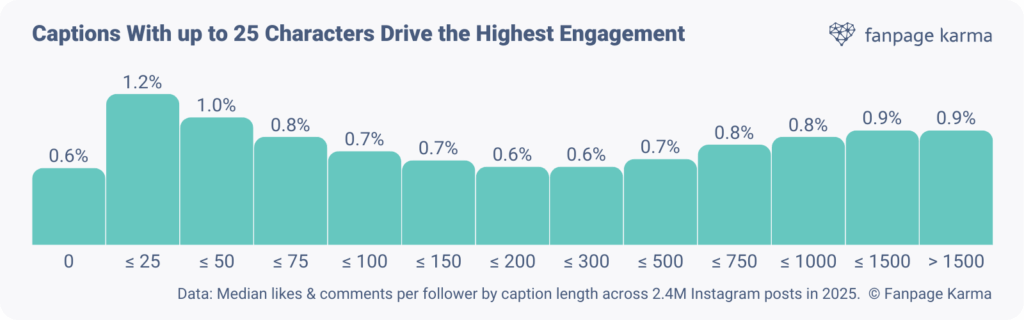
So does that mean all your captions need to be short to perform well? Not necessarily. Our data clearly shows that captions on the longer end of the spectrum can also perform strongly.
The key is matching your caption length to the format and purpose of your post. Fast-paced formats like reels benefit from extremely brief captions, ideally kept between 0 and 50 characters, since the video already tells most of the story. But carousels or educational posts often benefit from more detailed explanations, adding clarity and depth.
Insight 2: Data-Driven Decisions
Mastering the art of caption writing isn’t just about creativity, it’s about consistency and reflection. One of the most practical tips for writing social media captions is to establish a weekly writing routine: set aside time to brainstorm, write, review, and test. This rhythm helps you stay inspired while continually improving your style.
To understand how your captions actually perform, you can go beyond intuition and use a tagging analysis. This method involves labeling each post based on attributes that influence engagement, such as:
- Emotion: funny, inspirational, bold, empathetic
- Caption style: question-based, storytelling, educational
- Caption length: short, medium, long
Once your posts are tagged, you can compare how each group correlates with reach, likes, comments, and saves.
Insight 3: Use AI and Automation Features
AI can be a powerful partner when you’re figuring out how to create compelling social media captions. However, remember that the goal is collaboration, not replacement. You can use AI to speed up the creative process and give you multiple starting points. A practical approach is to follow a simple workflow:
- Start with a clear prompt that includes your topic, audience, and desired emotion.
- Ask AI to generate three to five hooks, headline options, or tone variations. This is where AI-driven social media captions can give you fast creative directions to explore.
- Select the strongest idea and refine it by adjusting the tone, simplifying the structure, or adding brand-specific language.
- Edit the final version yourself to ensure it feels human, relatable, and aligned with your brand voice.
AI is there to expand your ideas, not to define your voice. The best captions for social media should sound intentional, emotional, and personal.
Once AI has produced several caption options, automation and collaboration tools can streamline how your team works with them. Instead of reviewing captions manually or passing versions back and forth, use your social media publishing tool to:
- Assign caption drafts to team members for review or refinement.
- Allow the team to vote on AI-generated options to quickly identify the best direction.
- Use shared templates for editing, tone adjustments, and approval steps.
- Track revisions in one place so everyone stays aligned on brand voice and messaging.
Working this way creates a faster, more organized caption workflow. AI helps you generate strong ideas, while automation ensures your team can polish, evaluate, and approve them efficiently.
Conclusion: Elevating Your Social Media Caption Game
Learning how to write effective social media captions is about more than clever wording. Strong captions blend psychology, creativity, and data to turn simple text into engagement-driving stories. Treat every caption like a mini narrative that hooks attention, sparks emotion, and inspires action. Start small and stay consistent: constantly test different hooks, tones, and lengths, then track what performs best. Over time, these small experiments reveal what truly resonates with your audience and sharpen your caption-writing skills.
Social media tools like Fanpage Karma are perfect for figuring out what’s working and what isn’t. As an all-in-one social media platform, Fanpage Karma not only offers powerful analytics but also features for content planning, community management, and trend research. Best of all, you can try Fanpage Karma free for 14 days.
If you’d like to learn more about how to use Fanpage Karma to improve your performance, join our free weekly webinar, where we walk you through how to create better content using data.