A Guide to the Best Free Social Media Publishing Tools

Social media publishing tools have become an essential “must-have” for many social media managers. The reasons are clear: multi-posting capabilities, shared scheduling, and automations all play a role in this. Unsurprisingly, there are dozens of tools on the market, both free and paid, that can help social media managers do their jobs better and more efficiently. Which ones are the best? And are paid tools really better than free ones?
The answer to these questions can vary from social media manager to social media manager. The good news for many is that paid tools are not necessarily “better” than free ones. The reality is that, in order to find the best publishing tool for your social media activities, you need to look at what features are required so you can do your job more efficiently.
Your ultimate goal should be to find the one tool that offers the most worthwhile set of features. Interestingly, there are actually a number of free social media publishing tools that provide several robust features and will make you question why there are paid publishing tools in the first place. In this article, we want to help you sift through all the options in the market. We will start out by giving you an in-depth look into the 6 features you should be looking for in your free tool. Then, in order to help you out even more, we will present our list of the 5 best free social media publishing tools on the market in 2025.
The Features You Should Look for in Free Social Media Publishing Tools
What makes any social media tool truly great is not whether you have to pay for it but rather whether it adds value to your work. You will only be able to decide on a tool when you have an in-depth understanding of your brand and your work. That is because day-to-day work can differ considerably from one social media marketer to another, which makes understanding the features a tool offers crucial. With several free social media posting tools available, your first and foremost goal should be to identify the functions that you need and which tool provides all of those features.
The following list of 6 main features to help you set up social media posts as well as manage and publish them will equip you with the information needed to choose the right free social media publishing tool.
The best free social media publishing tool should include the following capabilities:
- Allow for Collaboration and Communication
- Centralize Publishing Power
- An Integrated Media Library
- Post-Performance Tracking
- Pre-scheduling Posts

1. Allow for Collaboration and Communication
Effective communication is the foundation of good teamwork. At a minimum, a free social media posting tool should provide a communal workspace and be created with teamwork in mind. First and foremost, this means project management features that help keep everything organized and with tasks clearly shared with everyone on the team.
One feature relates to all members of a team having access to the posts and being able to give feedback or edit posts. This is because, when kickstarting a new project, the management of content can be a challenge. Social media managers are often simultaneously working on multiple posts or campaigns, which requires a clear structure. A free social media publishing tool in this case should be a real game-changer by assisting in the structuring and display of content so that you can stay up to date on all developments. For more cooperative tasks and brainstorming, a voting system can be helpful to quickly detect what ideas become a project and which ones need to be given more thought. As you see below, activity logs and project management overviews are important features to have as part of your tool.
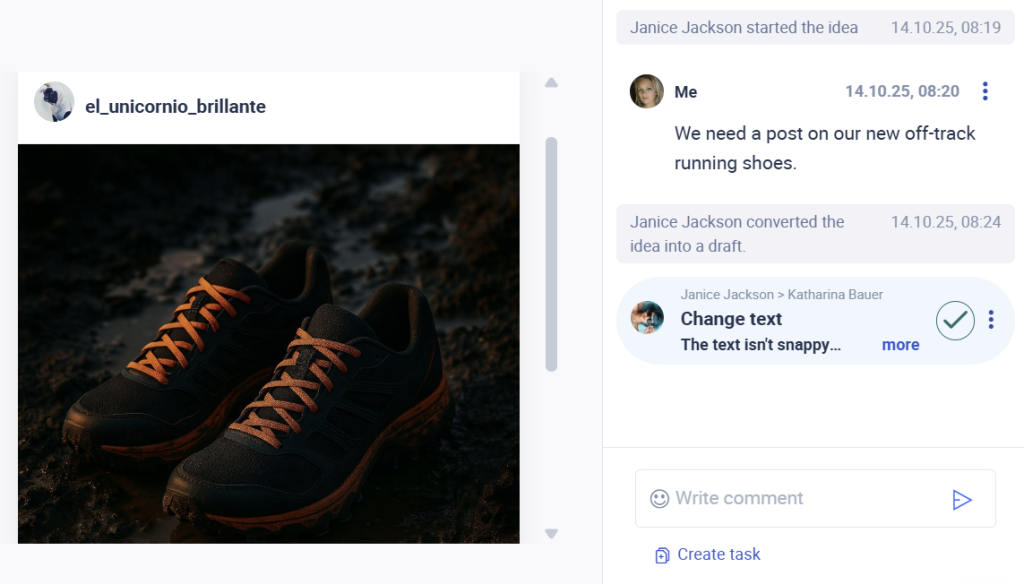
Additionally, having direct access to information such as who created a post, which posts are pending or waiting to be approved, and which tasks have been delegated speeds up daily processes. You no longer have to keep a separate account of who does what when you can see it at one glance.
An approval system is essential for teamwork and ensures that posts are never accidentally released without being reviewed first. With all information available in one place, there is no need to switch back and forth between platforms. Tools can also help to get feedback at the planning stage. When you are working with clients or across teams, communication on the platform can speed up your daily work.
2. Centralize Publishing Power
Having to juggle multiple applications and websites when working on a new post for social media is tedious and less effective. Managing social media profiles on the respective platform can be time-consuming. This is especially true if you are looking at a high posting volume across networks.
Your free social media publishing tool should do the heavy lifting for you, as it allows you to create content and publish it on multiple social media networks simultaneously. These multi-posting features should streamline the entire content creation process by allowing you to manage and post on as many of your profiles as you have while still giving you the ability to make minor adjustments depending on each profile’s post, all from a centralized platform. This includes adding first comments, hashtags, alt-text, and more, all from the centralized platform.
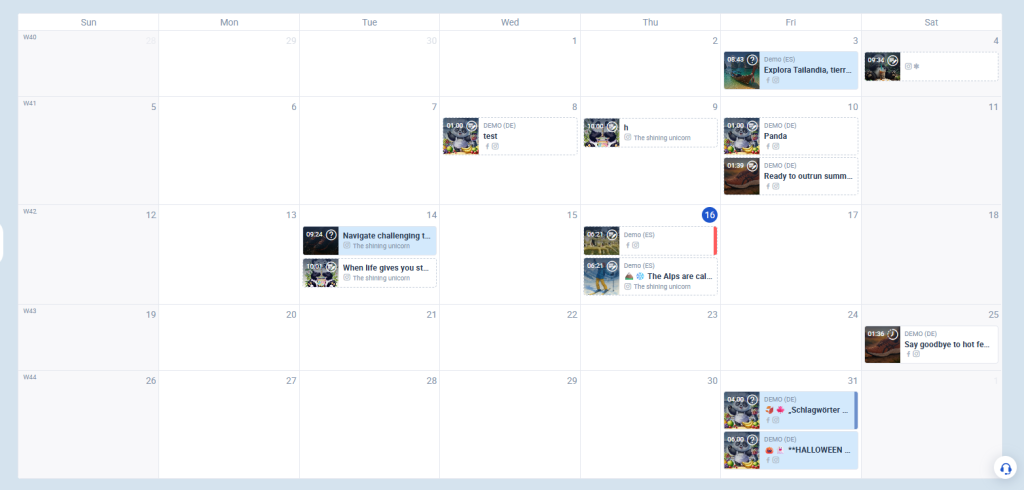
Of course, an in-tool content calendar is a great organizational tool in itself, as you can see what days your posts are going online and on which days you might want to plan posts for. You might, for instance, want to look at all your posts that have not been approved yet. Beyond that, your tool’s platform should supply information, such as who created a post and what needs to be changed before the post goes online. These features don’t only help with organization but also help boost efficiency since everyone can work in one place.
3. An Integrated Media Library
Integrated content libraries have obvious benefits, such as having access to all your media assets in one place. If you are working in a team, media for content is, most likely, not just stored on somebody’s computer but also in your Google Drive or Canva account. Having content with such data storage platforms allows for a linear workflow since media doesn’t have to be downloaded from one page just to be uploaded on another. This also makes your content accessible from any computer, which is imperative when working in teams or with clients.
By enabling collaborators to change content without losing older versions of posts, you become more flexible in your day-to-day work. Storage across multiple platforms makes day-to-day processes in content creation less straightforward. The right free social media publishing tools should give you the possibility to store all your content in one place as well as ways to organize your images and videos so that you can quickly retrieve them, all within the publishing platform.
4. Post-Performance Tracking
Keeping an eye on metrics such as interaction and engagement rates is important in the planning and scheduling of new content. The performance of older posts can often reveal insights into follower behavior, such as when your community is online and willing to engage. That is why it is so important to have tracking and analytic features available as part of any free social media posting tool.
There are two main things you should look for when it comes to analytics alongside a free social media publishing tool. The first is that it allows you to track all the key metrics you care about, whether it is follower growth, likes, post interaction rate, etc. The second is that it allows you to track all of your profiles without restrictions. Unfortunately, this can be a bit hard to find, although there are some options available.
5. Pre-scheduling Posts
One of the most notable advantages of using a free social media posting tool is the auto-publishing function. Being able to pre-schedule your posts allows you to publish content even at times when you are not working. Let’s say, for example, that your followership engages the most with posts on the weekend when none of your team members are in the office. Or, let us assume that you have a large following overseas who spends their time scrolling on social media while you’re asleep. A post pre-scheduling feature has your back by allowing you to set posts to be automatically published at a future time, giving your content planning more flexibility. Moreover, scheduling your posts this way takes pressure off social media marketing managers as they no longer have to worry about when to hit the publish button.
Keep in mind that if the free social media posting tool imposes a limitation as to how many posts you may queue, this may impact your ability to plan long-term. Highly restrictive posting limits make planning ahead impossible, as you will have to renew and readjust your lineup constantly.
The 5 Best Free Social Media Publishing Tools
You may already have a good idea of which functions you need for your daily work, but the question that remains is which tool actually brings all those features together. The goal of this article is not only to provide you insights about all the features you should look for but also to give you an overview of the best free tools available. That is why, below, we will give you our list of the 5 best free social media publishing tools:
- Fanpage Karma
- Buffer
- Metricool
- Publer
- Zoho Social
1. Fanpage Karma
Fanpage Karma is a powerful tool that allows you to create and schedule posts and optimize your workflow in a free social media posting tool. The free social media publishing tool allows for 100 posts per profile and per month. One major benefit of the tool is that you can add an unlimited number of your own profiles. Since it is free, an unlimited number of team members and users can work on the editorial calendar. The free Fanpage Karma tool allows data to be stored for up to 1 year.
Another key strength of the tool is the integrated approval process in which both members of the team, as well as clients, can give or revoke approval. Fanpage Karma allows users to add comments as well as request changes, combining all required actions to enable a smooth workflow. The tool was created to assist teams incorporating functions for project management, such as brainstorming or voting on ideas, as well as organizing posts into campaigns. Fanpage Karma also features an auto-posting function that allows users to schedule a post and publish it at a set time.
If you are interested in learning more about the full range of functions available in Fanpage Karma or want to get started with the free publishing tool, you can try it now for free. A summary of all the functions available in the free plan can be found on the pricing page. You are also welcome to join one of Fanpage Karma’s free weekly webinars to learn more about all the functions of the tool.

2. Buffer
Buffer offers a social media publishing tool for free that allows you to draft, schedule, and auto-publish posts on all major social media platforms. The posting is limited to 10 scheduled posts per channel, and users can create a queue of posts and rearrange them to their liking. The tool further encompasses a visual content calendar.
Buffer can be used freely on one user account and supports you in coming up with up to 100 ideas. The built-in reminder function reminds users when a post is meant to go online. The free version of Buffer is a good fit for anyone looking to organize their social media posts ahead of time.
3. Metricool
Metricool provides a planner and a social calendar that help users keep track of important dates that can be used for seasonal campaigns. In its free version, Metricool permits the user to post up to 50 posts per month. While this version does not support an approval system, it features a best time to post feature and comes with an auto-publish feature that enables users to create extensive lists to be published automatically.
A standout feature of Metricool’s free social media publishing tool is the AI-driven alt text generator for their pictures. In that, Metricool lends itself well to smaller teams of marketers working on focused campaigns.
4. Publer
Publer’s free social media posting tool allows up to 3 social media accounts to be managed with up to 10 free scheduled posts on each respective account. The counter renews itself whenever the scheduled posts go online. Publer retains the data from posts for 24 hours after the content was published.
Moreover, Publer allows the user to create a maximum of 25 post ideas and supports the creation with an in-built image editor. The tool also comes with an integrated post preview function. The Publer tool proves especially beneficial for teams when working on repetitive tasks, as it supports shortcodes for frequently used data.
5. Zoho Social
Zoho Social allows one brand with a maximum of 6 social media channels to be controlled on one account with an additional team member. Zoho Social lends itself well to the publication of posts on Facebook, Instagram, X (formerly Twitter), LinkedIn, and Google and supports various types of social media postings. The tool is known for its simplicity and intuitive use, making it easy to learn and adapt to.