
The Best Social Media Audit Tools

Staying on top of all your social media accounts is a full-time job of balancing content creation with the data analysis needed to improve your strategy. One of the most valuable (and, for some, dreaded) activities of social media managers is the audit. A social media audit is important because it shows whether your current approach is actually helping you reach your marketing goals by highlighting what’s working and where your strategy needs to change. However, audits can take some real time and effort to put together and should be done regularly.
We’ve already covered how to conduct a social media audit in a separate article, breaking the entire process down step by step. Now that the audit framework is in place, we can shift our focus to the tools that help you manage it more efficiently. In this article, we’ll show you how a social media audit tool online can simplify your workflow and which features you should prioritize when choosing the right tool for your analytics needs.
Why Social Media Audit Tools Are Important
While running a full social media audit can be time-consuming, there are tools that can help you with the heavy lifting, such as tracking and analyzing performance across all channels. In addition to merely saving time, these tools also increase transparency and accuracy while helping you gain strategic clarity. They give marketers the ability to base decisions on adjustable, detailed, and trustworthy data, making audits not just easier but more impactful. Most of all, social media audit tools can help marketers understand which content works, why it works, and where there is still room for improvement. With the right tool for social media audits, you can:
- Gather and analyze data across all platforms in one centralized dashboard
- Track performance trends over time
- Visualize KPIs clearly for teams or clients
- Identify what content performs best in your industry or content area
- Build extensive reports
Some marketers may consider using AI-Tools as an alternative to traditional social media tools. While LLMs such as ChatGPT can handle a large amount of data for you, the insights provided are surface-level and return only general KPIs. Moreover, they often lack the ability to conduct benchmarking and competitor analysis studies since knowing what competitors and similar profiles to include in your analysis to make your comparisons accurate and meaningful takes deep knowledge of the players in your industry or content niche. This is simply a task for which LLMs are not well suited, especially when compared to free tools to audit your social media or paid platforms built specifically for this purpose.
Furthermore, the main limitation when conducting a social media audit with an LLM is the lack of adaptability, reliability, and transparency. The results depend heavily on how the prompt is phrased, which means that you may receive inconsistent results for the same time period. Given these limitations, we will focus on the core features of specific tools for social media audits that integrate AI and are optimized specifically for this use case.
The Features of the Best Social Media Audit Tools
There are plenty of free tools to audit your social media, but price alone shouldn’t guide your decision. A tool should not only simplify your workflow but also provide deeper insights you can’t get elsewhere, helping you turn your findings into actionable strategies. The best social media audit tools should allow you to:
- Customize Your Metrics, Timeframes, and Visuals
- Analyze Your Competitors’ Performance
- Evaluate the Strengths and Weaknesses of Your Content
- Create a Visual Report of Your Findings
- Use Built-In AI Features
1. Customize Your Metrics, Timeframes, and Graphs/Charts/Tables
Customizing metrics, timeframes, and visualizations means tailoring your analytics setup to reflect what actually matters for your brand or client. Instead of relying on fixed dashboards or default KPIs, strong social media audit tools let you choose which metrics to track, define precise analysis windows, and decide how data is displayed. This enables highly specific analyses, such as isolating individual content formats, comparing multiple KPIs at once, identifying correlations between variables, and analyzing performance across competitors and extended timeframes in ways native analytics cannot support.
This is why effective social media audit tools must offer specific customization features, such as:
- KPIs capturing your social media marketing goals
- Centralized access to data from all your social media accounts
- Fully adjustable timeframes
- The ability to display data in different graphs, charts, and tables
Social media audit tools set themselves apart from the competition if they allow users to manage the data for their analysis in a straightforward interface, handling complex data analysis in a few clicks. This level of customization is essential for a social media audit, as it lets you structure data frames around specific audit questions, such as comparing platforms, isolating individual KPIs, or analyzing competitors alongside your own accounts. By adjusting how metrics are grouped, filtered, and displayed, you can quickly identify platform-specific patterns and establish best practices based on real performance data rather than assumptions.
This kind of customization is best illustrated through practical examples. Let us first explore how full adjustability of timeframes in a social media audit tool allows you to specify the exact timeframe for which you want to run your audit. Comparison frames over time give you another important advantage by enabling cross-period comparisons, which help you focus your strategy long-term.
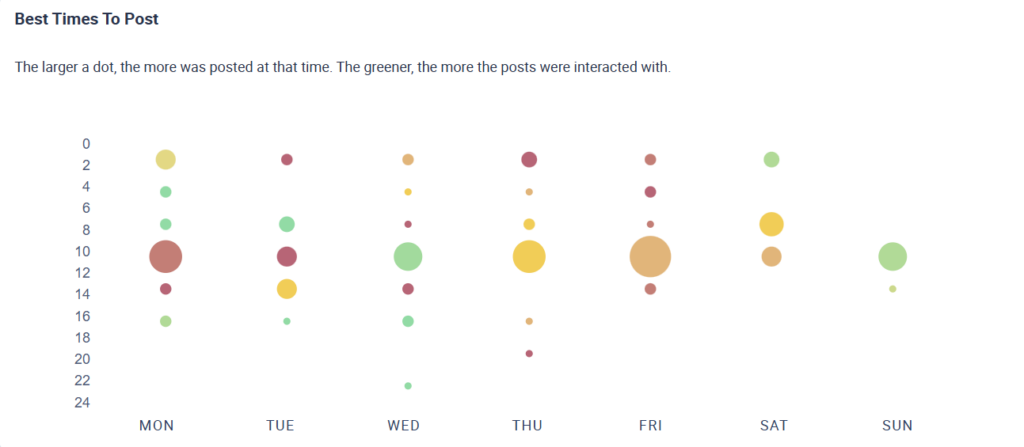
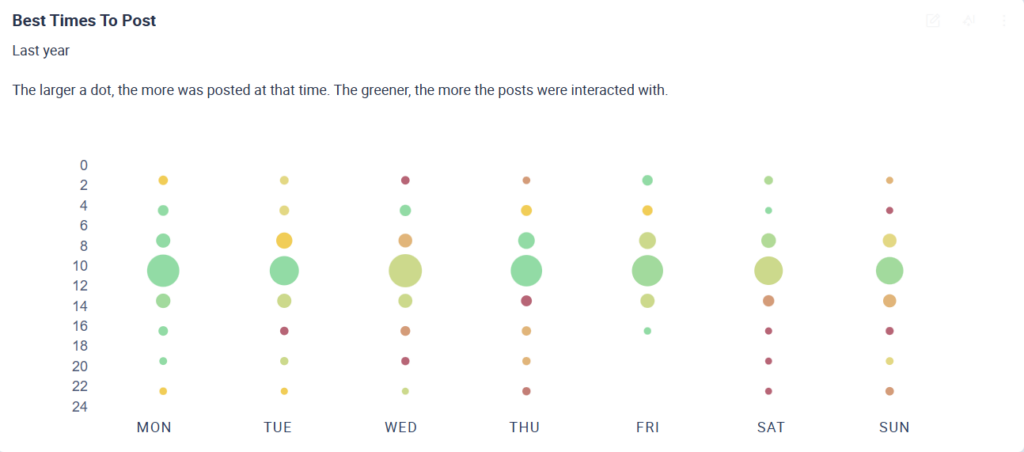
One example can be seen below. For this, we have conducted a comparative analysis of the ideal times to post for the Instagram accounts of five well-known skincare brands. The graph on the left shows you the best times to post based on data from the last 28 days, while the graph maps the trend based on data spanning a full year. As you can see, the days and times that are the best time to post change based on the length of the timeframe you are analyzing.
Analyses like the one above help you evaluate metrics across meaningful periods, including:
- seasonal or cyclical trends
- the impact of specific campaigns
- long-term performance patterns
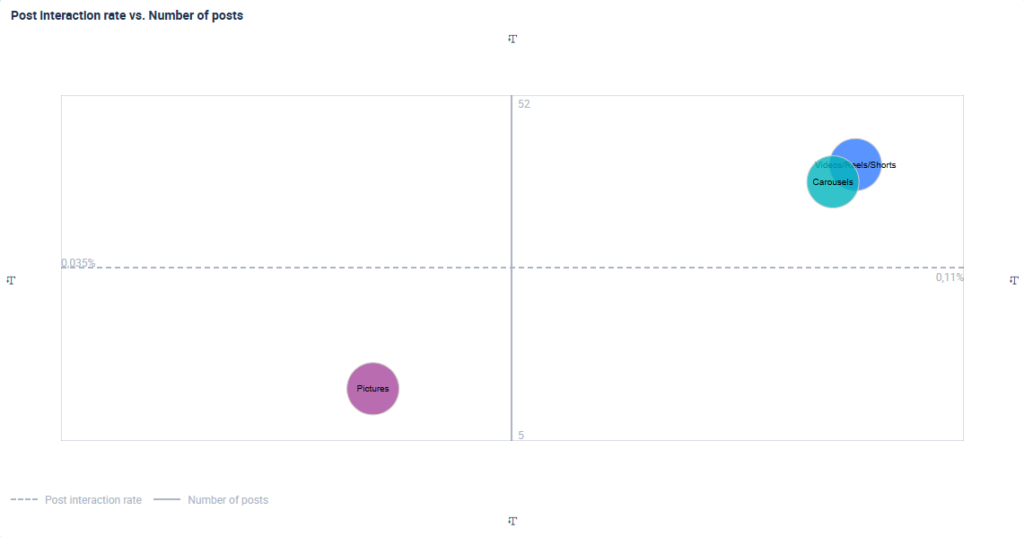
As mentioned above, social media audit tools enable deeper comparisons than native analytics. They let you analyze how metrics are influenced by multiple variables by identifying correlations. This can be in the form of various charts, graphs, and tables, depending on the different view you choose for looking at multiple metrics to search for correlations and patterns. Another clear example of how this can be done in a tool is shown below, where the distribution of Instagram post types (reels, pictures, carousels) is compared with their interaction rates.
The analysis shows that:
- Reels and carousels dominate the content mix across five popular skincare brands (shown on the Y-axis)
- These formats also deliver the highest interaction rates (shown on the X-axis)
- Pictures perform worst, combining low interaction rates with the lowest posting frequency
Overall, this kind of correlation analysis helps you quickly see what formats brands rely on and which ones actually drive engagement.
2. Analyze Your Competitors’ Performance
So far, we’ve focused on why having broad data from your own accounts matters for a social media audit. Now it’s time to look beyond your profiles and explain why competitor analysis is just as important.
These comparisons show how your accounts perform within your industry and allow you to establish industry benchmarks based on comparable and top-performing profiles. By analyzing these benchmarks, you can compare your own performance directly against competitors, identify which factors drive engagement, and pinpoint where your social media strategy needs adjustment.
Competitor analysis is the primary way to understand how your business stacks up against industry competitors on social media. There are two core reasons why your social media audit tool should include options to compare competitor data:
- Comparing performance across top, similar profiles:
By comparing your KPIs with those of relevant, high-performing competitor accounts, you can see how your profiles perform across key metrics such as engagement, growth, or activity levels. This helps you understand whether differences in performance are driven by strategy, content, or market dynamics rather than isolated results. - Establishing averages to set realistic goals:
Competitor data also allows you to calculate industry averages, such as average engagement or follower growth rates across comparable profiles. These averages act as a practical baseline, helping you set realistic performance goals instead of benchmarking against outliers or one-off successes.
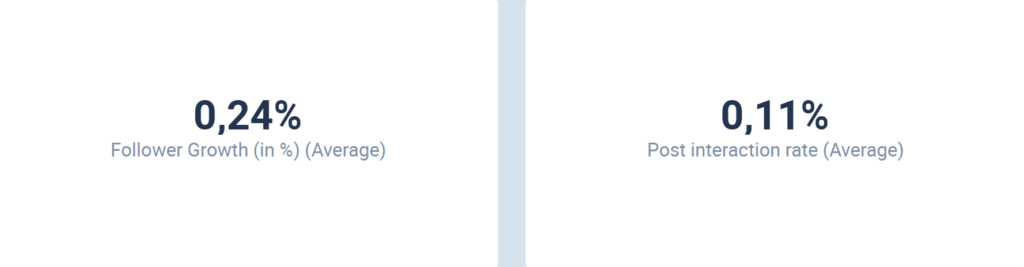
First, understanding your performance in the context of your industry is vital since metrics often mean little in isolation. What does a 3% engagement rate actually say about the success of your strategy? By comparing your KPIs to industry benchmarks, you get the context you need to evaluate whether your approach is effective and where you may need to adjust.
The image below shows how social media audit tools support this comparison by visualizing your account’s performance against the industry average, making it easier to see how your results compare to those of competitors. These benchmarks are calculated by using data from a defined time period (here, the last quarter) across both your own accounts and those of your competitors. By analyzing data from competitors of comparable size and influence, you gain valuable insight into what is realistically achievable within your market, allowing you to set attainable goals for your own social media marketing.
Analyzing your competitors’ performance is also an opportunity to see what the top content in your industry is. You may, for example, want to investigate your competitors’ most and least successful content formats. Social media audit tools allow you to investigate the success of your industry competitors according to chosen KPIs or in a more holistic approach with an overview of the best-performing posts. One example of this is shown below, where the most successful posts over the last 28 days are ranked according to the total number of likes on a post.
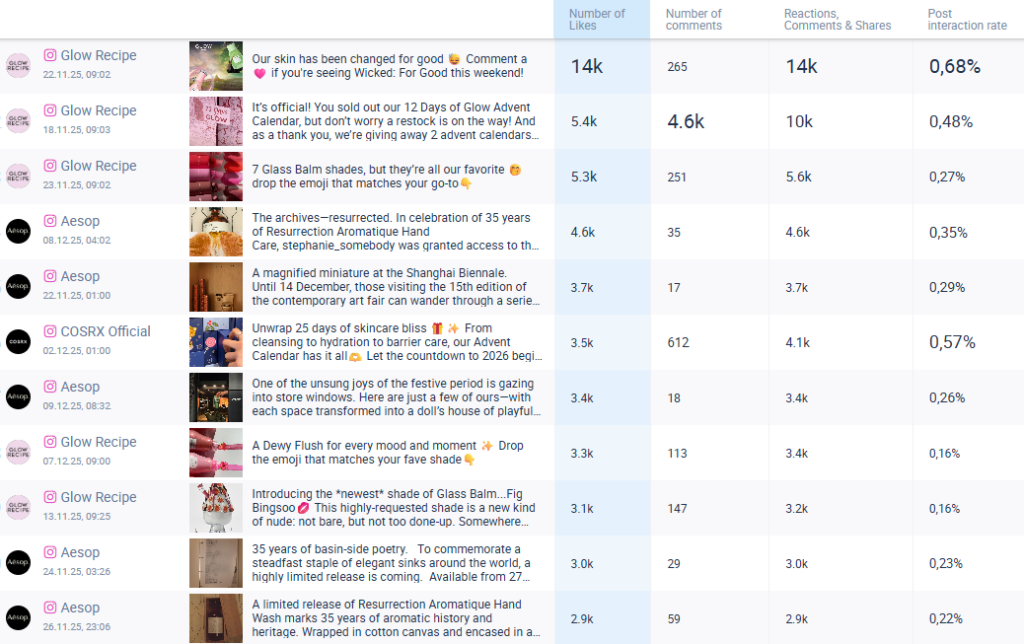
With the insights gained from your competitor’s content analysis, you can adapt proven elements into your own approach.
Social media audit tools need to provide these core features:
- Compare competitor KPIs directly to your own
- Identify high-performing content formats
- Observe trends in posting frequency, messaging, or campaign timing
- Review the keywords and hashtags that drive visibility in your niche
3. Evaluate the Strengths (and Weaknesses) of Your Content
The core purpose of any social media audit is to identify both what is working and what is not. Understanding your strengths shows you which content decisions to continue and scale, while identifying weaknesses highlights where performance drops and where targeted improvements are needed. Looking at both sides is essential if you want to optimize results rather than rely on assumptions or isolated instances of performance peaking.
To evaluate your content effectively, an audit needs to focus on the key performance drivers behind your results. To guide you through this process using a social media audit tool, the following sections cover:
- Understanding what drives engagement
- Optimizing posting frequency for stronger engagement
- Identifying the best posting times
- Studying hashtag performance
- Analyzing audience sentiment
1. Understanding What Drives Engagement
Understanding what drives engagement means analyzing which content characteristics consistently lead to stronger interactions across your social media channels. In the context of a social media audit, this goes beyond looking at surface-level KPIs and focuses on identifying which elements of a post influence interaction rates defined by user behavior, such as likes, comments, shares, and saves.
It is important to understand what content your audience enjoys and engages with. While engagement rates can quantify how much your community interacted with a post, this metric alone cannot define the strategic direction of your social media content. Social media audit tools can support your content strategy by allowing you to examine how creative elements, formats, and themes affect performance across different platforms and timeframes, helping you understand not just how much engagement you receive, but why certain content performs better than others.
So, how can social media audit tools help with this specific task? Instead of treating engagement as a single outcome, they allow you to analyze which specific content attributes are consistently linked to stronger performance. One common approach is a tagging analysis, where posts are labeled by defined attributes and then evaluated against selected KPIs. This makes it possible to compare different creative choices systematically and identify which elements contribute most to engagement across your content.
A tagging analysis allows you to examine content attributes such as:
- Content topic (e.g. product education, behind-the-scenes, tutorials, promotions)
- Tone of voice (e.g. informative, aspirational, humorous, promotional)
- Visual focus (e.g. product-only, people using the product, close-ups, lifestyle shots)
- Creative format (e.g. static image, carousel, short-form video, before-and-after)
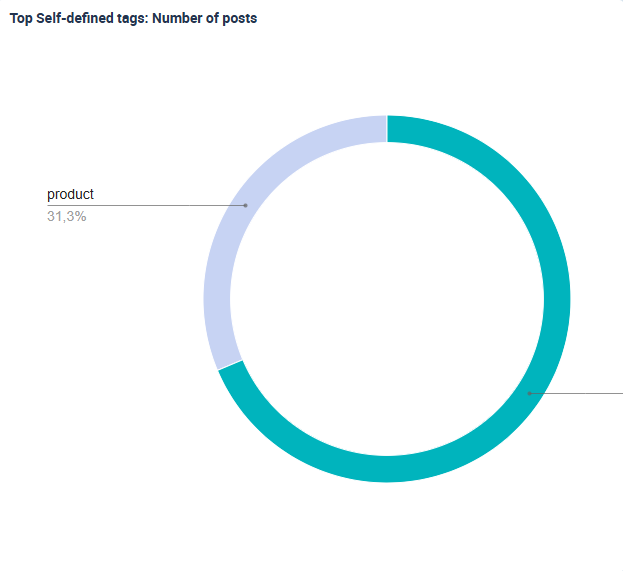
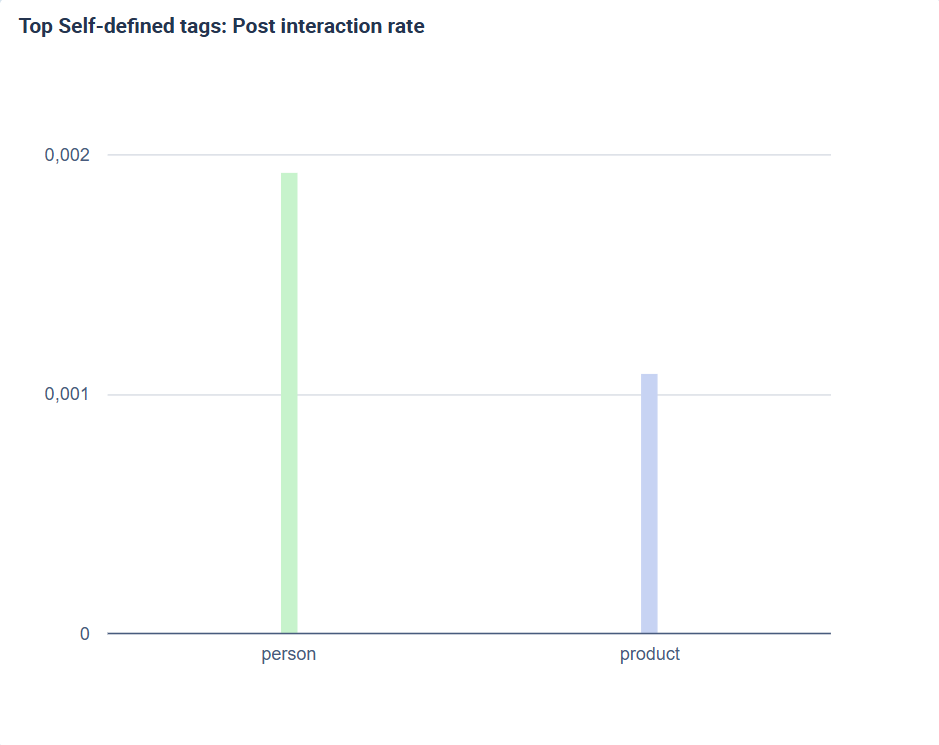
To make this more concrete, imagine a skincare brand that wants to understand whether images featuring people or products drive stronger engagement. In our tagging analysis example, we can see that 91% of posts in our data set focused on products, while only 9% featured people. However, when comparing interaction rates, posts featuring people consistently performed better. This is a pattern that would likely remain hidden without tagging. By combining tagging with analytics, social media audit tools help you turn raw content data into actionable insights.
2. Optimizing Posting Frequency for Stronger Engagement
Optimizing posting frequency means analyzing how engagement changes at different posting rates across your social media channels. Rather than assuming that more posts automatically lead to better results, this approach looks at how often you need to post to generate maximum engagement. Tools for social media audits make this possible by linking posting volume directly to interaction metrics. This turns posting frequency into a measurable performance factor instead of a subjective decision.
Understanding the impact of your posting frequency is important so that you can distribute your time, budget, and creative efforts effectively. Posting too often can dilute engagement, while posting too infrequently can limit visibility. Understanding how engagement responds to different posting rates helps you find a balance that fits each platform.
So, how can your social media audit tool help you with the optimization of your posting frequency? These tools can help you identify issues such as:
- Underposting: Gaps in your posting activity can lead to reduced visibility, possibly limiting reach and interactions
- Overposting: Excessive posting on a single topic can reduce engagement over time, signaling content fatigue within your audience.
- Inconsistency in posting rhythm: Consistent posting around defined time windows helps build audience expectations, while irregular schedules can weaken them.
- Platform-specific audience behavior trends: Analyzing how engagement rates vary across platforms helps you tailor your strategy to platform-specific user preferences. This also allows you to allocate resources more efficiently.
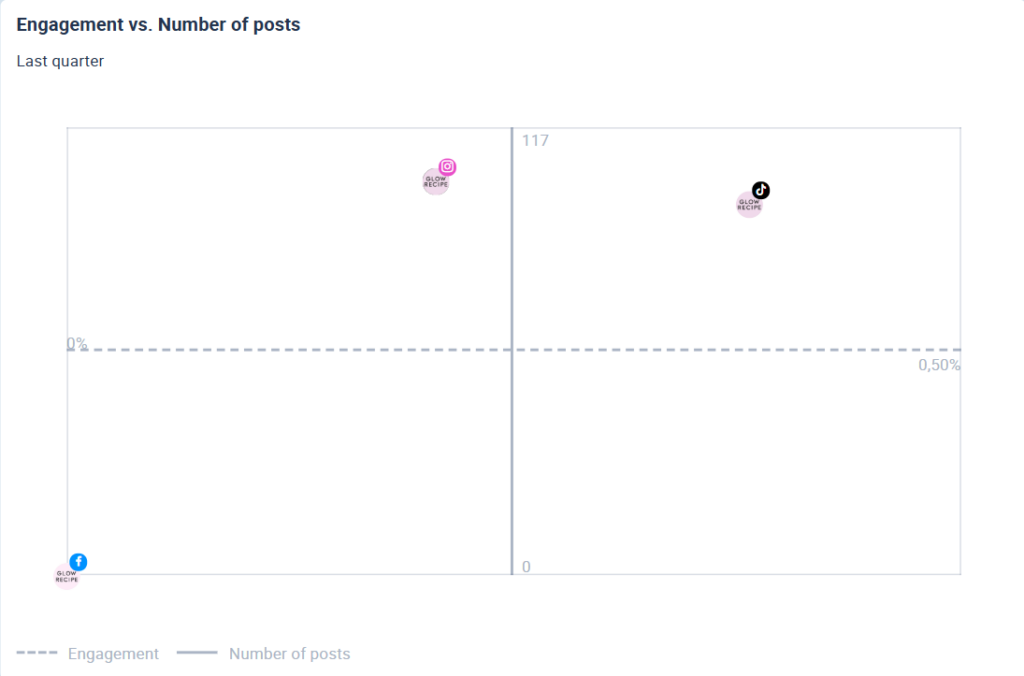
There are different ways to establish posting frequencies and their effect on engagement. One way to look at the data is through the lens of a correlation matrix. For this example, we are looking at the average engagement rate per post on three different social networking sites (Instagram, Facebook, and TikTok) in the last quarter. When choosing a social media audit tool, it is important to ensure that it offers detailed analyses of the correlation between the number of posts and different KPIs. This ensures you can allocate resources strategically and maintain consistent engagement across your channels.
3. Identify the Best Posting Times
Calculating the best time to post means using historical data to identify patterns in user behavior and interaction over time. Rather than relying on assumptions, this approach examines how posting times correlated with interaction rates in the past. A best-time-to-post feature visualizes these relationships by showing when user activity was high and when interaction rates peaked. This feature is an important part of a social media audit tool because it defines optimal posting windows based on real performance data instead of guesswork.
Timing has a direct impact on how visible and successful your content is. Even strong content can underperform if it is published when your audience is inactive or when competition is high. By highlighting time slots with the highest engagement potential, best-time-to-post features help you make more informed decisions for future scheduling. This shifts timing from a tactical afterthought to a strategic lever.
Within a social media audit, the time window used for best-time-to-post analyses is critical to the strength of the results. A period of around three months is usually ideal, as it balances statistical reliability with current relevance and often aligns with the auditing rhythm of brands. When selecting a timeframe in your social media audit tool, it is important to consider the following:
- Data spanning three months: Offers a strong balance between data volume and relevance to current audience behavior
- Shorter timeframes: Include less data and risk inflating individual effects or outliers
- Longer timeframes: May become less accurate as they fail to reflect seasonal shifts or platform changes
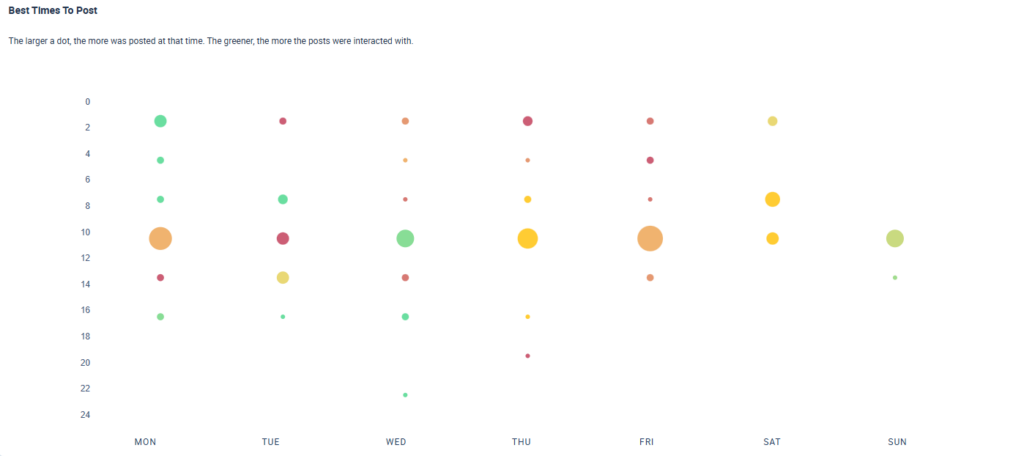
By using tools for social media audits, you can apply these time windows deliberately and assess whether timing itself may be limiting your results.A social media audit tool visualizes posting patterns and engagement potential in clear, easy-to-read charts. These visualizations highlight time slots where audience activity is high and posting volume is low, making opportunities immediately visible. In the example below, larger circles represent higher posting volume, while greener circles indicate stronger average interaction rates. This visual structure helps you quickly understand how timing, activity, and engagement relate without having to manually analyze raw data.
4. Studying Hashtag Performance
Hashtag analysis focuses on evaluating how individual hashtags perform based on past interaction data. Within a social media audit tool, this means examining which hashtags have been used, how frequently they appear, and how they correlate with engagement metrics. Hashtag analyses are based on historical performance data, allowing you to see how hashtags have performed over time rather than judging them in isolation. This creates a structured way to assess hashtags as measurable content elements instead of creative add-ons.
Hashtag analysis is important because platforms like Instagram and TikTok limit how many hashtags you can use, making every hashtag count. Data-backed insights help you estimate the success of specific hashtags and decide which ones to prioritize. Instead of relying on trial and error, you can focus on hashtags that consistently drive interaction. This ensures your hashtag strategy supports reach and engagement rather than diluting it.
Within a social media audit, hashtag analysis helps you move beyond surface-level metrics and understand how discoverability contributes to performance. Strong social media audit tools should provide insights that make hashtag performance measurable and comparable, including:
- Which hashtags have been used and how frequently they appear
- What interaction rates posts generate when using specific hashtags
- Adjustable timeframes to track changes in performance over time
- Competitor profiles to identify emerging or trending hashtags in your industry
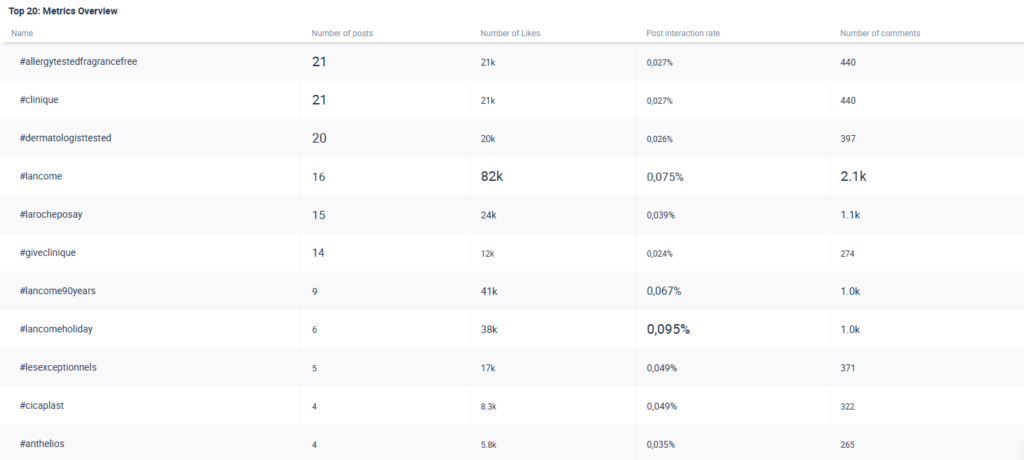
The table below lists hashtags alongside their historical performance metrics, making it easy to identify trending hashtags and topics. This allows you to filter for hashtags that have consistently driven higher interaction rates and are most likely to perform well going forward.
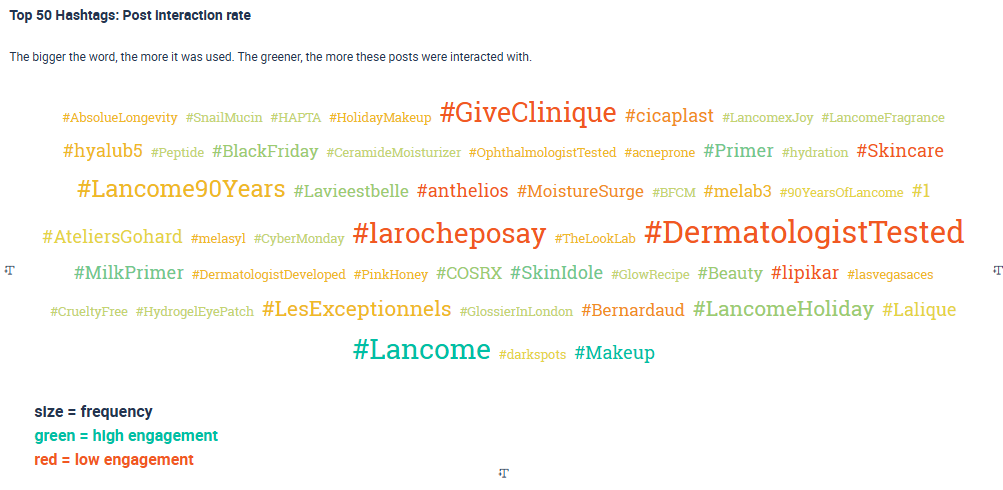
Another way to approach hashtag analyses is shown in the graphic below, where the most successful hashtags used by our sample of skincare brands are visualized. The chart highlights the relationship between how frequently a hashtag is used and the interaction rates of posts featuring that hashtag. Larger hashtags represent higher usage, while deeper shades of green indicate stronger interaction rates.
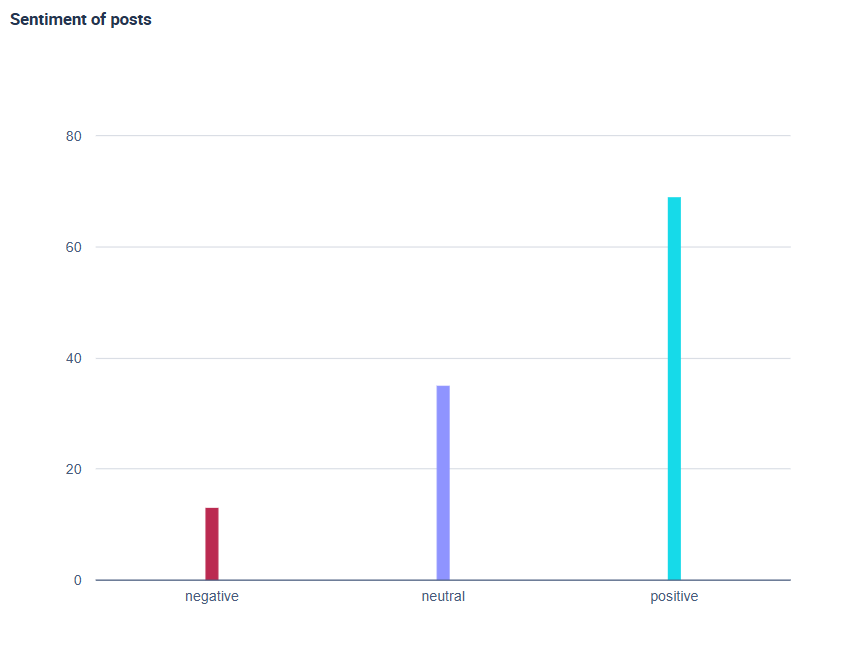
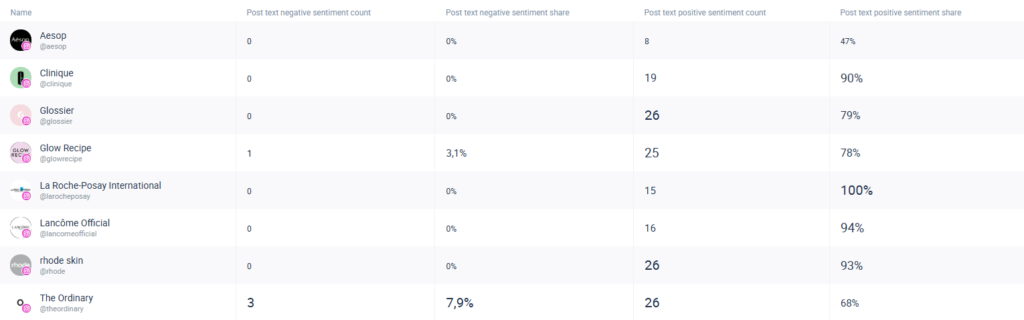
5. Analyzing Audience Sentiment
Sentiment analysis focuses on gauging audience opinions by classifying comments and reactions as positive, negative, or neutral. Rather than looking at individual responses in isolation, it provides an aggregated sentiment profile for each account. This makes it possible to see whether audience perception trends positively or negatively over time. This makes it easier to understand not just how much people interact with your content, but how they actually feel about it
Understanding audience sentiment is important because it helps you:
- Identify potential risks to your brand image, such as negative reactions or emerging issues
- Spot misunderstandings or recurring frustrations highlighted by negative comments
- Recognize what your audience values, based on consistently positive feedback
- Balance praise and criticism to make more informed strategic decisions
- Refine or strengthen your strategy based on how your content is actually received
Within a social media audit, sentiment analysis ensures that qualitative feedback is not overlooked. Instead of focusing only on engagement volume, you can assess how users actually feel about your brand and content. Social media audit tools support this process by providing sentiment analyses across all accounts while giving you direct access to the posts and comments behind the data. This allows you to validate insights quickly and respond with informed adjustments to your strategy.The metric overview below shows how sentiment patterns differ across the accounts you are tracking. This makes it easier to evaluate how users perceive your content, products, or services in comparison to your competitors. To act on these insights, your social media audit tool should allow you to trace positive and negative sentiment back to the original posts and comments so you can better understand what your audience responds to and what it criticizes.
4. Create a Visual Report of Your Findings
The best social media audit tools support you through every step of the auditing process, including the final reporting stage. Strong reporting visualizations highlight patterns that spreadsheets alone can’t reveal, making your findings easier to understand and more compelling to stakeholders. However, you shouldn’t just settle for a visually appealing report and call it a day. Here are some features that make your reporting worthwhile:
- Reports in multiple formats (e.g., PowerPoint, Excel, and PDF)
- Fully customizable dashboards with a wide range of charts available (e.g., matrices, graphs, and distribution plots)
- Annotation of charts with key takeaways
- Collaboration through guest links (for team members or clients)
- The option to brand reports to fit style guidelines
Automated features help maintain consistent, reliable reporting over time. This means that your social media audit tool should allow you to automatically generate and send reports to you, management, and your team at intervals you define. Once your dashboard is set up with the KPIs you want to track, there’s no need for manual exports, as the tool handles them for you.
Lastly, API connections are useful since they allow you to pull data from the tool into your own systems, dashboards, or business intelligence platforms. If this is important to you, then you should check that your social media audit tool allows for APIs and it meets your specifications.
5. Use Built-In AI Features
Producing a thorough social media audit means analyzing thousands of posts, dozens of metrics, and multiple platforms. AI features help you cut to the chase by analyzing large datasets quickly, highlighting what matters, and reducing the risk of overlooking key insights. Instead of manually scanning charts and tables, AI directs your attention to the patterns and correlations that would normally require time-consuming manual interpretation.
The true value of built-in AI lies in solving some of the challenges marketers face during audits:
- Speed: Large datasets can take hours to manually evaluate. AI accelerates this by instantly surfacing trends, KPI shifts, or unusual performance patterns.
- Efficiency: Instead of defining every query in advance, AI can explore the dataset on your behalf and point out significant patterns in the data.
- Accuracy: AI helps you accurately analyze the data because it isn’t prone to human error.
- Clarity: AI-generated explanations give straightforward explanations of the main takeaways so that you can act on your findings.
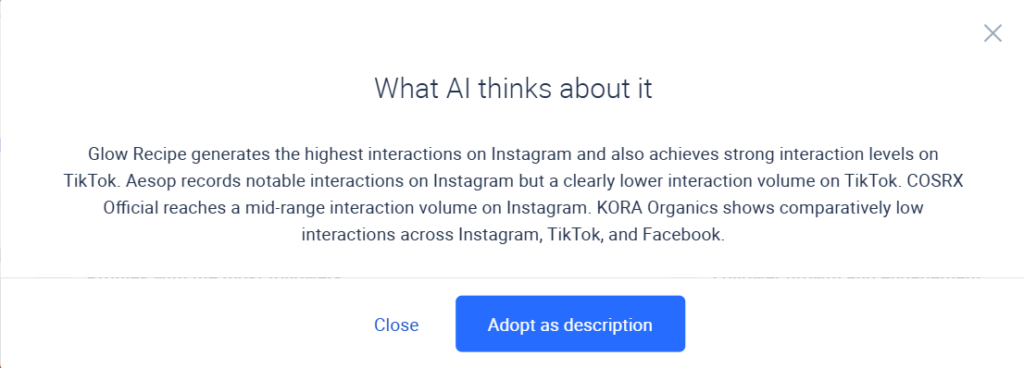
Social media audit tools should offer AI-driven interpretation for all of your charts and graphs, helping you understand what the data actually means. Not only this, but AI features can save you a significant amount of time for adding comments and descriptions to charts/graphs/tables for reporting purposes.
The Best Social Media Audit Tools
We’ve listed our top picks covering both free tools to audit social media and paid platforms to help you get started with your auditing process:
- Fanpage Karma
- Hootsuite
- Buffer
- Sprout Social
- Socialinsider
- Iconosquare
- ChatGPT
1. Fanpage Karma
Fanpage Karma’s analytics tool supports every step of your social media auditing process with a powerful, customizable analytics dashboard. With over 600 KPIs available as well as access to historical data both from your own profiles as well as competitors, you can easily build your audit and benchmarking report or run periodic performance reviews. The tool is the ideal fit for teams that want to integrate social media analytics into their broader performance analysis.
The Fanpage Karma tool offers a number of benefits that make it especially effective for social media audits:
- Unlimited profile tracking – track as many brand and competitor accounts for benchmarking and to uncover content optimization potentials.
- AI-powered analytics and insights – From interpretation of results to tagging analyses, the Fanpage Karma tool AI integration allows you to uncover deeper insights.
- Automated reporting – the tool allows you to automatically generate reports that are emailed to you on a weekly or monthly basis.
You can try Fanpage Karma’s free 14-day trial to see all the features that it offers for social media audits. Keep in mind that Fanpage Karma is an all-in-one social media tool that offers powerful features for analytics, community management, publishing, and research. You can also check out the free weekly webinar to help you get started.

2. Hootsuite
Hootsuite’s social media audit tool is powered by their analytics dashboard, providing insights into relevant KPIs and user demographics. The tool offers competitor benchmarking with variable pricing options depending on the number of profiles tracked. Hootsuite offers a free social media audit template, helping guide you through the process.
Advanced pricing plans come with customizable analytics and reporting functions, helping you attain actionable insights from your audit. Hootsuite’s tool is an option for small to medium-sized businesses with multiple social media accounts seeking to streamline their processes.
3. Buffer
Buffer offers a centralized analytics dashboard that enables users to track metrics across different social media platforms. The reporting tool is highly customizable, and timeframes can be adjusted according to the user’s needs. The analytics functions extend to content optimization metrics for better post scheduling.
Pricing is adjusted per social media channel tracked, which is why it lends itself to smaller companies or individual creators who want to focus on their own performance data rather than conduct elaborate competitor analyses. Buffer is for anyone that prioritizes content strategy over deep analytics and social monitoring, which makes it the tool for teams that value ease of use and a streamlined workflow.
4. Sprout Social
Sprout Social comes equipped with an analytics dashboard that allows you to access all of your metrics in one place. Multiple social networking channels can be tracked with pricing plans varying according to the number of profiles tracked. The reporting options of the tool span cross-network analyses in interactive charts.
Filters allow users to get to the required data and customize the auditing process. Social listening and insights into trends make it a tool for organizations of mid- to large scale seeking to correlate social media performance to ROIs or conversion rates.
5. Socialinsider
The tool offered by Socialinsider provides a unified dashboard across the major networking sites. With the help of Socialinsider, users can track metrics such as engagement, reach, and follower growth. Benchmarking options are included across different pricing plans, accounting for individual needs in the numbers of profiles tracked.
The reporting section allows users to simplify the auditing process with the help of white-label reports. The tool is targeted at social media managers and marketing teams who are looking for data-driven analytics and competitor benchmarking options.
6. Iconosquare
Iconosquare is a tool for agencies or brands focused on growth. Metrics in the custom dashboard adjust to user needs and allow for cross-media analyses on major social media platforms. Benchmarking and competitor analysis are featured in the tool, allowing users to track industry norms.
On the level of content optimization, Iconosquare allows users to sort posts by tags and analyze campaign-specific performance. A social media audit template is freely available.
7. ChatGPT
ChatGPT has become a common tool in both the workforce and everyday life alike. The usage is straightforward, as the generative LLM allows you to run a social media audit based on user commands. ChatGPT lends itself well to gaining a broader overview of the health of your social media accounts and getting simple insights. The reliability of the analytics may be reduced given the limited access to account data and is hence a viable option for smaller-scale audits and companies or agencies.
The LLM does not support adjustable timeframes, as available data is often broken down incrementally at retrieval. When employing ChatGPT for your social media audit, cross-verifying results with native tools can help ensure that relevant data isn’t excluded and that sources are used correctly.