
Your Guide to Finding the Best Free Social Media Scheduling Tool

Managing multiple social media accounts can quickly become overwhelming, especially when you’re juggling content planning, posting, and performance tracking. That’s where a time-saving tool that helps marketing teams stay consistent, organized, and efficient makes all the difference. This is very true of social media content creation, which can involve many steps, many coworkers, and many different tasks. With the right social media scheduling tool, you can simplify your entire content workflow, make it easier to work with your team, and even schedule your daily to-dos, all in one place.
You may see a number of different paid and free social media scheduling tools online. Initially, you may be a bit skeptical of the free versions, since isn’t paid better than free when it comes to functionality? Is there a free social media scheduling tool that actually meets the needs of modern social media teams? In this article, we are going to find out. Luckily, many of today’s free tools can bring everything to the table for your content scheduling, offering advanced features that help you stay on top of your posting strategy without spending a cent. But keep in mind that there can be big differences between all the free scheduling tools for social media on the market, and not every option will fit your specific needs.
To help you find the tool that truly suits your goals and workflow, this guide will walk you through the key features the best free social media schedulers should include. This will be followed by our carefully crafted list of the top free scheduling tools for 2025.
Free Social Media Scheduling Tools Can Do More Than You Think
When it comes to social media management, many marketers start with different expectations about what free social media scheduler tools should actually do. It’s true that many free tools don’t have all the highly advanced features of paid versions, and you may occasionally hit limits when it comes to analytics depth, automation volume, or multi-user access. However, free doesn’t have to mean lack of quality. With the right tool, you can plan, schedule, and manage your entire content workflow just as efficiently as with many paid alternatives.
Some free social media schedulers provide all the features you need to master your day-to-day tasks. From scheduling posts across multiple platforms to managing a shared content calendar, the right free scheduler can easily keep your team organized and your posting consistent. Your ultimate goal should be to find the free tool with the most features, one that helps you stay productive, saves time, and grows with your social media strategy.
Key Features to Look for in a Free Social Media Content Scheduler
Although a free scheduler for social media comes with no risk to your budget, it’s still worth making an informed decision before diving in. Choosing wisely from the start means you can get straight to work instead of wasting time trying out multiple platforms to find the one that truly fits your needs. This is important because you don’t want to start integrating a free scheduling tool into your workflow only to later find out it doesn’t have the capability to do some of the core tasks that you need.
To help better navigate the world of social media scheduling, we have highlighted five key features that the best free social media schedulers should include, so you know exactly what to look for before you commit your time and energy. So, if you are taking a close look at tools, make sure your free social media scheduling tool has these features:
- Collaborative Scheduling Features for Teams
- Centralized Calendar View
- Smart Content Library
- Automated Scheduling & Publishing
- Post Performance Tracking
1. Collaborative Scheduling Features for Teams
When managing multiple social media accounts, communication is key. Without it, tasks can be overlooked, instructions can be unclear, and what starts as a well-planned campaign can quickly turn into no effective workflow. That’s why collaboration features are essential, especially for marketing teams juggling content creation, approvals, and deadlines.
A free social media posting scheduler shouldn’t mean limited functionality when it comes to project management features. The best tools allow collaboration and task assignment, enabling teams to work together seamlessly and maintain an effective social media marketing workflow. Some of the particular features to be on the lookout for include the ability to assign tasks, dedicated areas to see a task overview for everybody on the team, alerts for the creation of new tasks, and activity logs to keep everyone up to date. These features keep everyone on the same page and ensure that each post aligns with your brand voice and strategy.
For organizations that work with clients needing approval from outsiders, make sure that the tool includes an option to be able to add external users at no extra charge. This can be for things such as feedback on content or ideas or simply to sign off on a post. Even within the company, multiple stages of approval are often necessary, from copywriting to design to management review.
A collaborative scheduling tool simplifies this process, ensuring smooth communication, transparency, and accountability at every step. Make sure that your free social media scheduling tool allows you to keep track of tasks throughout the content creation process and be able to include people from both inside and outside your organization as needed.
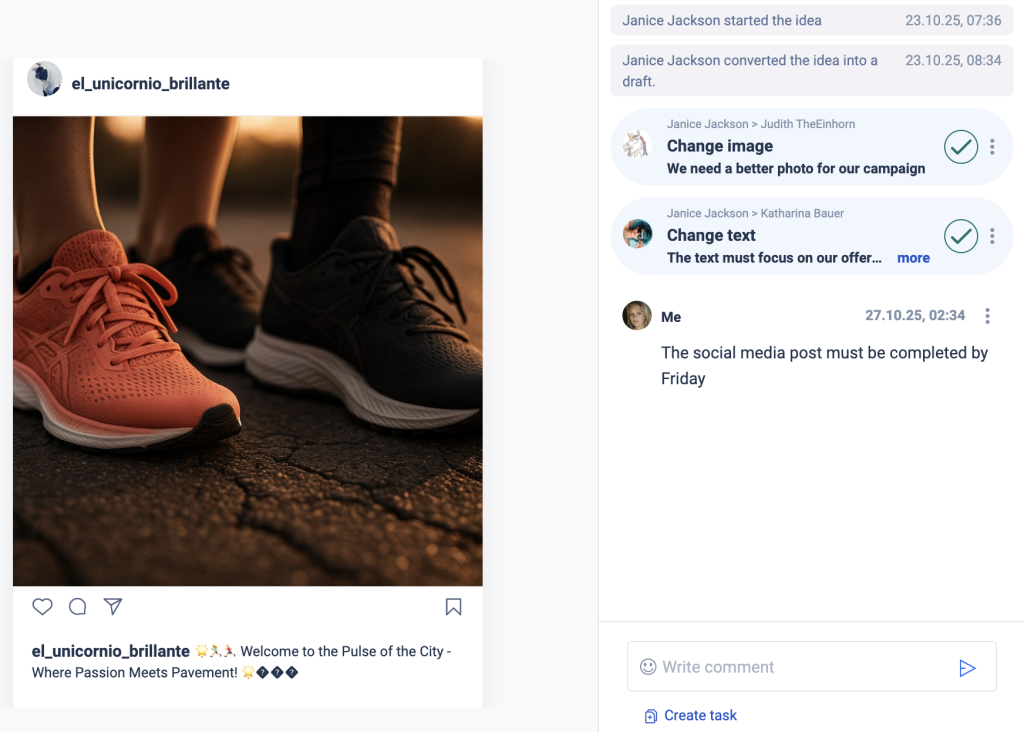
A collaborative scheduling tool simplifies this process, ensuring smooth communication, transparency, and accountability at every step. Make sure that your free social media scheduling tool allows you to keep track of tasks throughout the content creation process and be able to include people from both inside and outside your organization as needed.
2. Centralized Calendar View
One of the biggest time-savers in social media management is being able to store all your content in one place. A good free social media scheduler tool should bring everything together, from planned posts and drafts to ideas and approved content, so you can stay organized and avoid losing track of what’s next. Therefore, the best schedulers let you manage multiposting and see your entire content plan at a glance. With calendars and visual timelines, you can easily track what’s going live and when. This full overview helps your team stay aligned, ensures consistent posting, and eliminates the chaos of switching between spreadsheets or multiple tools.
It’s also important that your scheduler supports all the social media platforms your organization is active on, whether that’s Instagram, Facebook, LinkedIn, or TikTok. This should allow you to easily keep track of different posts for different platforms. Many tools even let you filter by category or campaign, so you can quickly identify which posts are uploaded, still in draft, or just an idea waiting to be developed.
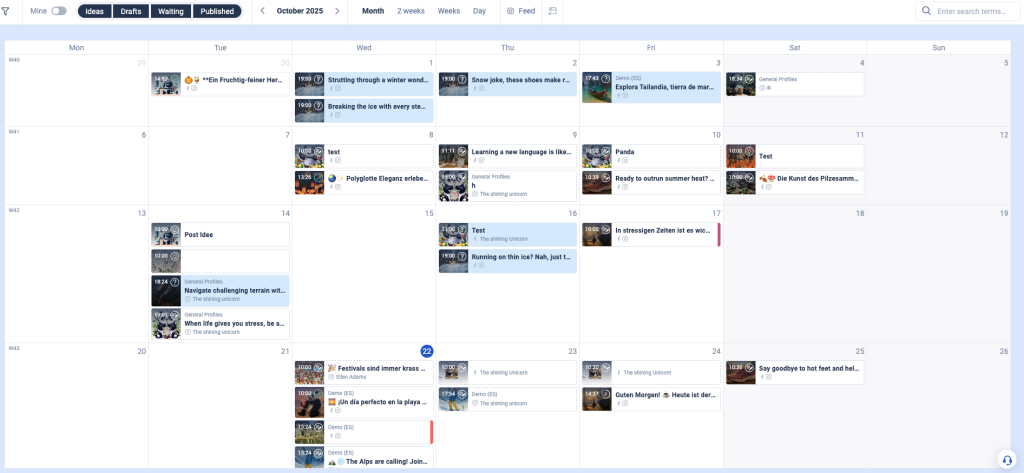
In short, a centralized publishing calendar doesn’t just make scheduling easier since it keeps your entire social media workflow organized, efficient, and transparent. As your posting frequency or schedule becomes more complex, your scheduling tool should be able to scale with you.
3. Smart Content Library
One of the most important features of free social media scheduling tools is a content library. This can help you stay organized and efficient because all your media, from images and videos to captions and drafts, so your entire team can easily find what they need when they need it. This also means a search function that allows them to search for images by keyword or format. Integration with tools like Canva and Google Drive takes this even further, making your content immediately available within your scheduler. Instead of switching between platforms, you can design, upload, and schedule your posts all in one place, saving time and streamlining your workflow.
A smart content library also makes navigating your assets easier by allowing you to rename images or videos even after uploading, as well as filter and search by media format, campaign, or topic. This ensures quick access to the right content and creates a smoother, more efficient posting process for your entire team.
4. Automated Scheduling & Publishing
One of the most valuable features of any free social media scheduling tool is an automated publishing feature. Instead of having to go and manually post your content, you can plan your content in advance and let the tool do the rest. With post scheduling, you simply set a post to be published at a specific date and time in the future, and then simply sit back and wait for your content to go live exactly when your audience is most active, even if you’re offline.
Automation not only saves time but also helps your team stay consistent across multiple platforms. Whether you’re managing Instagram, LinkedIn, Facebook, or TikTok, a smart social media scheduler ensures that every post follows your content plan and maintains your publishing rhythm. The best free social media post scheduler should also allow you to create and schedule multiple posts with the same content, even if they are to be posted at different times. In short, automated scheduling and publishing transform social media management from a daily chore into a seamless, flexible, and time-saving process, giving you more freedom to focus on creativity and strategy.
Some of the best social media scheduler free tools even include the ability to work on alt texts, helping you increase readability and optimize your content for accessibility and SEO. This small but important feature ensures your social media posts reach a wider audience while staying organized and on brand.
5. Post Performance Tracking
To schedule your content in the best way possible, you need to analyze your content performance. A social media scheduling tool that is free of charge to use should be able to give you basic analytics as it relates to your accounts. For this reason, the best tools include performance tracking and analytics features that show you exactly how your posts are performing. You can monitor engagement rates, impressions, clicks, and reach, and even get insights into the best timing to post, the best hashtags to use, and the content types that resonate most with your audience.
These built-in analytics help you understand which posts drive results and which need improvement, so you can fine-tune your scheduling strategy for better performance. By consistently reviewing and applying these insights, a free social media scheduling tool does more than just schedule but helps give you insights about how to best craft your content strategy going forward.
The 5 Best Free Social Media Scheduler Tools in 2025
There are many social media tools available today, and the sheer number of options can feel overwhelming. Each platform promises different features, integrations, and benefits, making it difficult to know which one truly fits your goals. To help you make the right decision and find the free social media scheduler tool that best matches your needs, we’ve put together a carefully curated list of the top options available in 2025.
This list highlights every key feature we discussed above that can help you take your social media strategy to the next level, from collaborative scheduling to content libraries and performance tracking. Here is our list of the 5 best free social media scheduler tools:
- Fanpage Karma
- Metricool
- Zoho Social
- Buffer
- Planable
1. Fanpage Karma
Fanpage Karma is a powerful all-in-one social media tool that lets you create, schedule, and optimize posts while streamlining your entire workflow. Notably, it offers a freemium version with strong scheduling features. Fanpage Karma’s free social media scheduling tool allows up to 100 posts per profile per month while also allowing you to monitor and analyze the performance of as many of your own profiles as you want across all major social media platforms.
Teams benefit from the ability to add unlimited users who can collaborate directly within the editorial calendar, making it perfect for businesses and agencies managing multiple accounts. The free Fanpage Karma plan also includes data storage for up to one year, a media library for managing uploads, and everything you need to schedule and publish high-quality content in one place.
One of Fanpage Karma’s standout features is its integrated approval process, allowing team members and clients to review, comment, and approve posts directly in the tool. Combined with functions for project management, such as brainstorming, voting on ideas, and organizing content into campaigns, Fanpage Karma ensures a smooth and collaborative workflow. It even includes an auto-posting feature, so you can schedule posts to publish automatically at the perfect time.
If you’d like to explore all the social media features Fanpage Karma has to offer, going beyond scheduling, you can start using the platform´s free publishing tool today. You can also join one of Fanpage Karma’s free weekly webinars to learn how to make the most of the platform’s analytics and publishing tools.

2. Metricool
Metricool offers a free social media scheduling tool that is perfect for small teams and focused campaigns. The free plan includes a planner and social calendar to help you track key dates and plan seasonal campaigns. You can also post up to 50 times per month, but for only one brand.
The tool also provides a feature that identifies the best times to post and offers auto-publishing, allowing you to schedule posts automatically. One of its standout features is the AI-driven alt text generator for images, which helps boost accessibility and SEO. These features make Metricool’s free plan a simple, efficient, and data-driven way to plan social media.
3. Zoho Social
Zoho Social is an easy-to-use tool that lets you manage one brand on up to six social media channels from a single account. You can also add one more team member to work together. Zoho Social supports publishing on various social media platforms and easily handles different types of posts. With its simple, intuitive interface, Zoho Social is ideal for small teams or individuals seeking an easy-to-learn solution for efficiently managing multiple platforms.
4. Buffer
Buffer provides a complimentary social media publishing tool that enables users to compose, schedule, and automatically publish posts on all the most common social media platforms. There can only be 10 scheduled posts per channel, but users can make a queue of posts and rearrange them however they like. A visual content calendar is also included in the tool. Buffer is available for free on a single user account and assists in the generation of up to 100 ideas. Users will be reminded by the built-in reminder function when their posts are scheduled to be published online. Ideal for anyone wishing to plan their social media content in advance.
5. Planable
Planable is a social media scheduling tool that helps teams create, plan and approve content in one place. It offers an intuitive, visual interface where users can schedule posts, get client feedback and streamline approval workflows. Panables free plan allows individuals or small teams to test its main features. It includes up to 50 total posts, supports multiple social media platforms and offers essential collaboration tools, making it perfect for freelancers or small business owners getting started with social media management.