
How to Increase Views on YouTube: A Step-by-Step Guide
For brands and marketing teams, YouTube views are a core performance metric. YouTube uses view counts to decide what might interest other users. Simply put, if people click and keep watching, your video reaches more users. Early views play a key role in how far your content spreads.
When it comes to how to increase video views on YouTube, it’s not about chasing the next viral hit. It’s about steady growth. The key is a clear, repeatable strategy based on real data. In this guide, you’ll learn 16 practical steps to grow your views sustainably to help take your YouTube growth to the next level.
What Are Views on YouTube?
First, let’s go over what a “view” on YouTube actually means and how YouTube tracks them. Views are the metric that YouTube uses to measure how many times your video or channel has been watched. Each time a viewer plays a video and watches it for at least 30 seconds, YouTube counts it as a view. Watching a video several times counts as a new view too. For YouTube Shorts, even the initial play counts as a view, and there is no minimum playtime.
An impression, on the other hand, is counted when your video thumbnail is shown to a user: in the home feed, in search results, or in the recommendations section. Impressions are a much weaker signal to the algorithm, as they are counted even if a user scrolls past your video.
Views are counted across all devices, whether content is accessed through a phone, tablet, TV, laptop, or desktop computer. YouTube videos that are viewed from external webpages, social media shares, embedded players, or external websites will still be counted and help you get more YouTube views.
How to Increase YouTube Views: 16 Strategies to Focus On
These 16 strategies cover the key levers that influence how your videos are discovered, clicked, and watched. When applied consistently, these strategies help you identify weak spots in your strategy and how to optimize your content for your target group.
- Analyze Top Content From Other Profiles
- YouTube SEO: Develop a Keyword Strategy
- Hashtag Search
- Best Times to Post
- Design Attention-Grabbing Thumbnails
- Write “Must-See” YouTube Titles and Descriptions
- Focus on Making a Great Intro
- Learn How to Tell Engaging Stories
- Add Timestamps to Your Videos
- Create YouTube Playlists and Series
- Post Shorts for Greater Content Variety
- Create a YouTube Trailer Featuring Your Best Content
- Use Cross-Promotion Strategically
- Boost Engagement With Well-Placed Calls to Action
- Actively Engage With Your Community
- Consider Collaborations
1. Analyze Top Content From Other Profiles
A strong starting point for a more advanced strategy to get more YouTube views is competitor analysis. By analyzing similar channels in your niche, you tap into large, relevant data sets based on overlapping target audiences. This gives you a much clearer picture of what topics, formats, and patterns actually perform.
To do this, collect competitor channels in a list or dashboard, focusing on businesses with a similar audience, size, and positioning. The more comparable data you include, the more reliable your insights become. Instead of guessing, you can base your decisions on patterns that consistently work across your niche.
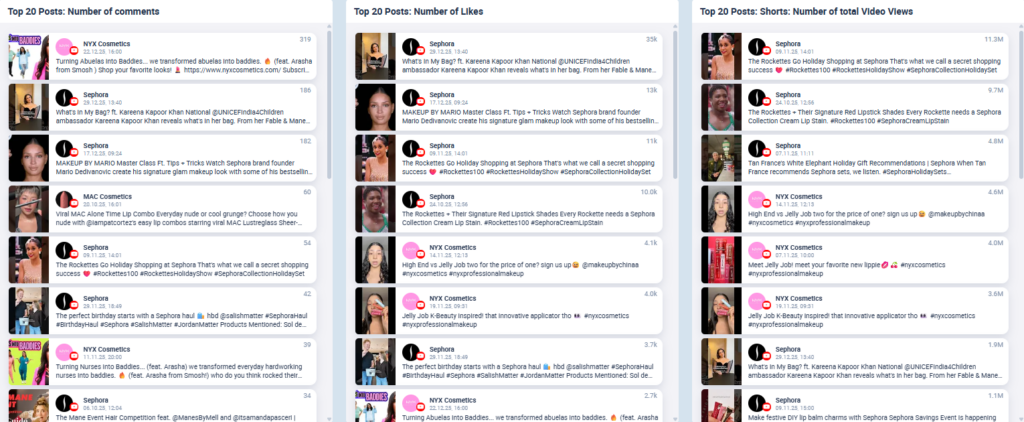
To illustrate how competitor data can support your understanding of how to increase video views on YouTube through content optimization, we provide an example analysis. For that, we took popular makeup brands on YouTube (NYX, Sephora, MAC Cosmetics, Nars Cosmetics, Anastasia Beverly Hills, e.l.f. Cosmetics, and Charlotte Tilbury Beauty). The goal of this analysis is to find content inspiration by identifying which topics your shared audience is engaging with.
You can see the top 20 videos across these brands in the chart below. The videos are ranked by interaction metrics such as the highest number of comments, likes, and total video views. The ranking is based on posts spanning October to December 2025, providing a snapshot of the topics your target audience enjoyed. To now find out what drives engagement on these types of content, you can look for patterns across top posts. Instead of focusing on each individual piece of content, analyze what they have in common regarding:
- Recurring topics (tutorials, product demos, service descriptions, infotainment, trends)
- Formats (short-form vs. long-form, storytelling vs. direct hooks)
- Angles and hooks (educational, entertaining, provocative, controversial)
By identifying themes and formats that repeatedly appear across the top rankings and comparing them with the content that performed worst, you can clearly see what your audience responds to. This is a key step in understanding how to increase views on YouTube, as it shows what users truly resonate with or value your brand’s online presence for.
You can take competitor data one step further by breaking down the strategies behind their content. The goal is not just to observe what they post, but to identify what they are succeeding at and why certain videos perform better than others. This helps you understand which topics, formats, and approaches actually drive views in your niche. That way, you can learn from well-executed strategies as well as find out what potential pitfalls to avoid.
2. YouTube SEO: Develop a Keyword Strategy
YouTube works like a search engine. To increase your YouTube views, you need to understand what your audience is actively searching for. Then, align your content with those search queries. Keyword optimization is fundamental when it comes to the question of how to increase your YouTube views.
Keyword research helps you identify relevant search terms and use them to guide content planning decisions. When choosing keywords, focus on these key aspects:
- Keyword fit: The search term should closely match what your video actually covers. Using overly broad or loosely related keywords rarely leads to sustainable views.
- Search volume: There is no universal benchmark for “good” volume. What matters is how a keyword performs relative to others in your industry, region, and target language.
- Keyword clusters: Instead of looking at keywords in isolation, group related terms together to identify topic opportunities and plan connected content more effectively.
Start your search with established SEO tools such as Google Keyword Planner, Ahrefs, SEMrush, Keywordtool.io, or WordStream’s Keyword Tool. These tools are a great hack when asking how to increase YouTube views by yourself, as they show exactly what search terms your viewers are using.
Keywords also help YouTube correctly classify your content and recommend it to the right audience. Do not just place keywords everywhere, but use them consistently and meaningfully across your channel.
3. Hashtag Research
Using hashtags strategically improves the discoverability of your videos and is an important lever if you want to increase views on YouTube. They help the algorithm understand your content and act as a signal to the algorithm, categorizing your content to fit it to a user. To help the algorithm understand who to recommend your content to, it’s crucial that your hashtags accurately reflect what your video is about.
A hashtag analysis helps you identify which tags attract your audience, aiding you in increasing YouTube views. Collect data from your own channel and competitor profiles, then compare hashtag usage with average interaction rates. Such analyses show you which hashtags drive engagement and what your audience responds to most.
When running a hashtag analysis, you compare how frequently specific hashtags appear in post captions with the interaction rates those posts achieve. By analyzing historical data, you can identify correlations between hashtag usage and engagement, revealing which hashtags are consistently linked to stronger performance. This helps you predict what users are more likely to engage with in future content.
The example below shows how this mapping works using the makeup brands from the earlier analysis. Larger text represents higher usage frequency, while greener text indicates stronger engagement within a given time period. This visualization doesn’t just show which hashtags are used, it helps you quickly understand how to evaluate their performance and decide what to do with them.
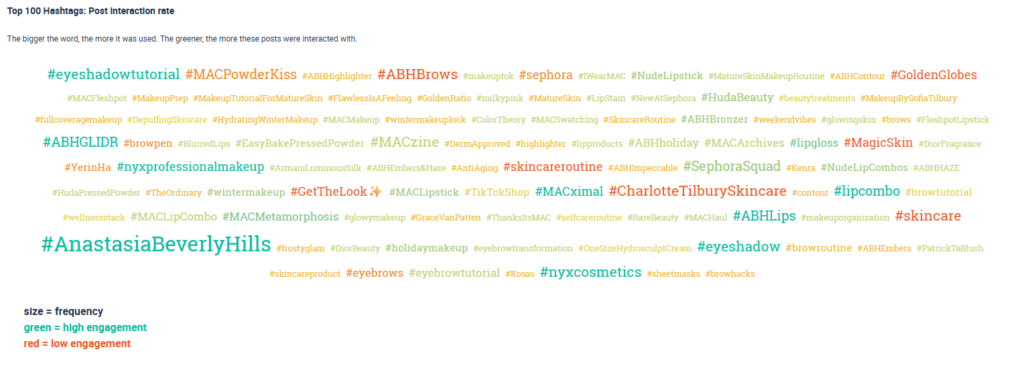
- Large green hashtags → keep using them
Frequently used and high engagement → proven performers
Examples: #AnastasiaBeverlyHills, #ABHLips - Small green hashtags → growth opportunities
Less used but strong engagement → potential to expand your content
Examples: #nyxprofessionalmakeup, #SephoraSquad - Large red/orange hashtags → reconsider usage
Frequently used but low engagement → likely oversaturated or ineffective
Examples: #skincare, #CharlotteTilburySkincare - Small red/orange hashtags → low priority
Rarely used and low engagement → minimal impact on performance
Examples: #sheetmasks, #browhacks
4. Best Time to Post
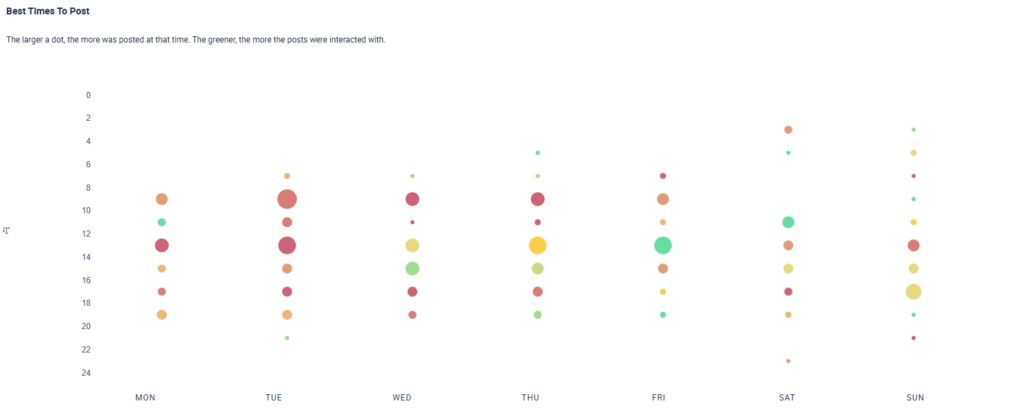
Choosing the best possible time to post a new video matters for increasing views on YouTube, since early engagement is a key signal for the recommendation algorithm. A best-time-to-post analysis examines historical performance data to identify time windows where videos receive high interaction rates relative to posting volume. In other words, it helps you find when your audience is most active and when competition for attention is lower.
These analyses become even more valuable when you include competitor data. By analyzing multiple channels targeting a similar audience, the size of your dataset increases, making findings more reliable. This broader data foundation gives you a clearer picture of when users are most active and likely to engage, making your timing strategy more scalable and data-driven.
As a result, you can publish content at times when your videos are more likely to gain immediate traction and increase YouTube video views. By aligning uploads with periods of high audience activity and lower competition, you improve your chances of generating early clicks, watch time, and interactions, which are key signals for the recommendation algorithm.
The diagram below shows such an analysis for the makeup brands in our sample. Larger circles represent high upload volume at a specific time, while greener circles indicate higher interaction rates. Our analysis is based on YouTube video data from October to December 2025. For these makeup brands, the data shows that:
- Midday to afternoon performs best, with most high-engagement periods between 12:00 and 16:00
- Early mornings and late evenings underperform, showing consistently lower interaction rates
- Friday afternoons stand out, combining high engagement with relatively high posting activity
5. Design Attention-Grabbing Thumbnails
You also need to think about what makes people click on your video in the first place. Even the most perfectly optimized content won’t lead to an increase in your YouTube views if the thumbnail fails to grab your target audience’s attention.
Learning how to increase your views on YouTube is about discovering what generates interest and packaging your video in an appealing way. An important aspect of this is creating custom thumbnails, as they are any user’s first impression of your content and the most important visual element in convincing someone to click. So, how do you create an attention-grabbing YouTube thumbnail?
Here is what you have to consider when creating appealing thumbnails:
- Using the right thumbnail dimensions (16:9 aspect ratio, 1280 x 720 pixels) (see this article for more information on image sizes on YouTube and social media)
- Taking clear, high-resolution photos for the background or other elements
- Creating a clean, uncluttered design with no more than three objects
- Using bright, inviting colors
- Stick to one theme or idea
- Close-ups of faces tend to perform well
- Evoke curiosity or emotion in your thumbnail (visually convey the emotion you want to trigger)
6. Write “Must-See” YouTube Titles and Descriptions
The way to increase your views on YouTube is by creating a true “must-see” title. Focus on writing titles that trigger curiosity or emotion. The question you should really be asking is not, “How can I increase my views on YouTube?” but rather, “Why should someone care enough to click on this specific video?”
Effective titles don’t just describe the content in a factual way; they highlight a clear tension or point of interest. This can mean making a strong claim, challenging a common belief, or lightly leaning into ragebait and taking a clear stance on a topic. Titles that signal relevance, controversy, or a fresh perspective give viewers a reason to click and see what your video has to say.
Here are some tips on how to increase YouTube video views by coming up with a good video title:
- Keep titles simple and easy to read: YouTube is global, so make sure non-native English speakers can understand your title.
- Use punchy, direct language: Get straight to the point. Instead of “Here’s why XYZ benefits your health,” say something like “X will help you live longer.”
- Avoid vague wording
- Skip puns and wordplay: They’re often harder to understand and don’t translate well across languages.
- Limit adjectives and complex phrasing
- Include relevant SEO keywords
- Keep titles under 50 characters
- Use proven title formats: questions, “best-of” lists, hyperboles (“insane,” “…of all time”), and clear how-to titles tend to perform well.
- Focus on the outcome: Highlight the concrete value or result viewers can expect.
- Use specific, impressive numbers: Numbers catch the eye and make claims feel more tangible.
- Spark curiosity: Give just enough information to make people click
A title can make or break your video’s ability to attract attention, so it’s worth investing time and effort into developing a strong YouTube title. If coming up with compelling options doesn’t come naturally, AI tools can help you explore and refine variations more quickly.
7. Focus on Making a Great Intro
On YouTube, the drop-off rate in the first 30 to 60 seconds is the highest. Hooking viewers right away helps reduce these early drop-offs, making it an important strategy when thinking about how to increase YouTube video views. This means that a strong introduction is absolutely necessary for the success of your video. Additionally, YouTube takes the viewer retention rate to be a signal to the recommendation algorithm, defining the target group and value of your content.
Follow these steps to prevent viewers from dropping off early:
- Define the purpose of your hook: Decide whether it’s meant to spark interest, present a solution, or clearly communicate the value of the video.
- Signpost the structure early: Let viewers know what’s coming by outlining the main sections, either verbally or through chapters and on-screen cues.
- Align the intro with the promise: Make sure the rest of the intro delivers on the hook and matches the outlined structure. Remove any fluff or filler that doesn’t add value.
- Keep branded intros short and purposeful: If your channel uses a recurring intro as part of its branding strategy, make sure it supports the video instead of delaying the start. Long or overly promotional intros can distract from the core value and increase early drop-offs.
Try to open with the moment or promise shown in the thumbnail to meet viewer expectations. Leading with brand trailers or promotional clips, especially if they last more than a few seconds, can interrupt momentum.
8. Learn How To Tell Engaging Stories
Learning how to engage viewers through storytelling is probably the most important part when it comes to understanding how to increase YouTube views and subscribers. Once you have completed your introduction, it’s time to build a narrative that your audience will want to follow. Ensure that your content consistently communicates the value of watching until the end by offering a solution or insight.
But what actionable advice can we give you as you’re looking to learn more about how to build an audience on YouTube? While we have already composed a more extensive overview of what you need to know about storytelling on social media, we included a condensed list of the most important aspects below:
- A strong hook
- A clear protagonist (give viewers somebody or someone to follow)
- A recognizable problem (or tension)
- Emotional anchor points
- Consistency across formats
- A clear narrative arc
- Authenticity
- A clear takeaway
It is important to monitor audience behavior to spot meaningful changes, especially when you adjust your own content or strategy. Strategic changes come with opportunities and risks, which is why the regular review of key engagement metrics is essential.
9. Add Timestamps to Your Videos
In September 2019, Google announced that it would link directly to key moments in YouTube videos from search results. By adding timestamps, you give your videos a clear structure, improve user experience, and increase the likelihood of your content appearing in Google and YouTube search results.
Beyond discoverability, timestamps allow viewers to jump straight to the sections they find most relevant. While this may seem counterintuitive when thinking about how to increase your reach on YouTube, it actually works in your favor. Clear chapter markers help prevent early drop-offs by showing viewers the information they’re looking for. As such, timestamps make long-form videos easier to consume.
10. Create YouTube Playlists and Series
YouTube playlists allow you to group multiple videos around a shared topic, product, or theme and present them as a connected viewing experience. Don’t treat each video as a standalone; instead, show related videos in a clear, intentional way. This helps you position yourself as a resource to come back to.
Used strategically, playlists offer several advantages when it comes to increasing YouTube video views, especially for product- or service-specific formats that naturally belong together:
- Position your channel as a reliable source by consistently covering a topic in depth, reinforcing expertise and professionalism
- Encourage repeat viewing by regularly updating and expanding playlist content
- Improve content consumption by making it easier for viewers to navigate related videos
- Guide viewing order by automatically queuing videos in the sequence you want your audience to watch
- Increase watch time across videos since viewers who enjoy one video in a playlist are more likely to continue watching others in the series
Using clear, descriptive titles and adding a short playlist description can provide helpful context and set expectations. Ensure that your videos build on one another and follow your logical progression. By updating your playlists, you signal freshness and ongoing relevance to the YouTube algorithm, which is an important part of learning how to increase your YouTube video views.
11. Post Shorts for Greater Content Variety
Following the massive success of TikTok and Instagram Reels, YouTube has enabled viewers to upload vertical short-form videos as well. Shorts offer a high potential for rapid reach and virality. They are effective in raising awareness and introducing new audiences to your content. Given this potential, the question of how to increase YouTube Shorts views naturally follows.
There are a few key principles to keep in mind when thinking about how to increase reach on YouTube Shorts and how to increase views on YouTube Shorts:
- Hook viewers instantly
- Keep it focused on one idea
- Design for vertical viewing experience
- Maintain fast pacing
- Optimize for silent viewing by using captions or on-screen text
- Encourage replays by looping videos
- Use keywords and hashtags for SEO
- Post consistently
Shorts are not a secondary task, as the creation of content always requires deliberate planning and the ability to distill a core message into a very short format. When used strategically, Shorts work best as an extension of your long-form content and style. Shorts act as a low-commitment entry point that helps introduce potential viewers to your brand and content.
12. Create a YouTube Trailer Featuring Your Best Content
If you’re asking yourself, “How can I increase my views on YouTube?”, creating a YouTube channel trailer is simple but effective. A YouTube trailer is a short video that is automatically shown to new visitors when they land on your channel, making it key for first impressions.
A well-structured trailer helps orient new viewers quickly and encourages them to take action. In just a short amount of time, it should:
- Show new viewers what kind of content you create
- Highlight the benefits your channel provides
- Encourage them to subscribe
- Motivate visitors to watch more of your videos
Think of your YouTube trailer as a digital business card for your channel. It communicates who you are, what your channel is about, and why viewers should stay. This concise video should convey your focus, goals, and personality.
Creating a YouTube trailer works like uploading any other video. Once it’s published, go to your channel homepage, click “Customize Channel,” and select the video under the “For New Visitors” tab. This ensures your trailer is shown automatically to first-time visitors and helps turn channel visits into sustained views.
13. Use Cross-Promotion Strategically
It is helpful to guide viewers toward related content on your channel. Highlight videos that cover similar topics and encourage viewers to watch them next. This extends watch sessions and increases views on not just one video but across your existing content library.
There are several effective ways to promote your videos and increase YouTube views:
- Use YouTube cards within your videos to recommend related content on your channel
- Add end screens to guide viewers to another video, playlist, or to encourage subscriptions
- Link related videos in your description to keep viewers exploring your content
Cards can be placed throughout a video to suggest relevant follow-up content. End screens can also extend watch sessions or direct viewers to playlists. Both features support strategies of how to increase video views on YouTube across multiple videos. In practice, cross-promotion works best when it is planned, not occasional. You can tease new videos, resurface evergreen content, or drive viewers toward playlists and related videos.
To consistently increase views on YouTube, you should embrace a multi-channel strategy. Relying on YouTube alone limits your reach; instead, use your social accounts to promote your videos to a wider audience and drive additional traffic back to YouTube.
14. Boost Your Engagement With Well-Placed Calls to Action
Calls to action (CTAs) help increase YouTube views by encouraging viewers to interact with your videos. Actions such as liking, commenting, subscribing, or watching another video keep viewers active on your channel for longer. Clear CTAs help turn passive viewers into actively engaged community members whose interaction with your content helps your platform.
Effective CTAs should feel natural and align with the goal of the video, especially when thinking about how to get more views on YouTube across your content library. Do not force generic prompts but focus on CTAs that fit naturally into the context of the video, such as:
- Asking viewers to subscribe for future updates
- Prompting them to watch a related video or playlist next
- Encouraging comments by posing a specific question
- Inviting viewers to like the video if they found it helpful
CTAs can be delivered verbally, shown as on-screen text, or reinforced through end screens and descriptions. Focusing on one or two clear actions instead of overwhelming viewers with multiple requests.
To understand how to increase video views on YouTube over time, it’s important to monitor which CTAs actually drive results. Comparing videos helps reveal which prompts led to increased watch times, comments, or click-through rates. Testing different wordings, placements, or formats helps you figure out the best strategy for your brand.

15. Actively Engage With Your Community
YouTube is also a social space where engagement works both ways. You need to interact with your audience by responding to comments. Another option is to join conversations on other creators’ or brands’ channels to build visibility and stronger relationships.
Encouraging comments, questions, or feedback on your own videos helps you understand what resonates with your audience and where they need more clarity. When viewers feel a stronger connection to your channel, they are more likely to be active in your community, which affects view counts. There are several practical ways to encourage active participation on YouTube, including:
- Hosting live streams to interact with viewers in real time
- Running Q&A sessions to address common questions or explore specific topics
- Using polls in the YouTube Community tab to gather feedback and ideas
- Highlighting or responding to viewer comments directly in your videos
- Posting challenges or discussion prompts to encourage participation
16. Consider Collaborations
Collaborations with other channels can help you increase YouTube reach and introduce your videos to new audiences. Partnering up with relevant creators and tapping into established communities and shared interests can drive up YouTube views.
When selecting a collaboration partner, focus on the following criteria:
- Brand fit: Does the creator or brand operate in a similar niche or address a comparable audience?
- Shared values: Do they represent similar principles, tone, and worldview?
- Fresh perspective: Do they contribute a new angle or expertise that adds real value to your content?
- Audience overlap (without duplication): Is there enough overlap to feel relevant, while still reaching new viewers?
- Content format compatibility: Do your storytelling style, pacing, and production quality work well together?
- Engagement quality: Does the partner’s audience actively comment, like, and participate, rather than just inflate subscriber numbers?
- Clear expectations: Are roles, responsibilities, and promotion plans defined in advance?
- Long-term potential: Could this collaboration evolve into a recurring format or series instead of a one-off video?
Conclusion: From Strategy to Sustainable YouTube Growth
Knowing how to increase views on YouTube is only effective when individual tactics work together as part of a consistent strategy. Content and channel optimization help capture attention and induce longer watch sessions and repeated viewing. Combined with thoughtful promotion, community engagement, and regular performance reviews, these elements turn posts into a scalable growth system.
To put these strategies into practice efficiently, having the right tools in place makes a measurable difference. Fanpage Karma supports YouTube creators and marketing teams with centralized analytics, competitor benchmarking, and performance reporting across channels. It also helps identify emerging trends and potential collaborators. If you want to test how these insights come together in practice, you can explore Fanpage Karma with a free weekly webinar or start your free 14-day trial and test the functions of the tool yourself.